Tag: Salesforce Agentforce

  • Enterprise AI Agents: What They Are and 7 Top Platforms

    Enterprise AI Agents: What They Are and 7 Top Platforms

    The best enterprise AI agents are the ones that fit the systems you already run, respect your permissions, and leave an audit trail. For a Microsoft 365 shop, that is usually Microsoft Copilot Studio. Salesforce teams start with Agentforce, Google Cloud teams with Gemini Enterprise Agent Platform, and regulated firms with IBM watsonx Orchestrate. RPA-heavy teams look at UiPath, engineering-led teams at LangChain, and companies with unusual workflows at a custom build from a partner like Hatzs Dimensions.

    The problem is that every vendor now says "agent." You are comparing products that range from a low-code builder for HR requests to a code framework for custom multi-agent systems. This article explains what enterprise AI agents are and how they work. Then it walks through seven options with the same lens: how each works, who it suits, what it costs, and where it falls short.

    We build and ship AI agents into production for mid-sized and large companies. The judgments below come from integration work, governance reviews, and rollouts, not from vendor feature sheets. Where a price is not public, we say so instead of guessing.

    What enterprise AI agents are and how they work

    Enterprise AI agents are software systems that use a large language model to pursue a goal across your business tools, with the security, permissions, and audit logging a large organization requires. They plan steps, call systems such as your CRM or ticketing tool, and act, while people step in for approvals and exceptions.

    What makes an agent enterprise-grade is not the model, it is the permissions, logging, and controls around it.

    The loop: perceive, plan, act

    Every agent runs the same loop. It perceives a trigger, such as a new invoice email or a support ticket. It plans by breaking the goal into steps and choosing tools. It acts by calling APIs, updating records, or drafting a reply, then checks the result and repeats until the work is done or a person takes over.
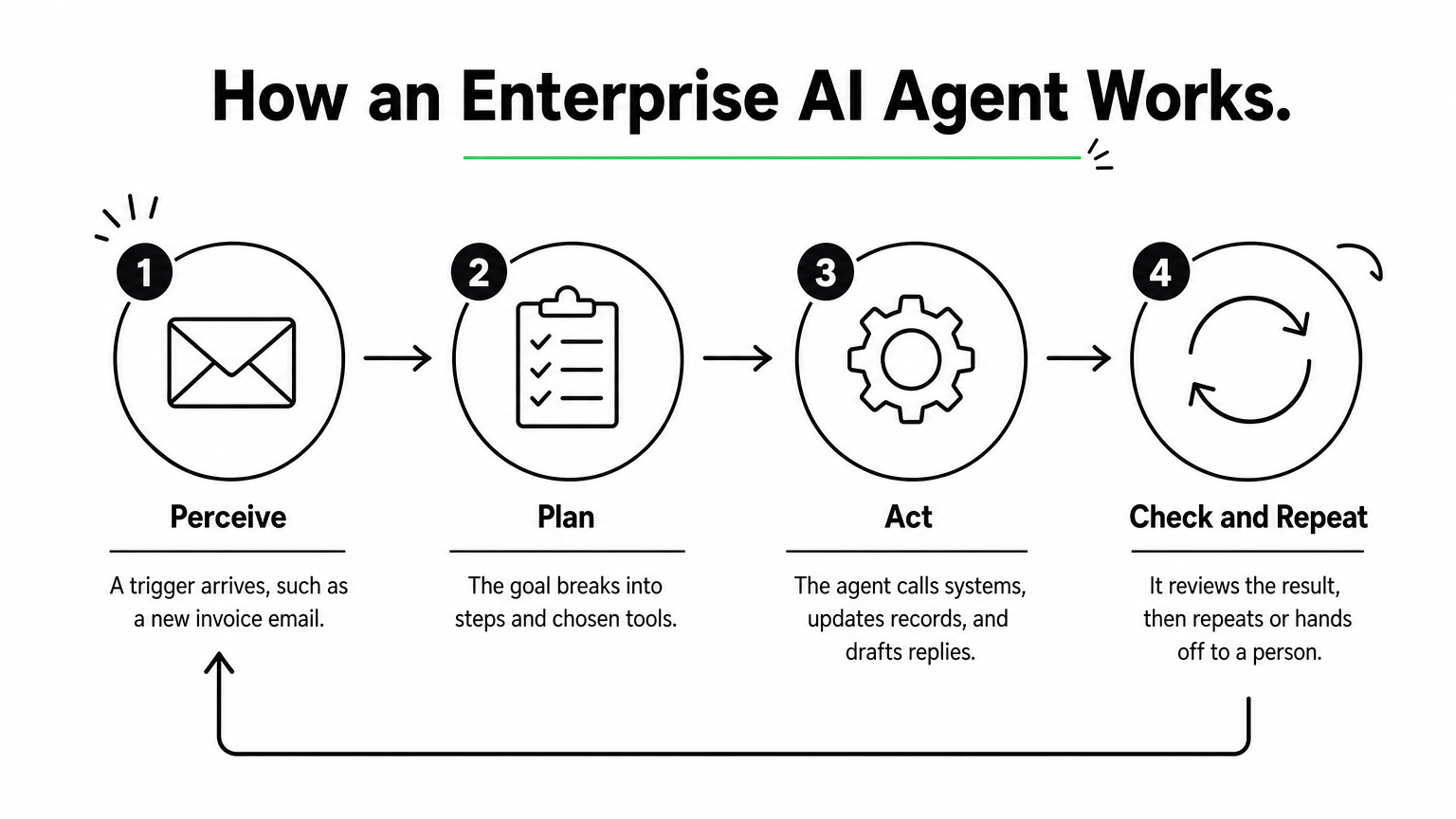
    A four-step process diagram showing an agent perceiving a trigger, planning, acting, and checking results in a loop.

    A plain chatbot stops at the answer. An autonomous AI agent keeps going until the task is complete. Four controls turn that loop into something an enterprise can run:

    • Identity and permissions: the agent inherits the access of the user or role it serves, through SSO and role-based access control.
    • Audit logs: every tool call and decision is recorded with who triggered it and what data it touched.
    • Human approval: risky steps, such as payments or customer-facing replies, pause for a person.
    • Data controls: masking, residency rules, and model access policies keep sensitive data inside approved boundaries.

    How they differ from copilots, chatbots, and RPA

    The main difference is who starts the work and how much of it the software can finish alone. The table sets the four common tools side by side.

    Tool Who starts the work Handles messy input Typical scope
    Chatbot The user asks a question Somewhat Answers and FAQs
    Copilot The user prompts it Yes Drafts and suggestions inside one app
    RPA bot A schedule or trigger No, needs fixed rules Scripted clicks and data entry
    Enterprise AI agent A trigger, rule, or goal Yes Multi-step work across several systems

    In practice these layers combine. Many agents call RPA bots as one of their tools.

    The seven types of AI agents

    Textbooks classify agents by how they decide. Lists vary slightly, but these seven cover the usual answers.

    Type How it decides Enterprise example
    Simple reflex Fixed condition-action rules Route tickets that contain a keyword
    Model-based reflex Rules plus a memory of current state Track open orders and flag stalls
    Goal-based Plans steps toward an objective Resolve an IT ticket end to end
    Utility-based Scores options and picks the best trade-off Choose a carrier by cost versus speed
    Learning Improves from feedback Fraud flags refined by analyst reviews
    Hierarchical A manager agent delegates to sub-agents A finance agent splitting invoice tasks
    Multi-agent system Specialist agents collaborate Onboarding with verification, provisioning, and compliance agents

    Most modern LLM-based enterprise agents are goal-based with tool access. The more ambitious deployments stack them into hierarchical or multi-agent setups.

    1. Hatzs Dimensions

    Hatzs Dimensions builds custom enterprise AI agents around your systems, data, and compliance rules instead of selling a fixed product. Choose it when no off-the-shelf platform matches your workflow.

    Pick a custom build when your workflow is the competitive advantage, not a template.

    How it works

    Engagements follow four stages: discovery and planning, design and prototyping, development and testing, then deployment and support. The team covers AI agent design, GenAI consulting, data engineering and integration, and AI governance and compliance, so the agent, its data pipelines, and its controls come from one group.

    Because the agents are custom, they can sit on top of whichever model, cloud, and systems of record you use. A senior-only engineering team with 7+ years of shipping enterprise AI into production does the build. One insurance client cut operations costs by 30%.

    Who it suits and what it costs

    It suits CTOs, CIOs, and product leaders at mid-sized and large companies, especially in insurance, banking, healthcare, and logistics. These are teams whose processes do not map to a vendor template, or who need one agent spanning several systems under strict governance.

    AI agent pricing is scoped per engagement. You can pick dedicated teams when requirements will keep evolving, or fixed-price projects when you need budget certainty. There is no public price list.

    Strengths and limits

    • Strength: the agent is built around your data, workflows, and compliance needs, with less dependence on one vendor’s roadmap.
    • Strength: strategy, design, AI, cloud, and long-term support come from one team, backed by 250+ clients and 98% retention.
    • Limit: time to first value is longer than switching on a prebuilt agent.
    • Limit: you need a business owner who can make product decisions during discovery.

    2. Microsoft Copilot Studio

    Microsoft Copilot Studio is a low-code builder for agents that live inside Microsoft 365, Teams, and the Power Platform. It is the quickest route to enterprise AI agents if your company already runs on Microsoft.

    If your people already live in Teams and Outlook, the agent should live there too.

    How it works

    Makers describe an agent in natural language, attach knowledge sources and Power Platform connectors, and publish it to Teams, Microsoft 365, or a website. Identity runs through Microsoft Entra, so the agent respects the same sign-in and access rules as the rest of your tenant.

    Administration sits in the Power Platform admin center. Policies there control which connectors makers can use and which data stays inside the tenant. Systems outside the Microsoft estate, such as SAP, Workday, or Salesforce, may need custom connectors.

    Who it suits and what it costs

    It suits IT-led teams and trained citizen developers in Microsoft-first companies. Typical builds are HR help desks, IT service requests, and internal knowledge agents.

    Licensing is based on capacity and usage rather than a simple flat fee. Model it against your expected conversation volume. Microsoft adjusts the billing units from time to time, so confirm current terms before you budget.

    Strengths and limits

    • Strength: governance and identity are inherited from your Microsoft tenant, which shortens security review.
    • Strength: low-code building lets non-engineers ship useful agents quickly.
    • Limit: cross-system work outside Microsoft usually means extra engineering.
    • Limit: usage-based costs are hard to forecast until you have real traffic.

    3. Google Gemini Enterprise Agent Platform

    Google Cloud’s Gemini Enterprise Agent Platform is a platform to build, scale, govern, and optimize agents, with model selection and tooling in one place. It fits cloud-first companies that already run data and applications on Google Cloud.

    The platform earns its place when your data already lives in Google Cloud.

    How it works

    Google presents the platform as a single environment for choosing models, building agents, and governing them once they run. Google’s agent tooling has been known for grounding agents in enterprise data and handling multimodal input such as text, images, audio, and video.

    If you have used Vertex AI, ask your Google Cloud representative how the new platform relates to your existing projects before you migrate. Do not assume one-to-one feature parity. Check the current documentation for model availability, regional deployment, and compliance certifications.

    Who it suits and what it costs

    It suits data-heavy organizations on Google Cloud that have an ML or platform engineering bench. Think document analysis, visual inspection, or agents sitting on BigQuery data.

    Pricing is consumption-based, so cost depends on model usage, volume, and regions. Plan for someone to own cost monitoring, because token-heavy agents can grow expensive without limits in place.

    Strengths and limits

    • Strength: deep fit with Google Cloud data services and a broad choice of models.
    • Strength: governance and scaling features sit alongside the build tools.
    • Limit: teams without engineering depth may struggle with cost tuning and model management.
    • Limit: value drops if your systems of record live elsewhere.

    4. Salesforce Agentforce

    Salesforce Agentforce puts agents directly on your Salesforce data and workflows. It is the natural choice among enterprise AI agents when the CRM is where customer work happens.

    An agent that reads live CRM records beats one that reads a nightly copy.

    How it works

    Agents operate on Salesforce’s own data model, so they work with current records and no synchronization layer. They can trigger and respond to Salesforce Flow automations. The Einstein Trust Layer applies data masking and filtering before a request reaches a model.

    Every action is logged inside Salesforce. When an agent cannot resolve a case, it escalates to a person in Service Cloud with the conversation context attached.

    Who it suits and what it costs

    It suits sales, service, and marketing operations teams that treat Salesforce as the system of record. Lead qualification, case triage, and CRM hygiene are the common first uses.

    Agentforce is sold as an add-on to Salesforce, with usage-based pricing. Salesforce has changed its pricing models over time, so get a current quote and compare it against your expected volume of agent actions.

    Strengths and limits

    • Strength: inherited permissions, sharing rules, and audit trails from the Salesforce platform.
    • Strength: fast deployment for teams already configured on Salesforce.
    • Limit: orchestration across ERP, HR, and ITSM systems often needs MuleSoft or custom API integration work.
    • Limit: it adds little if your customer data lives in another CRM.

    5. IBM watsonx Orchestrate

    IBM watsonx Orchestrate is built for regulated enterprises that need explainable, auditable automation across HR, procurement, and IT. It stands out among enterprise AI agents for how much weight it puts on traceability.

    A closed ledger binder on a desk with a magnifying glass on top and numbered tags tied in a row beside it.

    When a regulator might ask why the agent did that, traceability is the feature.

    How it works

    The platform orchestrates agents and tools through a catalog of pre-built agents and skills, with integrations for systems such as SAP, Salesforce, and ServiceNow. Each action can be traced back to the data, rules, and model reasoning behind it.

    Governance is a first-class part of the product, not an add-on. That matters for audit teams, who can review decision trails without asking engineers to reconstruct them.

    Who it suits and what it costs

    It suits banks, insurers, healthcare providers, and other large organizations where compliance review is a gating step. It also suits companies with sprawling back-office systems that need one orchestration layer.

    Pricing is negotiated at the enterprise level. Expect a longer procurement and implementation cycle than a SaaS-native option, and budget for it.

    Strengths and limits

    • Strength: audit and explainability depth that suits regulated workflows.
    • Strength: pre-built integrations with common enterprise systems.
    • Limit: slower to deploy than agents native to a system you already use.
    • Limit: heavier than needed for a small team with a few simple workflows.

    6. UiPath AI agents

    UiPath adds language-model agents to the automation platform many enterprises already use for RPA. If you have hundreds of existing robots, enterprise AI agents from UiPath let you add reasoning without starting over.

    The cheapest agent is the one that reuses automations you already trust.

    How it works

    An agent decides and extracts, while UiPath robots execute. Orchestrator handles scheduling, access, and audit trails. Action Center routes exceptions to people with full context, and Document Understanding reads invoices, forms, and contracts.

    That mix is useful for processes that cross modern APIs and legacy desktop applications. The agent handles the unstructured judgment, and the robots handle the clicks.

    Who it suits and what it costs

    It suits enterprises with an established UiPath footprint and process teams who already know its tooling. Finance operations, claims processing, and back-office document work are typical fits.

    Licensing is layered across robots, AI services, and orchestration, which makes cost modeling harder than a per-user plan. Ask for a bundled estimate based on the processes you actually plan to automate.

    Strengths and limits

    • Strength: reuse existing robots, queues, and exception handling.
    • Strength: mature document understanding and a broad connector marketplace.
    • Limit: its desktop heritage means cloud-only environments may need extra engineering.
    • Limit: resilient cross-system agents often require experienced UiPath developers.

    7. LangChain with LangGraph

    LangChain and its LangGraph framework are open source toolkits for engineering teams that want to code and own their agent stack end to end. They give the deepest control of any option here, in exchange for the most work.

    Numbered wooden blocks connected by rope into a branching path on a workbench, with a spool of thread beside them.

    A framework gives you control, and you pay for it in engineering hours.

    How it works

    Developers define agent logic, tools, memory, and multi-step graphs in code, in languages such as Python and TypeScript. LangSmith, the commercial layer, adds tracing, evaluation, and deployment, which helps you debug long, branching agent runs. Alternatives such as CrewAI take a similar code-first approach, focused on role-based agent teams.

    Nothing about security or compliance comes preconfigured. You choose the hosting, the access controls, and the logging, which suits teams with strong opinions about all three.

    Who it suits and what it costs

    It suits engineering-led enterprises with a platform team, custom requirements, and a willingness to maintain what they build. It does not suit teams that want business users to build agents themselves.

    The frameworks are free. LangSmith has a free developer tier and paid seat-based plans, plus custom enterprise terms. The real cost is engineer time, hosting, and the governance layer you have to build.

    Strengths and limits

    • Strength: maximum flexibility over models, tools, and agent behavior, with strong observability.
    • Strength: no dependence on one vendor’s application ecosystem.
    • Limit: SLAs, security, and compliance are your responsibility.
    • Limit: non-technical colleagues cannot contribute directly to agent design.

    How to compare and shortlist enterprise AI agents

    Shortlist by your system of record first, then by governance needs, then by how much engineering you can commit. Most enterprise AI agent decisions are settled by those three, not by model quality.

    Start with where your data lives, because the agent has to live next to it.

    Comparison at a glance

    Option Best fit Build effort Pricing model
    Hatzs Dimensions Custom, multi-system workflows Partner-led Fixed-price or dedicated team
    Microsoft Copilot Studio Microsoft 365 and Azure estates Low-code Capacity and usage
    Gemini Enterprise Agent Platform Google Cloud data and ML teams Medium to high Consumption
    Salesforce Agentforce Salesforce-centered customer work Low to medium Usage-based add-on
    IBM watsonx Orchestrate Regulated, audit-heavy enterprises Medium Negotiated contract
    UiPath AI agents Existing RPA estates Medium Multi-SKU licensing
    LangChain with LangGraph Engineering-led custom stacks High Free frameworks, paid tooling

    Six questions to ask every vendor

    Run the same checklist against each option. Gaps show up fast.

    1. Where does the agent get its permissions, and can it ever exceed the user’s?
    2. Can you see every tool call and decision in a log your auditors can read?
    3. Where does data go, and what residency and masking controls exist?
    4. Which steps require human approval, and can you configure them per workflow?
    5. Can you switch or add models without rebuilding the agent?
    6. How is usage metered, and what does a month of real traffic cost?

    The big four and the top three

    No official ranking names a "big four" or a "top three." The four large vendors that appear on most enterprise shortlists are Microsoft, Google, Salesforce, and IBM, because each owns a cloud, a suite, or a system of record. If you need three starting points, take the one that matches your estate: Copilot Studio for Microsoft, Agentforce for Salesforce, and Google’s platform for Google Cloud. Treat them as starting points, not verdicts.

    Choosing your first enterprise agent platform

    Pick the platform that sits closest to your data, check it against the six governance questions, and start with one contained workflow. Native platforms win on speed when your systems line up. Frameworks win on control when you have engineers to spare. A custom build wins when the workflow itself is what sets you apart.

    If your processes span several systems, or your compliance team needs controls that off-the-shelf tools do not offer, a senior build partner can save months of rework. You can plan your enterprise AI agent with the Hatzs Dimensions team and start with a scoped first workflow.
  • AI Agents for Business: 12 Best Options by Size and Cost

    AI Agents for Business: 12 Best Options by Size and Cost

    Picking AI agents for business is harder than it looks. Every vendor claims their agent "automates work," but a support bot, a sales assistant, and a custom workflow agent solve very different problems. Pricing ranges from $20 per seat to six-figure builds, and the wrong pick wastes a quarter of your budget.

    Here is the short answer. Small teams under 50 people should start with off-the-shelf platforms that cost under $500 a month. Mid-sized and enterprise companies usually outgrow those tools once agents need access to internal data, approvals, and compliance controls. At that point, a platform with real integration depth or a custom build pays off.

    This list ranks 12 options, from no-code tools to enterprise platforms. For each one, you get what it does, what it costs, and which company size and use case it fits. Our team at Hatzs Dimensions has shipped production AI agents for 250+ clients, so the notes on limits and hidden costs come from real deployments, not vendor demos.

    1. Hatzs Dimensions custom AI agents

    What it does

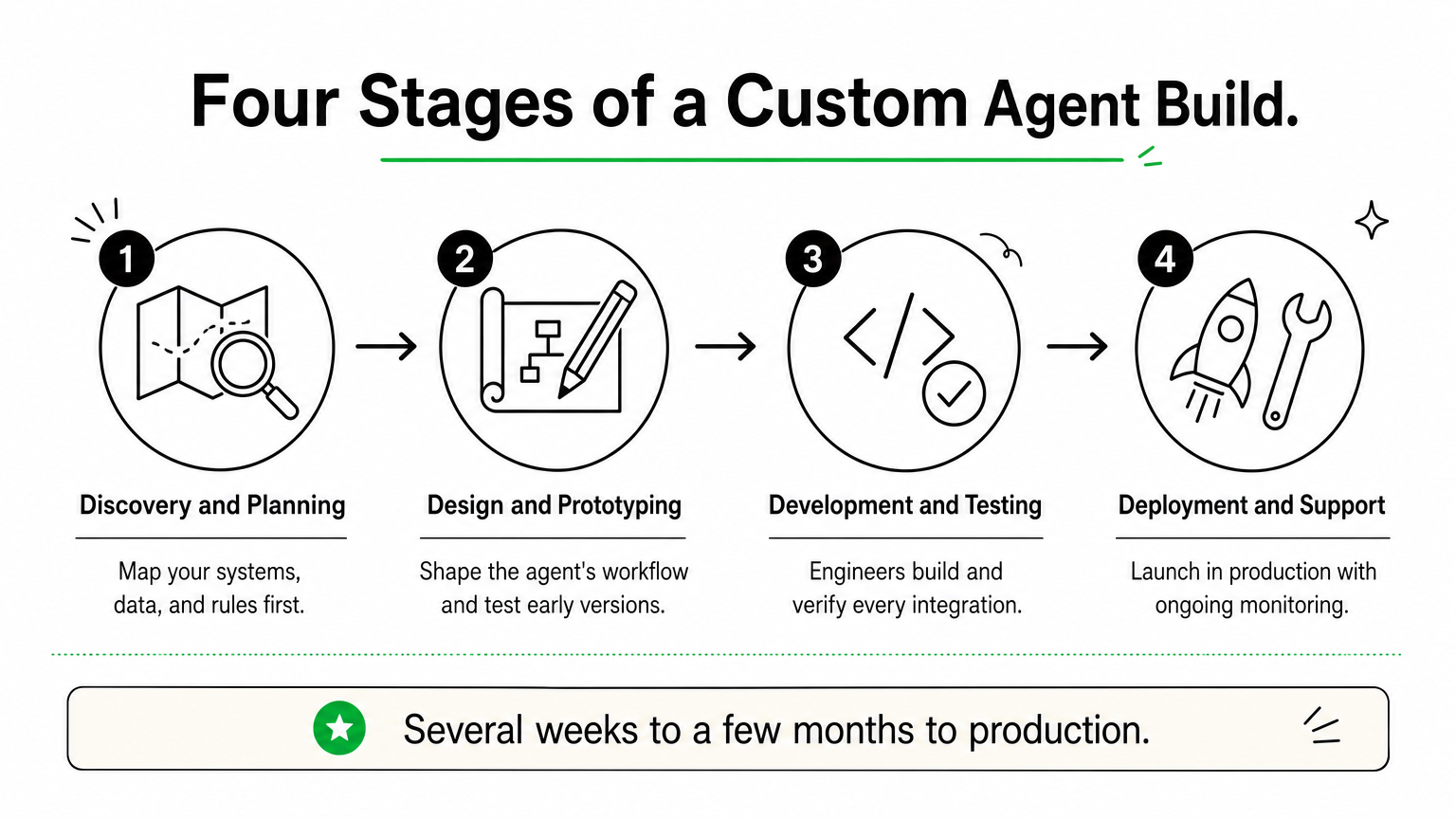
    Four-step process diagram showing discovery, design, development, and deployment stages of a custom AI agent project.

    Hatzs Dimensions builds custom AI agents around your systems, data, and rules instead of asking you to fit a template. We handle design, engineering, and ongoing support, so you get a production agent, not a prototype. Typical builds include:

    • Support and claims agents that resolve tickets or process documents
    • Sales agents that qualify leads and book meetings
    • Operations agents that reconcile data, route approvals, and update records

    Best for company size and use case

    Mid-sized and enterprise teams in insurance, banking, healthcare, and logistics get the most from this route. These AI agents for businesses with complex workflows need to read and write to core systems, apply compliance rules, and leave an audit trail. Our insurance work cut operations costs by 30% because the agent sat inside the claims process, not beside it.

    Buy a platform for generic tasks, and build custom when the agent must act on your own data.

    Skip this option if you only need an inbox helper or a simple lead-capture bot. The no-code tools later in this list do that for far less money.

    Cost and pricing model

    We do not publish a price list, because scope drives cost. Pricing is quoted after discovery, and you choose between two engagement models:

    Model Best when How you pay
    Fixed-price project Scope is clear and budget must be certain One agreed price per deliverable
    Dedicated team The roadmap will change or you plan several agents Ongoing monthly team cost

    Expect a higher upfront spend than a subscription, but no per-seat or per-conversation platform fees. Budget separately for model usage and cloud hosting.

    Setup effort and integrations

    Every project runs through four stages, with senior engineers on each one:

    1. Discovery and planning
    2. Design and prototyping
    3. Development and testing
    4. Deployment and support

    A focused first agent usually reaches production in several weeks to a few months, depending on data quality and how many systems it touches. We connect to CRMs, ERPs, databases, and cloud services through APIs, and we can add data governance and AI governance controls from day one.

    Limitations to know

    Custom means slower to start than a subscription. You cannot sign up on Friday and run an agent on Monday, and the upfront investment is real.

    You also need an internal owner who can answer process questions and approve decisions. Without one, projects stall. And because you own the system, plan for monitoring and updates after launch, whether you handle them or we do under a support agreement.

    2. Microsoft Copilot Studio

    What it does

    Copilot Studio is Microsoft’s low-code builder for AI agents. You describe a task in plain language, connect knowledge sources such as SharePoint, and publish to Teams, a website, or Microsoft 365 Copilot.

    Agents can also run on their own. Autonomous agents trigger on events like a new email or a changed record, then act without a prompt.

    Best for company size and use case

    Mid-sized and enterprise teams already on Microsoft 365 get the fastest return. IT helpdesk, HR questions, and internal knowledge bots fit well, because the data and identity controls already exist.

    Copilot Studio wins when your data already lives in Microsoft 365.

    Shops outside the Microsoft ecosystem lose most of that advantage. Small teams without Microsoft licensing should look at Zapier Agents or Lindy instead.

    Cost and pricing model

    Pricing is usage-based, built on Copilot Credits. Confirm current numbers on Microsoft’s Copilot Studio page before budgeting, because plans change often.

    Option Price Notes
    Credit pack $200 per month 25,000 credits, shared across the tenant
    Pay-as-you-go $0.01 per credit No upfront commitment
    Microsoft 365 Copilot $30 per user per month Covers agent use inside Microsoft 365

    Setup effort and integrations

    Simple agents take hours to days. Anything touching approvals or several systems needs someone who knows Power Platform.

    • Over 1,000 connectors, including Dynamics 365, SAP, and ServiceNow
    • Governance through Entra ID, Purview, and the admin center
    • Custom actions through Power Automate flows or APIs

    Limitations to know

    Credit consumption is hard to predict. Generative answers and agent actions burn credits fast, so monthly costs can climb as adoption grows.

    Deep customization hits a ceiling. Agents that need complex multi-system logic or data outside Microsoft’s stack often end up needing custom engineering.

    3. Salesforce Agentforce

    What it does

    A robotic arm pulls a customer card from a file drawer beside a headset.

    Agentforce is Salesforce’s platform for building AI agents that work inside your CRM. Agents answer customers, qualify leads, and update records using data from Sales Cloud, Service Cloud, and Data Cloud. You set topics, guardrails, and actions in Agent Builder, then deploy to chat, email, web, or Slack.

    Best for company size and use case

    Mid-sized and enterprise companies already running Salesforce get the most value. Service case deflection, lead qualification, and sales follow-up fit best, because the agent reads the same records your reps use.

    Agentforce pays off when Salesforce is already your system of record.

    Teams on another CRM would pay for a migration before they got an agent. Small businesses will find the licensing heavy for what they need.

    Cost and pricing model

    Salesforce has changed its pricing several times, so verify numbers on the Agentforce pricing page before you budget. Three models are common:

    Model Price Notes
    Flex Credits $0.10 per action Sold in packs, such as $500 for 100,000 credits
    Per-user add-ons From $125 per user per month Built for employee-facing agents
    Agentforce 1 Editions From $550 per user per month Bundled licenses across clouds

    Setup effort and integrations

    A basic service agent can go live in a few weeks if your Salesforce data is clean. Plan on a Salesforce admin or implementation partner. Agents connect through Flow, Apex, and MuleSoft, and the Einstein Trust Layer masks sensitive data before it reaches the model.

    Limitations to know

    Action-based billing is hard to forecast, since every lookup and update can consume credits. Data Cloud often becomes a required add-on, which raises the total bill.

    Agent quality also depends on your CRM data. Messy records produce weak answers, and systems outside Salesforce need extra integration work.

    4. Sierra

    What it does

    Sierra builds conversational agents for customer service. They handle chat, email, and voice, and they take real actions, such as processing a return, changing a subscription, or rebooking a delivery. Bret Taylor, a former Salesforce co-CEO, co-founded the company, and teams configure agent behavior through Sierra’s Agent SDK and tooling. Brand voice, escalation rules, and guardrails are set up front.

    Best for company size and use case

    Among AI agents for business, Sierra is one of the most narrowly focused. It suits large consumer brands in retail, telecom, subscription services, and financial services, where support volume is the biggest cost line. Internal helpdesks and back-office automation are not its strength.

    Sierra fits companies whose biggest expense is customer conversations.

    Cost and pricing model

    Sierra does not publish prices. You get a quote through sales. The company is known for outcome-based pricing, where you pay when the agent resolves a conversation without a human handoff. Ask early how a "resolution" is defined, because that definition drives your invoice.

    Setup effort and integrations

    Onboarding is sales-led and hands-on. Expect weeks, not hours, and plan for engineering time to expose the right actions safely. Typical connections include:

    • Your CRM and helpdesk
    • Order, billing, and subscription systems
    • Knowledge bases and policy documents
    • Telephony for voice agents

    Limitations to know

    There is no self-serve trial, so you cannot test it over a weekend. Budgets skew toward enterprise, which puts it out of reach for most small teams.

    It also stays in the customer-facing lane. If you need agents that reconcile data or route internal approvals, look at Copilot Studio or a custom build instead.

    5. Google Gemini Enterprise Agent Platform

    What it does

    Google’s offering pairs Gemini Enterprise, a workspace where employees build and run agents, with Vertex AI Agent Builder for developers. Google renames and bundles these products often, so check current names on the Gemini Enterprise page.

    • No-code agent designer for business users
    • Agent Development Kit for custom code
    • Managed runtime and Agent2Agent protocol support

    Best for company size and use case

    Mid-sized and enterprise teams on Google Cloud or Workspace get the most from it. For AI agents for business that search across Drive, Gmail, and BigQuery, the data connections already exist. Research, document analysis, and data-heavy workflows fit best.

    Choose Google’s platform when your data already lives in Google Cloud.

    Cost and pricing model

    Pricing mixes per-user seats with usage-based charges for developer tools. Verify figures before budgeting, because they shift.

    Component Typical price Notes
    Gemini Business About $21 per user per month Smaller teams
    Gemini Enterprise From about $30 per user per month Adds governance and security
    Agent Builder and runtime Usage-based Billed on compute and model tokens

    Setup effort and integrations

    Business users can launch a simple agent in hours. Custom agents built with the Agent Development Kit need cloud engineers who understand IAM, networking, and deployment.

    • Connectors for Google Workspace, Salesforce, SAP, and Microsoft 365
    • Access controls through Google Cloud IAM
    • Model choice beyond Gemini through Vertex AI

    Limitations to know

    The product line is broad and confusing. Teams often struggle to tell which tier they need, and usage costs on the developer side are hard to forecast.

    Companies outside Google’s ecosystem also lose the main advantage. Without Workspace or Google Cloud data, integration work grows and the case for this platform weakens.

    6. Lindy

    What it does

    Lindy is a no-code builder for AI agents. You describe a job in plain language, pick a trigger such as a new email or calendar event, and the agent follows the steps you set. Popular templates include:

    • Inbox triage and drafted replies
    • Meeting scheduling and call notes
    • Lead research and outreach

    Best for company size and use case

    Small teams and solo operators get the most from it. For AI agents for business with 1 to 50 people, Lindy takes over repetitive admin work like follow-ups, scheduling, and CRM updates, with no developer involved.

    Lindy works best as a fast, low-cost assistant, not as core infrastructure.

    Larger companies can use it for sales or ops pilots, but they will hit limits quickly.

    Cost and pricing model

    Lindy bills by credits, and plans change often. Check the current numbers before you commit.

    Plan Approx. price Notes
    Free $0 Small credit allowance for testing
    Pro About $50 per month Several thousand credits
    Business About $300 per month Higher limits, team features
    Enterprise Custom Security and support add-ons

    Long, multi-step tasks use more credits, so heavy usage costs more than the sticker price suggests.

    Setup effort and integrations

    Most agents take under an hour to build and test. You connect Gmail, Google Calendar, Slack, HubSpot, Salesforce, and Notion with a few clicks, and thousands of other apps are reachable through partner connections.

    Limitations to know

    Complex jobs with many branches can misfire without close testing, so review outputs before you let an agent send anything to customers. Governance is also thin. You get little control over audit trails, data residency, or role-based approvals.

    Once an agent must write to your core systems under compliance rules, a custom build is the safer route.

    7. Zapier Agents

    What it does

    Zapier Agents lets you build AI teammates that work across your apps. You write instructions, attach data sources, and the agent uses Zapier’s app connections to take action. It can also browse the web for research. Typical jobs include:

    • Researching leads and enriching CRM records
    • Drafting and routing support replies
    • Summarizing meetings and posting follow-ups

    Best for company size and use case

    Small and mid-sized teams that already run Zaps get the fastest win. Among AI agents for business in this price range, it suits ops, marketing, and sales teams that want flexible task automation without hiring engineers.

    Zapier Agents work best when your tools are scattered across many apps.

    Large regulated companies will want tighter controls than it offers.

    Cost and pricing model

    Billing is activity-based, so every agent action counts against a monthly allowance. Zapier adjusts plans often, so confirm figures on its pricing page. Treat these as rough ranges:

    Plan Approx. price Notes
    Free $0 Small activity allowance for testing
    Paid tiers From about $35 per month Larger allowances, billed annually
    Team and Enterprise Custom SSO, admin controls, support

    Setup effort and integrations

    A simple agent takes under an hour. Zapier connects to thousands of apps, including Gmail, Slack, HubSpot, Salesforce, and Google Sheets, so you rarely write code. Your existing Zaps can also become agent tools.

    Limitations to know

    Activity counts add up quickly. An agent that researches, drafts, and updates records in one run can use several activities per task, so heavy volume costs more than the entry price suggests.

    Agents also act less predictably than fixed Zaps. Test with approval steps before you let one email customers. Governance and audit depth are thin, so core-system work under compliance rules points toward a custom build.

    8. Gumloop

    What it does

    Gumloop is a visual no-code platform for building AI workflows and agents. You drag nodes onto a canvas and chain them together. The flow pulls data, runs an AI model, and pushes results into your other tools. Its built-in assistant can also draft a flow from a plain-language request. Common uses include:

    • Scraping and enriching lead lists
    • Summarizing documents and emails at scale
    • Routing data between sheets, CRM, and Slack

    Best for company size and use case

    Ops, marketing, and sales teams of 5 to 200 people get the most from it. Among AI agents for business at this tier, Gumloop suits data-heavy repetitive work like lead enrichment and content pipelines, where you want more control than a simple trigger-and-action tool gives you.

    Gumloop fits teams that want to see and tune every step of an agent.

    Enterprises can run pilots on it, but regulated workloads need stronger controls.

    Cost and pricing model

    Pricing is credit-based, and plans move often, so check Gumloop’s site before you commit. Treat these as rough figures:

    Plan Approx. price Notes
    Free $0 About 2,000 credits for testing
    Solo About $37 per month Roughly 10,000 credits, billed annually
    Team About $244 per month Larger credit pool, shared workspace
    Enterprise Custom Security and support add-ons

    Model-heavy steps burn credits quickly, so high volume costs more than the entry price suggests.

    Setup effort and integrations

    Your first flow takes an hour or two to build and test. Gumloop connects to Gmail, Slack, Google Sheets, Notion, Airtable, and HubSpot, and an API request node reaches most other systems.

    Expect more setup time than with Lindy, since you design the logic yourself. Anyone comfortable with spreadsheet formulas can manage it, so no engineers are required for standard flows.

    Limitations to know

    Governance is lighter than enterprise platforms offer, with limited audit depth and approval controls. The tool also leans toward structured workflows more than open-ended autonomy.

    Large flows become hard to maintain as they grow, and credit costs rise with volume. If an agent must write to core systems under compliance rules, a custom build is the safer route.

    9. Relevance AI

    What it does

    Relevance AI is a no-code platform for building AI agents and teams of agents. You give an agent instructions, a knowledge base, and tools, then run it on a trigger or a schedule. Its multi-agent workforce feature lets one agent hand work to another. Common builds include:

    • Sales research and outbound drafting
    • Inbound lead qualification
    • Support triage and document processing

    Best for company size and use case

    Growth-stage and mid-sized teams of 20 to 500 people get the most from it. For AI agents for business that need more than one trigger and one action, it suits sales and operations teams that want several agents working a process together.

    Relevance AI fits teams that want agents to collaborate, not just automate single tasks.

    Solo operators will find simpler tools like Lindy cheaper and quicker to start.

    Cost and pricing model

    Pricing combines a monthly plan with usage credits, and Relevance AI has changed its tiers several times. Treat these as rough figures and confirm on its pricing page.

    Plan Approx. price Notes
    Free $0 Small allowance for testing
    Pro About $19 per month Solo and early pilots
    Team About $234 per month Shared workspace, higher limits
    Business About $599 per month Larger volume, more controls
    Enterprise Custom Security and support add-ons

    Agents that call premium models or run long chains use more credits, so real costs track usage, not the plan name.

    Setup effort and integrations

    A first agent takes one to a few hours to build and test. You connect Gmail, Slack, HubSpot, Salesforce, and Google Sheets with a few clicks. For anything else, a custom API or code tool fills the gap. Standard agents need no engineers, but multi-agent flows reward someone who thinks in process logic.

    Limitations to know

    Costs are hard to forecast until you watch a pilot run for a few weeks. Chained agents also fail in subtle ways, so test each handoff before customers see any output.

    Governance is lighter than enterprise platforms offer. If an agent must write to core systems under compliance rules, a custom build is the safer route.

    10. n8n

    What it does

    A locked server rack in an office connected by cables to a laptop showing a node workflow.

    n8n is a workflow automation platform with a built-in AI Agent node. You build on a visual canvas, connect a language model, memory, and tools, and the agent picks its next step. Unlike most tools above, you can self-host it on your own servers.

    Best for company size and use case

    Technical teams of 10 to 500 people get the most from it. For AI agents for business where data must stay inside your environment, n8n suits engineers and ops teams that want control over hosting and logic without coding everything from scratch.

    n8n fits teams that want no-code speed with the option to drop into code.

    Non-technical teams will move faster with Lindy or Zapier Agents.

    Cost and pricing model

    Billing is per workflow execution, not per step, so long agent runs stay predictable. The self-hosted Community Edition is free, and you pay only for servers. Cloud prices below are approximate, so confirm them before budgeting.

    Plan Approx. price Notes
    Community (self-hosted) $0 You handle hosting and upkeep
    Starter About €20 per month Around 2,500 executions
    Pro About €50 per month Around 10,000 executions
    Business and Enterprise From about €667 per month SSO, environments, support

    Setup effort and integrations

    A first agent takes a few hours. Self-hosting adds a day or two for Docker, backups, and security. Key connection points:

    • 400+ built-in integrations, including Gmail, Slack, HubSpot, and Postgres
    • HTTP request nodes for any API
    • JavaScript and Python code nodes for custom logic

    Limitations to know

    Self-hosting makes you responsible for uptime, updates, and security. Without a DevOps owner, small problems turn into outages.

    The license is "fair-code," not fully open source, so check the terms before reselling it inside a product. Agents also need careful testing, and enterprise governance features sit on the higher tiers.

    11. CrewAI

    What it does

    CrewAI is an open-source Python framework for building teams of AI agents. You define roles, such as researcher and writer, give each one goals and tools, and the "crew" splits the work. A paid platform adds a visual studio, deployment, and monitoring on top of the framework.

    Best for company size and use case

    Engineering-led teams of any size get the most from it. For AI agents for business that run multi-step research, content, or analysis pipelines, CrewAI gives developers full control over agent logic without building an orchestration layer from scratch.

    CrewAI suits teams that have developers and want to own how their agents work.

    Non-technical teams will move faster with Lindy or Zapier Agents.

    Cost and pricing model

    The framework is free under an open-source license. You pay for model usage and your own hosting, while the managed platform charges by execution. Tiers shift, so confirm current figures on CrewAI’s site.

    Option Approx. price Notes
    Open source $0 You host and maintain it
    Professional About $25 per month Set execution allowance, overage per run
    Enterprise Custom Security, support, private deployment

    Setup effort and integrations

    Expect a day or two to get a working crew, and longer to reach production. You need Python skills. CrewAI connects to OpenAI, Anthropic, Google, and local models, and custom tools wrap any API or database you already use.

    Limitations to know

    Code-first means no quick wins for non-developers. Multi-agent runs can loop or burn tokens, so set step limits and log every action.

    Self-hosting leaves monitoring, security, and uptime with you. For regulated workloads that need audit trails, a custom build with governance from day one is the safer route.

    12. Beam AI

    What it does

    Beam AI builds autonomous agents that run back-office processes from start to finish. Typical jobs include invoice matching, order management, and ticket resolution. You start from prebuilt agent templates or design your own, and the agents improve from the corrections your team makes. Human-in-the-loop review lets a person approve low-confidence decisions before anything executes.

    Best for company size and use case

    Mid-sized and enterprise operations teams get the most from it. Among AI agents for business, Beam suits high-volume, document-heavy processes in finance, supply chain, and customer operations, where staff lose hours re-keying data between systems.

    Beam AI fits companies that want to automate whole processes, not individual tasks.

    Small teams with simple inbox or scheduling jobs will do better with Lindy or Zapier Agents.

    Cost and pricing model

    Beam does not publish full pricing, so expect a sales-led quote. Confirm current terms on its site before you budget. Cost usually depends on three things:

    • Number of agents in production
    • Volume of tasks or process runs
    • Support and security requirements

    Ask for a fixed-price pilot so you can measure real savings before committing to a larger rollout.

    Setup effort and integrations

    Plan on several weeks for a first process. Most of that time goes to mapping rules and exceptions, not building, and templates shorten the work. Beam connects to ERP, CRM, helpdesk, and email systems through connectors and APIs. Your IT team must grant scoped access, and an operations lead should own the process definition.

    Limitations to know

    Scope is narrower than general builders. Beam targets process automation, so it is a poor fit for personal assistants or quick experiments. There is also little public pricing and no cheap self-serve path, which means you cannot test it over a weekend.

    Unusual internal systems can push you toward extra engineering. When an agent must follow your exact rules inside legacy software, a custom build is worth pricing next to it.

    Choosing your first AI agent

    Start with the job, not the tool. If your team has under 50 people and a simple task, a no-code option like Lindy, Zapier Agents, or Gumloop gets you a working agent this week for under $500 a month. If your data already lives in Microsoft, Salesforce, or Google, use the platform that holds it.

    Custom work earns its cost when the agent must act on your core systems under compliance rules. Most AI agents for business reach that point sooner than expected, and they then need audit trails, governance, and integration depth that subscriptions rarely offer.

    Pilot one narrow process, measure the savings, then expand. If you want a senior team to scope that first build, talk to Hatzs Dimensions about custom AI agent development.