Tag: AI Governance

  • Enterprise AI Agents: What They Are and 7 Top Platforms

    Enterprise AI Agents: What They Are and 7 Top Platforms

    The best enterprise AI agents are the ones that fit the systems you already run, respect your permissions, and leave an audit trail. For a Microsoft 365 shop, that is usually Microsoft Copilot Studio. Salesforce teams start with Agentforce, Google Cloud teams with Gemini Enterprise Agent Platform, and regulated firms with IBM watsonx Orchestrate. RPA-heavy teams look at UiPath, engineering-led teams at LangChain, and companies with unusual workflows at a custom build from a partner like Hatzs Dimensions.

    The problem is that every vendor now says "agent." You are comparing products that range from a low-code builder for HR requests to a code framework for custom multi-agent systems. This article explains what enterprise AI agents are and how they work. Then it walks through seven options with the same lens: how each works, who it suits, what it costs, and where it falls short.

    We build and ship AI agents into production for mid-sized and large companies. The judgments below come from integration work, governance reviews, and rollouts, not from vendor feature sheets. Where a price is not public, we say so instead of guessing.

    What enterprise AI agents are and how they work

    Enterprise AI agents are software systems that use a large language model to pursue a goal across your business tools, with the security, permissions, and audit logging a large organization requires. They plan steps, call systems such as your CRM or ticketing tool, and act, while people step in for approvals and exceptions.

    What makes an agent enterprise-grade is not the model, it is the permissions, logging, and controls around it.

    The loop: perceive, plan, act

    Every agent runs the same loop. It perceives a trigger, such as a new invoice email or a support ticket. It plans by breaking the goal into steps and choosing tools. It acts by calling APIs, updating records, or drafting a reply, then checks the result and repeats until the work is done or a person takes over.
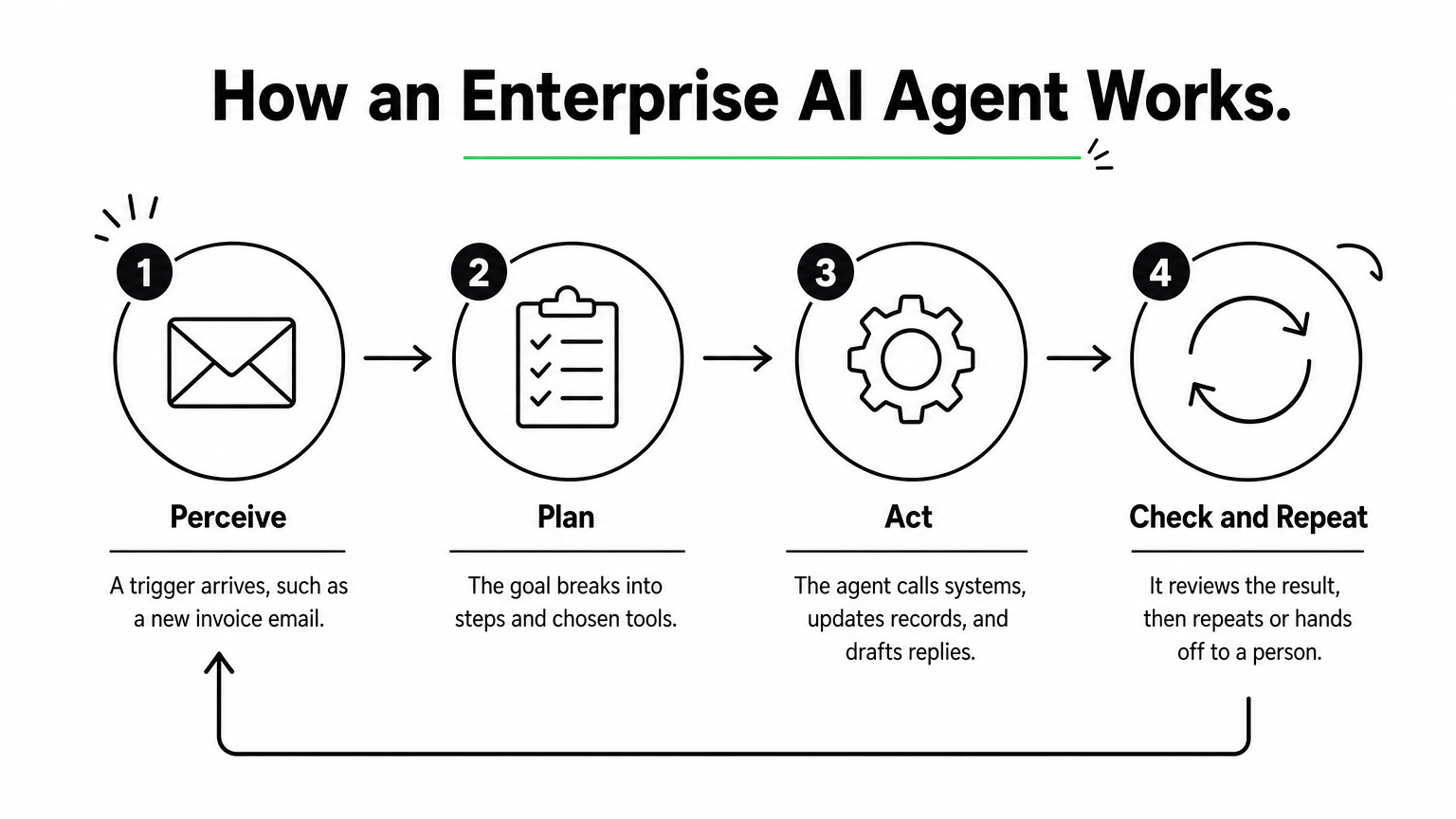
    A four-step process diagram showing an agent perceiving a trigger, planning, acting, and checking results in a loop.

    A plain chatbot stops at the answer. An autonomous AI agent keeps going until the task is complete. Four controls turn that loop into something an enterprise can run:

    • Identity and permissions: the agent inherits the access of the user or role it serves, through SSO and role-based access control.
    • Audit logs: every tool call and decision is recorded with who triggered it and what data it touched.
    • Human approval: risky steps, such as payments or customer-facing replies, pause for a person.
    • Data controls: masking, residency rules, and model access policies keep sensitive data inside approved boundaries.

    How they differ from copilots, chatbots, and RPA

    The main difference is who starts the work and how much of it the software can finish alone. The table sets the four common tools side by side.

    Tool Who starts the work Handles messy input Typical scope
    Chatbot The user asks a question Somewhat Answers and FAQs
    Copilot The user prompts it Yes Drafts and suggestions inside one app
    RPA bot A schedule or trigger No, needs fixed rules Scripted clicks and data entry
    Enterprise AI agent A trigger, rule, or goal Yes Multi-step work across several systems

    In practice these layers combine. Many agents call RPA bots as one of their tools.

    The seven types of AI agents

    Textbooks classify agents by how they decide. Lists vary slightly, but these seven cover the usual answers.

    Type How it decides Enterprise example
    Simple reflex Fixed condition-action rules Route tickets that contain a keyword
    Model-based reflex Rules plus a memory of current state Track open orders and flag stalls
    Goal-based Plans steps toward an objective Resolve an IT ticket end to end
    Utility-based Scores options and picks the best trade-off Choose a carrier by cost versus speed
    Learning Improves from feedback Fraud flags refined by analyst reviews
    Hierarchical A manager agent delegates to sub-agents A finance agent splitting invoice tasks
    Multi-agent system Specialist agents collaborate Onboarding with verification, provisioning, and compliance agents

    Most modern LLM-based enterprise agents are goal-based with tool access. The more ambitious deployments stack them into hierarchical or multi-agent setups.

    1. Hatzs Dimensions

    Hatzs Dimensions builds custom enterprise AI agents around your systems, data, and compliance rules instead of selling a fixed product. Choose it when no off-the-shelf platform matches your workflow.

    Pick a custom build when your workflow is the competitive advantage, not a template.

    How it works

    Engagements follow four stages: discovery and planning, design and prototyping, development and testing, then deployment and support. The team covers AI agent design, GenAI consulting, data engineering and integration, and AI governance and compliance, so the agent, its data pipelines, and its controls come from one group.

    Because the agents are custom, they can sit on top of whichever model, cloud, and systems of record you use. A senior-only engineering team with 7+ years of shipping enterprise AI into production does the build. One insurance client cut operations costs by 30%.

    Who it suits and what it costs

    It suits CTOs, CIOs, and product leaders at mid-sized and large companies, especially in insurance, banking, healthcare, and logistics. These are teams whose processes do not map to a vendor template, or who need one agent spanning several systems under strict governance.

    AI agent pricing is scoped per engagement. You can pick dedicated teams when requirements will keep evolving, or fixed-price projects when you need budget certainty. There is no public price list.

    Strengths and limits

    • Strength: the agent is built around your data, workflows, and compliance needs, with less dependence on one vendor’s roadmap.
    • Strength: strategy, design, AI, cloud, and long-term support come from one team, backed by 250+ clients and 98% retention.
    • Limit: time to first value is longer than switching on a prebuilt agent.
    • Limit: you need a business owner who can make product decisions during discovery.

    2. Microsoft Copilot Studio

    Microsoft Copilot Studio is a low-code builder for agents that live inside Microsoft 365, Teams, and the Power Platform. It is the quickest route to enterprise AI agents if your company already runs on Microsoft.

    If your people already live in Teams and Outlook, the agent should live there too.

    How it works

    Makers describe an agent in natural language, attach knowledge sources and Power Platform connectors, and publish it to Teams, Microsoft 365, or a website. Identity runs through Microsoft Entra, so the agent respects the same sign-in and access rules as the rest of your tenant.

    Administration sits in the Power Platform admin center. Policies there control which connectors makers can use and which data stays inside the tenant. Systems outside the Microsoft estate, such as SAP, Workday, or Salesforce, may need custom connectors.

    Who it suits and what it costs

    It suits IT-led teams and trained citizen developers in Microsoft-first companies. Typical builds are HR help desks, IT service requests, and internal knowledge agents.

    Licensing is based on capacity and usage rather than a simple flat fee. Model it against your expected conversation volume. Microsoft adjusts the billing units from time to time, so confirm current terms before you budget.

    Strengths and limits

    • Strength: governance and identity are inherited from your Microsoft tenant, which shortens security review.
    • Strength: low-code building lets non-engineers ship useful agents quickly.
    • Limit: cross-system work outside Microsoft usually means extra engineering.
    • Limit: usage-based costs are hard to forecast until you have real traffic.

    3. Google Gemini Enterprise Agent Platform

    Google Cloud’s Gemini Enterprise Agent Platform is a platform to build, scale, govern, and optimize agents, with model selection and tooling in one place. It fits cloud-first companies that already run data and applications on Google Cloud.

    The platform earns its place when your data already lives in Google Cloud.

    How it works

    Google presents the platform as a single environment for choosing models, building agents, and governing them once they run. Google’s agent tooling has been known for grounding agents in enterprise data and handling multimodal input such as text, images, audio, and video.

    If you have used Vertex AI, ask your Google Cloud representative how the new platform relates to your existing projects before you migrate. Do not assume one-to-one feature parity. Check the current documentation for model availability, regional deployment, and compliance certifications.

    Who it suits and what it costs

    It suits data-heavy organizations on Google Cloud that have an ML or platform engineering bench. Think document analysis, visual inspection, or agents sitting on BigQuery data.

    Pricing is consumption-based, so cost depends on model usage, volume, and regions. Plan for someone to own cost monitoring, because token-heavy agents can grow expensive without limits in place.

    Strengths and limits

    • Strength: deep fit with Google Cloud data services and a broad choice of models.
    • Strength: governance and scaling features sit alongside the build tools.
    • Limit: teams without engineering depth may struggle with cost tuning and model management.
    • Limit: value drops if your systems of record live elsewhere.

    4. Salesforce Agentforce

    Salesforce Agentforce puts agents directly on your Salesforce data and workflows. It is the natural choice among enterprise AI agents when the CRM is where customer work happens.

    An agent that reads live CRM records beats one that reads a nightly copy.

    How it works

    Agents operate on Salesforce’s own data model, so they work with current records and no synchronization layer. They can trigger and respond to Salesforce Flow automations. The Einstein Trust Layer applies data masking and filtering before a request reaches a model.

    Every action is logged inside Salesforce. When an agent cannot resolve a case, it escalates to a person in Service Cloud with the conversation context attached.

    Who it suits and what it costs

    It suits sales, service, and marketing operations teams that treat Salesforce as the system of record. Lead qualification, case triage, and CRM hygiene are the common first uses.

    Agentforce is sold as an add-on to Salesforce, with usage-based pricing. Salesforce has changed its pricing models over time, so get a current quote and compare it against your expected volume of agent actions.

    Strengths and limits

    • Strength: inherited permissions, sharing rules, and audit trails from the Salesforce platform.
    • Strength: fast deployment for teams already configured on Salesforce.
    • Limit: orchestration across ERP, HR, and ITSM systems often needs MuleSoft or custom API integration work.
    • Limit: it adds little if your customer data lives in another CRM.

    5. IBM watsonx Orchestrate

    IBM watsonx Orchestrate is built for regulated enterprises that need explainable, auditable automation across HR, procurement, and IT. It stands out among enterprise AI agents for how much weight it puts on traceability.

    A closed ledger binder on a desk with a magnifying glass on top and numbered tags tied in a row beside it.

    When a regulator might ask why the agent did that, traceability is the feature.

    How it works

    The platform orchestrates agents and tools through a catalog of pre-built agents and skills, with integrations for systems such as SAP, Salesforce, and ServiceNow. Each action can be traced back to the data, rules, and model reasoning behind it.

    Governance is a first-class part of the product, not an add-on. That matters for audit teams, who can review decision trails without asking engineers to reconstruct them.

    Who it suits and what it costs

    It suits banks, insurers, healthcare providers, and other large organizations where compliance review is a gating step. It also suits companies with sprawling back-office systems that need one orchestration layer.

    Pricing is negotiated at the enterprise level. Expect a longer procurement and implementation cycle than a SaaS-native option, and budget for it.

    Strengths and limits

    • Strength: audit and explainability depth that suits regulated workflows.
    • Strength: pre-built integrations with common enterprise systems.
    • Limit: slower to deploy than agents native to a system you already use.
    • Limit: heavier than needed for a small team with a few simple workflows.

    6. UiPath AI agents

    UiPath adds language-model agents to the automation platform many enterprises already use for RPA. If you have hundreds of existing robots, enterprise AI agents from UiPath let you add reasoning without starting over.

    The cheapest agent is the one that reuses automations you already trust.

    How it works

    An agent decides and extracts, while UiPath robots execute. Orchestrator handles scheduling, access, and audit trails. Action Center routes exceptions to people with full context, and Document Understanding reads invoices, forms, and contracts.

    That mix is useful for processes that cross modern APIs and legacy desktop applications. The agent handles the unstructured judgment, and the robots handle the clicks.

    Who it suits and what it costs

    It suits enterprises with an established UiPath footprint and process teams who already know its tooling. Finance operations, claims processing, and back-office document work are typical fits.

    Licensing is layered across robots, AI services, and orchestration, which makes cost modeling harder than a per-user plan. Ask for a bundled estimate based on the processes you actually plan to automate.

    Strengths and limits

    • Strength: reuse existing robots, queues, and exception handling.
    • Strength: mature document understanding and a broad connector marketplace.
    • Limit: its desktop heritage means cloud-only environments may need extra engineering.
    • Limit: resilient cross-system agents often require experienced UiPath developers.

    7. LangChain with LangGraph

    LangChain and its LangGraph framework are open source toolkits for engineering teams that want to code and own their agent stack end to end. They give the deepest control of any option here, in exchange for the most work.

    Numbered wooden blocks connected by rope into a branching path on a workbench, with a spool of thread beside them.

    A framework gives you control, and you pay for it in engineering hours.

    How it works

    Developers define agent logic, tools, memory, and multi-step graphs in code, in languages such as Python and TypeScript. LangSmith, the commercial layer, adds tracing, evaluation, and deployment, which helps you debug long, branching agent runs. Alternatives such as CrewAI take a similar code-first approach, focused on role-based agent teams.

    Nothing about security or compliance comes preconfigured. You choose the hosting, the access controls, and the logging, which suits teams with strong opinions about all three.

    Who it suits and what it costs

    It suits engineering-led enterprises with a platform team, custom requirements, and a willingness to maintain what they build. It does not suit teams that want business users to build agents themselves.

    The frameworks are free. LangSmith has a free developer tier and paid seat-based plans, plus custom enterprise terms. The real cost is engineer time, hosting, and the governance layer you have to build.

    Strengths and limits

    • Strength: maximum flexibility over models, tools, and agent behavior, with strong observability.
    • Strength: no dependence on one vendor’s application ecosystem.
    • Limit: SLAs, security, and compliance are your responsibility.
    • Limit: non-technical colleagues cannot contribute directly to agent design.

    How to compare and shortlist enterprise AI agents

    Shortlist by your system of record first, then by governance needs, then by how much engineering you can commit. Most enterprise AI agent decisions are settled by those three, not by model quality.

    Start with where your data lives, because the agent has to live next to it.

    Comparison at a glance

    Option Best fit Build effort Pricing model
    Hatzs Dimensions Custom, multi-system workflows Partner-led Fixed-price or dedicated team
    Microsoft Copilot Studio Microsoft 365 and Azure estates Low-code Capacity and usage
    Gemini Enterprise Agent Platform Google Cloud data and ML teams Medium to high Consumption
    Salesforce Agentforce Salesforce-centered customer work Low to medium Usage-based add-on
    IBM watsonx Orchestrate Regulated, audit-heavy enterprises Medium Negotiated contract
    UiPath AI agents Existing RPA estates Medium Multi-SKU licensing
    LangChain with LangGraph Engineering-led custom stacks High Free frameworks, paid tooling

    Six questions to ask every vendor

    Run the same checklist against each option. Gaps show up fast.

    1. Where does the agent get its permissions, and can it ever exceed the user’s?
    2. Can you see every tool call and decision in a log your auditors can read?
    3. Where does data go, and what residency and masking controls exist?
    4. Which steps require human approval, and can you configure them per workflow?
    5. Can you switch or add models without rebuilding the agent?
    6. How is usage metered, and what does a month of real traffic cost?

    The big four and the top three

    No official ranking names a "big four" or a "top three." The four large vendors that appear on most enterprise shortlists are Microsoft, Google, Salesforce, and IBM, because each owns a cloud, a suite, or a system of record. If you need three starting points, take the one that matches your estate: Copilot Studio for Microsoft, Agentforce for Salesforce, and Google’s platform for Google Cloud. Treat them as starting points, not verdicts.

    Choosing your first enterprise agent platform

    Pick the platform that sits closest to your data, check it against the six governance questions, and start with one contained workflow. Native platforms win on speed when your systems line up. Frameworks win on control when you have engineers to spare. A custom build wins when the workflow itself is what sets you apart.

    If your processes span several systems, or your compliance team needs controls that off-the-shelf tools do not offer, a senior build partner can save months of rework. You can plan your enterprise AI agent with the Hatzs Dimensions team and start with a scoped first workflow.
  • AI Agents vs Agentic AI: What Each Is and How They Differ

    AI Agents vs Agentic AI: What Each Is and How They Differ

    People use the terms interchangeably, and that causes real problems when you scope a project or evaluate a vendor. If you are comparing AI agents vs agentic AI, the short version is this: they are not the same thing, and mixing them up leads to mismatched budgets and expectations.

    An AI agent is a single software component built to complete a defined task, such as answering support tickets or pulling data from a CRM. Agentic AI is the broader approach, where one or more agents plan, decide, and act toward a goal with minimal human direction. Think of agents as the workers and agentic AI as the system that coordinates them. Both differ from generative AI, which creates content when prompted but does not act on its own.

    Below, we define each term, show how they relate, and walk through practical examples. We also explain where generative AI fits. Our senior engineers have shipped enterprise AI systems into production for over 7 years, so the guidance here comes from real deployments, not theory. By the end, you will know which one your use case calls for.

    Why the difference between AI agents and agentic AI matters

    Most teams first hit this distinction in a budget meeting. Someone asks for "an agentic AI solution," engineering hears "a chatbot with a few tools," and finance hears "a platform." The label sets the scope, and a wrong label means a wrong estimate. Settling the agentic AI vs AI agents question early also keeps your project plan honest before any code is written.

    It changes what you scope and budget

    A single AI agent has a narrow job, a short list of tools, and a clear finish line. Think of an agent that classifies inbound support tickets and drafts replies. You can scope it in a short discovery phase and test it against a fixed set of real examples.

    Agentic AI is a different build. You are designing several agents, the logic that hands work between them, shared memory, and rules for when the system must stop and ask a person. The orchestration layer takes most of the effort, not the individual agents. Teams that price an agentic system like a single agent usually run out of budget at integration.

    It changes your risk profile

    An agent that drafts a reply can be wrong in a small, visible way. A system that plans its own steps, calls your billing API, and updates customer records can be wrong in ways that compound before anyone notices. Autonomy raises the cost of every mistake, so the controls you need grow with it.

    The more freedom a system has to act, the more it needs guardrails, logging, and a human checkpoint.

    The table below shows how the same questions get different answers depending on what you are building.

    Question Single AI agent Agentic AI system
    Scope One defined task A goal that spans many tasks
    Main build effort Prompts, tools, evaluation Orchestration, memory, guardrails
    Impact of an error Usually limited to one output Can cascade across steps and systems
    Oversight needed Spot checks and sampling Audit trails and approval gates

    Regulated industries feel this most. In banking, insurance, and healthcare, compliance teams ask what a system is allowed to do on its own. "It’s an agent" does not answer that. They want defined decision boundaries and a clear AI governance record of who approved what.

    It changes how you evaluate vendors

    Vendors use both terms loosely. A product with one model call and a button can end up marketed as "agentic." Four questions cut through the pitch:

    • Does it plan multiple steps on its own, or follow a fixed script?
    • Which systems can it act on, and with what permissions?
    • What happens when it fails or is unsure?
    • Can you see and audit every action it takes?

    Clear answers tell you whether you are buying a capable single agent or a coordinated system. Both can be the right purchase. The problem starts when you pay for one and expect the other.

    How to tell AI agents and agentic AI apart in practice

    Definitions only help if you can apply them to a real system. When you review a demo, an architecture diagram, or your own backlog, run a few simple tests instead of trusting the label. The tests below settle most debates about AI agents vs agentic AI in a few minutes, and they look at behavior, not marketing.

    Four tests you can run on any system

    Each test asks what the system does, not what the vendor calls it. Count how many rows lean right in the table. One is a hint. Three or four means you are dealing with agentic AI.

    Test Leans toward an AI agent Leans toward agentic AI
    Goal A defined task, such as "classify this ticket" An outcome, such as "resolve this customer’s issue"
    Planning Follows a path someone designed Builds and revises its own steps
    Coordination One component does the work Several agents hand work to each other
    Memory Context lasts one session State persists across tasks and days

    Planning is the most telling test. An agent walks a path that an engineer drew. An agentic system chooses its own path, changes it when a step fails, and decides when the goal is met.

    One request, two designs

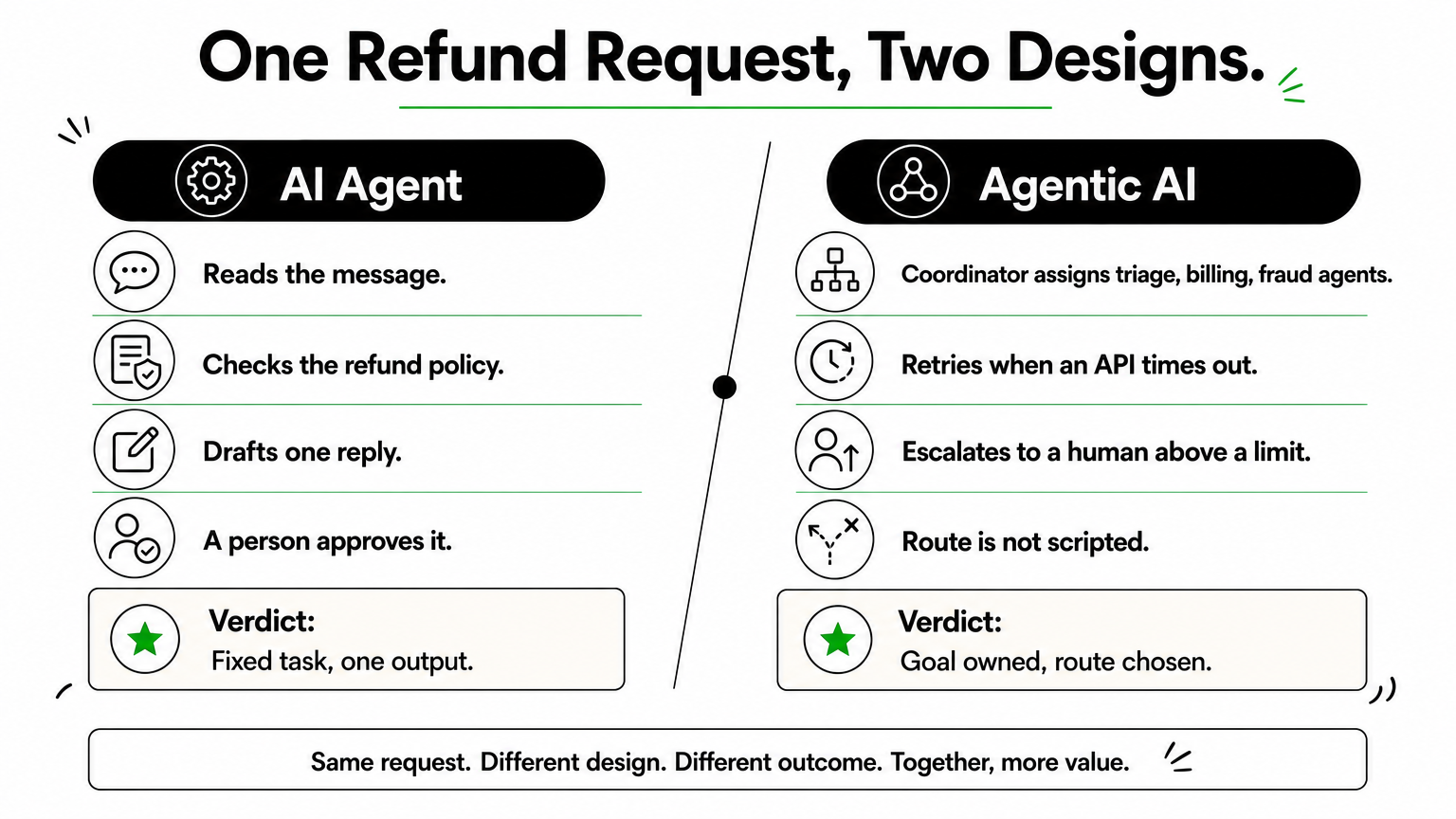
    Consider a customer refund request. Built as an AI agent, the system reads the message, checks the refund policy, and drafts a reply for a person to approve. The task is fixed and the output is one reply.

    Comparison of an AI agent and an agentic AI system handling the same refund request.

    Agentic AI treats the same request as a goal: resolve this refund. A coordinator assigns a triage agent, a billing agent, and a fraud-check agent, retries when an API times out, and escalates to a human when the amount passes a set limit. Nobody scripted the exact order of those steps.

    If one component finishes a named task, it is an agent. If the system chooses the route to an outcome, it is agentic AI.

    Where the line blurs

    Plenty of products sit in the middle. A single agent with a loop and five tools can plan within one task without any coordination. Call it an agent with agentic traits, and ask what it can do without a person. That answer, not the label, should drive your risk review and your budget.

    How generative AI, AI agents, and agentic AI compare

    Three terms get blurred together in most vendor decks, so it helps to place them on one scale. Generative AI creates, an AI agent acts, and agentic AI pursues a goal. Each step up adds capability, and each adds risk.

    Generative AI produces, it does not act

    Generative AI takes a prompt and returns content such as text, code, images, or summaries. Ask it for a refund email and you get a polished draft. It does not send the email, check the refund policy, or notice that the customer has written twice. A person carries every output into the next system, so a human stays in the loop for each step.

    Side-by-side comparison

    The table shows where the three differ on the points that affect cost and oversight.

    Generative AI AI agent Agentic AI
    Core job Create content Complete a defined task Reach a goal across tasks
    Starts when You write a prompt A trigger or request arrives A goal is set
    Acts on systems No Yes, through a few tools Yes, across many systems
    Planning None Follows a designed path Builds and revises its own plan
    Human role Uses every output Approves or samples Sets goals and limits

    Notice that the jump from generative AI to an agent is about access to tools. The jump from an agent to agentic AI is about who decides the route. Those are different engineering problems with different price tags.

    They stack, they do not compete

    Most AI agents run on a generative model. The model reads the request and reasons about it, and the agent wraps that model with instructions, tools, and a task. Agentic AI then coordinates several of those agents. The same model can sit under all three, which is why the labels confuse buyers.

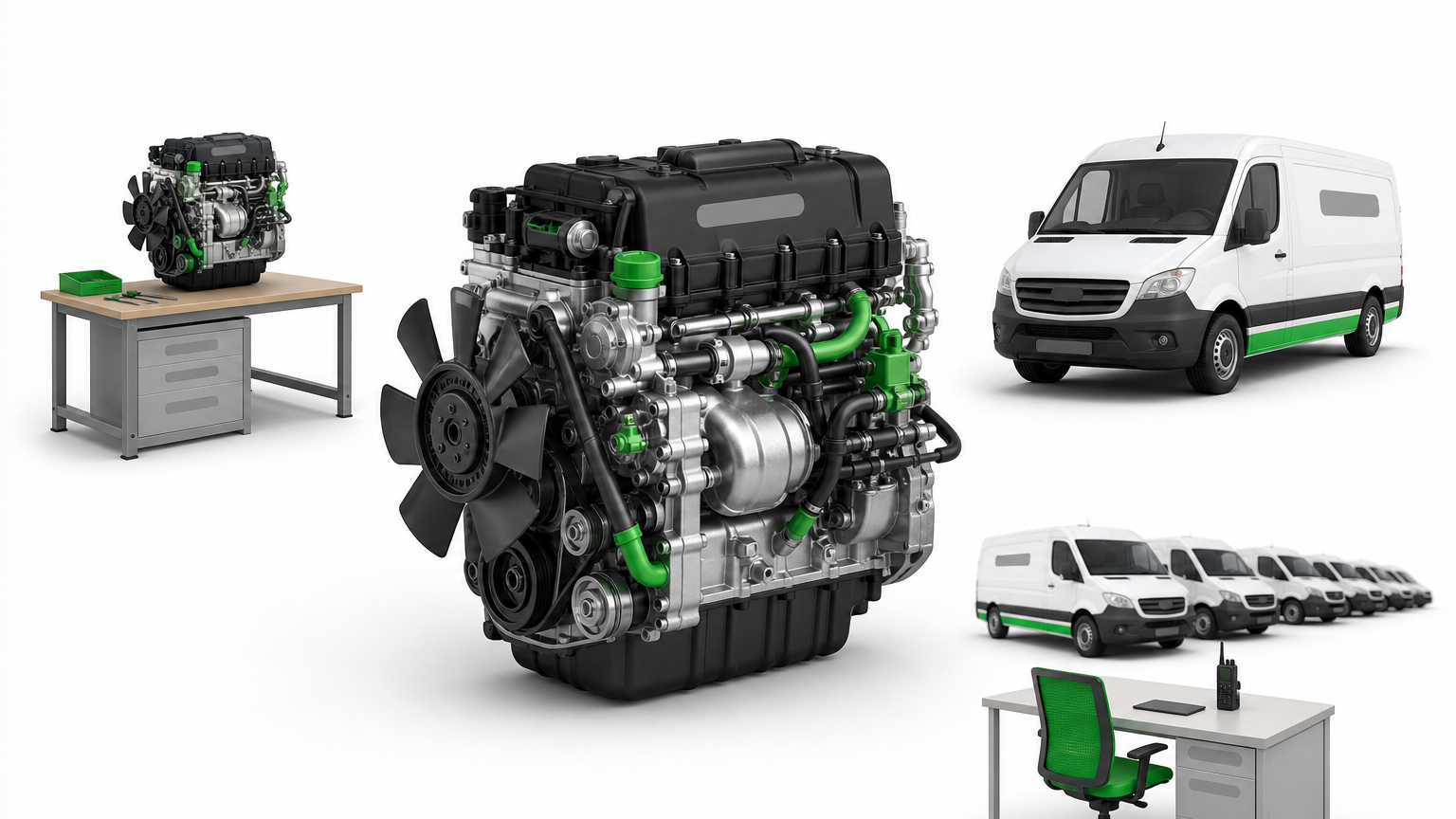
    An engine, a van built around it, and a fleet of vans with a dispatcher desk.

    Generative AI is the engine, an AI agent is a vehicle built around it, and agentic AI is the fleet with a dispatcher.

    So the agentic AI vs AI agents question is about scope, not about which model you license. You can start with one agent, prove it on real data, and add coordination later. Building in layers lets you add autonomy only where your testing shows it is safe.

    Real-world examples of AI agents and agentic AI

    AI agent examples make the split concrete. Across industries the pattern repeats: an agent owns one task, while an agentic system owns an outcome.

    Examples of single AI agents

    Most production AI today is agents. Each has a single trigger, a few tools, and a clear finish line, so you can measure accuracy on a fixed test set before launch. Typical examples:

    A desk with invoices, a ticket tray, and a calendar, each marked with a small flag.

    • A support agent that tags tickets and drafts replies
    • An accounts payable agent that extracts invoice lines and posts them to your ledger
    • A sales agent that qualifies inbound leads and books meetings

    Examples of agentic AI systems

    Agentic AI appears where work crosses systems and the route changes case by case. The table shows one industry at both levels, with the agentic version owning the whole outcome.

    Industry AI agent Agentic AI
    Insurance Extracts data from a claim form Runs a claim from intake to payout recommendation, checks coverage, flags fraud, routes exceptions
    Logistics Predicts a delivery delay Reroutes the shipment, rebooks the carrier, notifies the customer
    Banking Summarizes a KYC document Runs the onboarding review, requests missing documents, escalates edge cases

    The difference between agentic AI vs AI agents is less about intelligence and more about how much of the journey the system owns.

    Start narrow, then connect

    Nothing in the agentic column is exotic. Each row is several agents plus coordination, memory, and escalation rules. The practical path is to deploy one agent first, prove it on real data, then connect it to others.

    Also watch for cosmetic claims. A demo that runs a scripted five-step flow is an agent with a long script. Ask the vendor to show the system recovering from a failed step. If it cannot, it is not choosing its own route.

    How to decide which approach fits your business

    Choosing between AI agents vs agentic AI is a business decision before it is a technical one. Three questions drive it: how predictable the work is, how costly a mistake would be, and whether your systems are ready. Start with the work, not the technology, because the right answer changes from one process to the next inside the same company.

    Match the approach to the work

    Look at the process you want to improve and count the decisions inside it. Fixed steps with a clear finish line point to an agent. Variable routes across several systems point to agentic AI.

    • Choose a single AI agent when the task repeats, inputs look alike, and success is easy to measure. Invoice extraction and ticket tagging fit this.
    • Choose agentic AI when each case needs different steps and the goal is an outcome, such as handling a claim or recovering a delayed shipment.
    • Choose neither yet when the process is undocumented. If your own team cannot describe the steps, software cannot learn them.

    Check your readiness

    Next, test your AI readiness by checking whether your foundations can support autonomy. An agent needs clean access to the right data and a few reliable APIs. An agentic system also needs shared memory, logging, and approval gates, and those take real engineering time to build and test.

    Risk tolerance matters just as much. If an error touches money, health records, or legal exposure, limit what the system can do alone and keep a person at the final checkpoint. Teams in banking and insurance often start with agents that recommend, then let them act only after months of clean results.

    Give a system the least autonomy that solves the problem, then grant more only as your evidence builds.

    Match the engagement model

    Budget shape follows scope. A single agent with a defined task suits a fixed-price project, since you can test it against real examples and know the finish line. An agentic system grows as you add agents, tools, and rules, so a dedicated team usually fits better. Either way, pilot one workflow first. Measure error rate, time saved, and how often a person had to step in, then decide whether the next workflow earns more freedom.

    Common misconceptions, including ChatGPT and agent types

    Three myths come up in almost every scoping call. Each one leads to the wrong purchase or the wrong level of oversight, so it pays to clear them up before the AI agents vs agentic AI discussion goes any further.

    Myth: ChatGPT is agentic AI

    A plain chat session is generative AI. You type a prompt, it returns text, and you decide what happens next. Nothing acts on your systems and nothing pursues a goal after the reply appears.

    The line moves when tools enter the picture. Give a model a browser, your calendar, or code execution plus a task, and it behaves like a single AI agent. Even then it is one agent. It is not a coordinated system with shared memory, escalation rules, and several specialized agents.

    Myth: agentic means no humans

    Agentic describes who chooses the route, not who is accountable. Production systems keep approval gates on anything touching money, records, or legal exposure. Teams that remove people entirely usually put them back after the first costly error.

    Autonomy is a setting you tune per workflow, not a switch you flip for the whole system.

    Myth: the classic agent types are the same as agentic AI

    Textbook AI, such as Russell and Norvig’s Artificial Intelligence: A Modern Approach, sorts agents into five types. These describe how one agent decides, not how many agents work together.

    Type How it decides Example
    Simple reflex Fixed if-then rules on current input Spam filter rule
    Model-based Rules plus a memory of the world Inventory monitor
    Goal-based Picks actions that reach a target Route planner
    Utility-based Weighs trade-offs to maximize a score Dynamic pricing engine
    Learning Improves from feedback Recommendation engine

    A goal-based agent is still one agent. Agentic AI is a system-level property: several agents, any of these types, coordinated toward an outcome. So when someone says "it’s a learning agent, so it’s agentic," ask how many components share the goal and who decides the route. Those two answers settle it.

    Putting the two terms in their place

    The difference comes down to scope. An AI agent completes a defined task, while agentic AI coordinates several agents toward a goal and chooses its own route. Generative AI sits underneath both, creating content but not acting. Once you see that, the AI agents vs agentic AI debate stops being about labels and starts being about how much of an outcome you want a system to own.

    For your own projects, test behavior instead of trusting vendor names. Start with one agent, prove it on real data, and add autonomy only where results justify it. Give a system the least autonomy that solves the problem, and keep human checkpoints wherever money, records, or compliance are at stake.

    If you are weighing agentic AI vs AI agents for a real workflow, our senior engineers can help you size it. You can scope an AI agent pilot with Hatzs Dimensions and get a plan that fits your process and risk level.

  • 7 Best Self-Hosted AI Agents for Running AI on Your Terms

    7 Best Self-Hosted AI Agents for Running AI on Your Terms

    Every time you send a prompt to a cloud AI provider, your data leaves your infrastructure. For companies in healthcare, banking, insurance, or law enforcement, that alone can be a compliance problem, not just an inconvenience, which is why AI governance and compliance belongs in the decision from the start. That’s why more engineering teams are turning to self-hosted ai agents: systems that run on your own servers, under your own security policies, with full control over how data moves and where it’s stored.

    If you’re comparing options right now, you want a straight answer, not marketing copy. This article breaks down seven proven open-source platforms for running agents on infrastructure you own, covering what each tool does well, where it falls short, and which use cases it fits best, from simple task automation to complex multi-agent orchestration.

    We’ve built and deployed AI systems for over 250 clients, so this list reflects what actually holds up in production, not just what looks good in a demo. You’ll get a practical comparison of deployment complexity, scalability, and integration effort for each platform, so you can pick the one that matches your team’s technical capacity and your organization’s data governance requirements, without gambling on a tool that stalls once real workloads hit it.

    1. LangChain and LangGraph

    LangChain started as a library for chaining prompts and tools together, but its real value today comes from LangGraph, the framework built on top of it for orchestrating multi-step, stateful agents. Together they form the closest thing to a standard toolkit for building self-hosted ai agents that need to reason across multiple steps, call external APIs, and maintain memory between turns. If you’ve outgrown a single prompt-response chatbot and need something that plans, retries, and branches based on conditions, this is usually where teams land first.

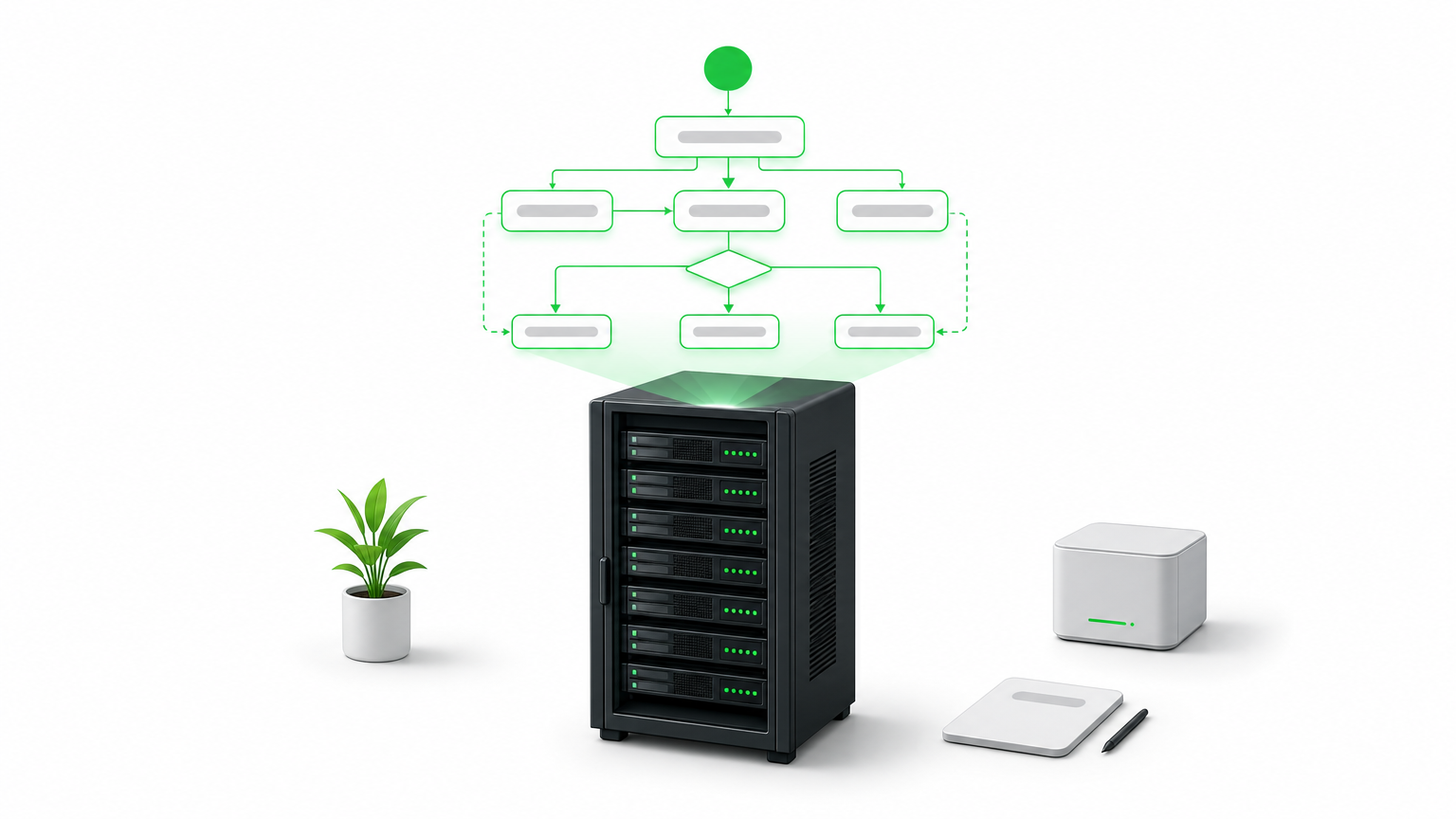
    A server rack beneath a glowing diagram of connected nodes and arrows representing an agent graph.

    How it works

    LangGraph models an agent as a directed graph, where each node represents a function, tool call, or LLM invocation, and edges define how control passes between them. This graph structure matters because it replaces the fragile if-else logic that older agent frameworks relied on. You define state explicitly, so the agent can pause, resume, or loop back without losing context. Typical production setups include:

    • A vector database (Chroma, Pgvector, or Weaviate) for retrieval-augmented generation
    • A self-hosted model server (Ollama, vLLM, or a local Hugging Face deployment) or an API connection to a hosted LLM
    • A persistence layer for checkpointing agent state between steps
    • LangSmith or an open-source alternative for tracing and debugging agent runs

    A graph-based agent doesn’t just answer questions, it remembers what it tried, what failed, and what to do next.

    Who it’s for

    Engineering teams with Python experience and at least one developer comfortable reading and modifying agent logic will get the most out of this stack. It suits companies building custom enterprise AI automation rather than deploying an off-the-shelf chatbot, think insurance claims triage, multi-step data enrichment pipelines, or internal copilots that need to query several systems before responding. It’s not the fastest path to a working demo, and teams without in-house engineering support often underestimate the ramp-up time before their first agent runs reliably in production.

    Pricing and licensing

    Both LangChain and LangGraph are open source under the MIT license, so you pay nothing to run them on your own infrastructure. Costs come from what you connect them to: compute for self-hosted models, API fees if you call hosted LLMs, and engineering time to build and maintain the graph logic. LangSmith, the observability layer, has a free tier and paid plans starting around $39 per seat per month, though you can substitute open-source tracing tools if you want a fully self-hosted stack with zero recurring fees.

    2. Dify

    Dify takes a different approach than LangChain: instead of a code-first framework, it gives you a visual application builder for creating and deploying LLM agents, complete with a web interface for managing prompts, datasets, and workflows. If your team wants to stand up a working agent without writing orchestration code from scratch, Dify gets you there faster, while still letting developers drop into the backend when they need custom logic.

    How it works

    Dify packages everything an agent needs into one deployable stack: a workflow canvas for chaining prompts and tools, built-in retrieval-augmented generation with document upload and chunking, and an API layer that turns any workflow into a callable endpoint. You install it via Docker Compose, point it at a self-hosted or hosted LLM, and manage agents through the dashboard rather than a codebase.

    A visual builder won’t replace a skilled engineer, but it lets that engineer ship an agent in a day instead of a sprint.

    Who it’s for

    Product teams and smaller engineering shops that want self-hosted AI agent deployment without a heavy coding lift will find Dify a good match. It works well for internal tools, customer support bots, and document Q&A systems where the logic is fairly linear. Teams needing complex branching, long-running state, or deep custom orchestration will eventually bump into the platform’s limits and may need to graduate to something like LangGraph.

    Pricing and licensing

    Dify’s self-hosted community edition runs under an open-source license with no seat fees, and you can deploy it entirely on your own servers. Dify also offers a managed cloud version with paid tiers if you’d rather skip infrastructure management, but for teams prioritizing data control, the self-hosted route keeps everything, including prompts and documents, inside your own network.

    3. Flowise

    Flowise takes the visual-builder idea one step further by focusing on drag-and-drop agent construction for teams that live closer to the LangChain ecosystem but don’t want to write graph code by hand. Built on top of LangChain’s node library, it exposes the same building blocks, chains, retrievers, memory modules, and tool calls, through a canvas interface, making it one of the more approachable self-hosted ai agents platforms for teams that already understand LangChain concepts but want a faster way to assemble them.

    How it works

    Behind the interface, Flowise runs on Node.js and stores your flows as JSON, which means you can version them in git and move them between environments without rebuilding anything by hand. Each node on the canvas maps directly to a LangChain component, so an experienced developer can open the underlying code and extend a node when the visual layer runs out of options. Deployment typically looks like:

    • Docker container running the Flowise server and UI
    • A connected vector store for document retrieval
    • A model endpoint, either local (Ollama) or hosted
    • Exported flow JSON stored in version control for rollback and review

    The value of a canvas tool isn’t skipping code, it’s giving your team a shared, visual reference for logic that used to live only in a developer’s head.

    Who it’s for

    Flowise suits teams split between technical and non-technical members, where a product manager or analyst wants to prototype an agent’s logic visually, then hand it to a developer for hardening. It’s a strong fit for rapid agent prototyping and internal tools that don’t need heavy custom orchestration, but less suited to teams building highly complex, stateful multi-agent systems from the ground up.

    Pricing and licensing

    Flowise is open source under the Apache 2.0 license, so self-hosting costs nothing beyond your own infrastructure and any LLM API fees. A hosted cloud version exists for teams that don’t want to manage servers, with paid plans layered on top, but the self-hosted deployment remains free and fully under your control.

    4. n8n

    n8n started as a general workflow automation tool, closer to Zapier than to an agent framework, but recent versions added native AI agent nodes that let you build actual reasoning workflows instead of simple triggers-and-actions. That history shows: n8n is less about pure agent orchestration and more about connecting agents into the rest of your business systems, which makes it one of the more practical self-hosted ai agents options for teams that already run automation pipelines and want AI layered into them, not built as a standalone project.

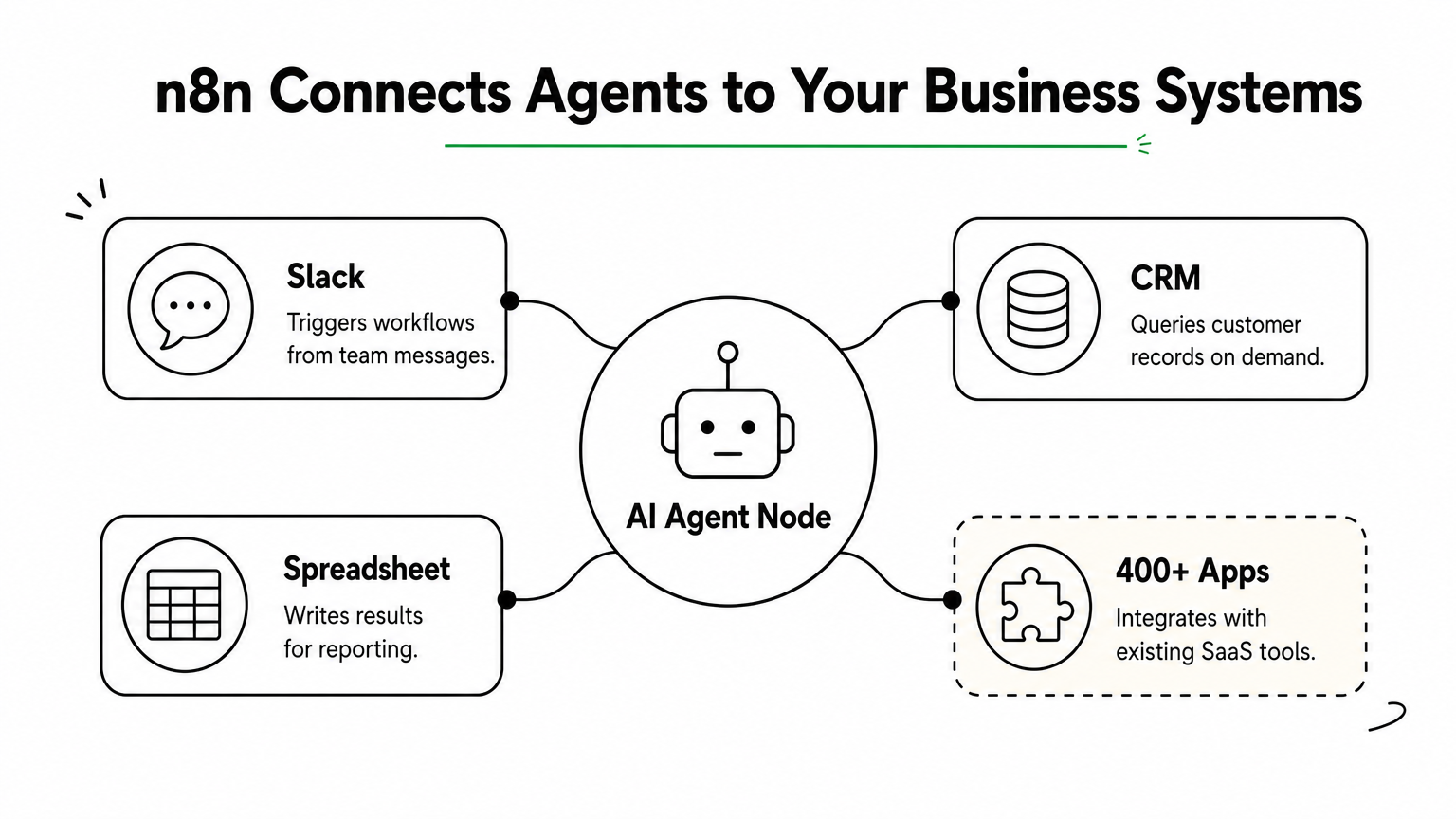
    Hub diagram showing an AI agent node connected to Slack, CRM, spreadsheet, and other app integrations.

    How it works

    Workflows in n8n live on a visual canvas where each node handles a task: an HTTP call, a database query, a conditional branch, or now, an AI agent node that wraps an LLM with tools and memory. You self-host the whole thing with a single Docker container or a docker-compose stack, connect it to Postgres for workflow storage, and point the AI nodes at OpenAI, Anthropic, or a local model server like Ollama. Because it already integrates with over 400 apps and services, many of them the same platforms and tools we build with, an agent built here can trigger from a Slack message, query a CRM, and write results to a spreadsheet without custom glue code.

    An agent is only useful once it can act on the systems your business actually runs, and that’s where n8n earns its place.

    Who it’s for

    Operations and IT teams running intelligent process automation across existing SaaS tools will get the most value here, especially if the agent’s job is to fetch data, apply logic, and push updates rather than hold complex multi-turn conversations. It’s a weaker fit for teams needing deep custom reasoning chains or long-running stateful agents.

    Pricing and licensing

    n8n’s self-hosted edition is source-available under a fair-code license, free for internal use with no workflow limits, though commercial resale requires a separate agreement. Its hosted cloud plans start around $20 per month if you’d rather skip server management.

    5. AutoGPT platform

    AutoGPT was one of the first projects to popularize the idea of a fully autonomous agent loop, an AI that sets its own subtasks, executes them, and self-corrects without a human approving every step. The original 2023 hype cycle overstated what it could do, but the current AutoGPT platform has matured into a legitimate option for teams who want an agent that runs continuously toward a goal rather than responding to single prompts.

    How it works

    The platform now ships as a modular system with a visual workflow builder, a backend server, and a library of reusable "blocks" that represent actions like web search, file operations, or API calls. You deploy it with Docker Compose, connect it to an LLM provider or a self-hosted model, and define a goal along with the tools the agent can access. From there, the agent loops through planning, execution, and evaluation steps on its own, logging each decision so you can audit why it took a given action.

    An autonomous loop is only as safe as the guardrails you put around it, so budget for monitoring before you budget for automation.

    Who it’s for

    Teams experimenting with autonomous task execution, like continuous research gathering, monitoring, or multi-step content pipelines, get the most value here. It suits organizations comfortable putting engineering time into sandboxing and reviewing agent behavior, since unsupervised loops can rack up API costs or take unintended actions if left unchecked. It’s a poor starting point for teams that need predictable, auditable single-purpose agents, since the open-ended design trades control for autonomy.

    Pricing and licensing

    AutoGPT is open source under the MIT license, so self-hosting the platform costs nothing beyond your own infrastructure and whatever LLM you connect it to. There’s no official paid tier tied to the core project, which keeps the cost model simple, but you’ll want to set hard spending caps on any connected API keys before letting an autonomous loop run unattended.

    6. OpenHands

    OpenHands, previously known as OpenDevin, targets a narrower problem than the general-purpose frameworks above: it’s an autonomous coding agent that writes, tests, and debugs code inside its own sandboxed environment. Instead of chaining prompts around a business workflow, OpenHands acts like a junior developer you can hand a ticket to, one that can read a codebase, make changes, run the test suite, and iterate until the task passes.

    A computer screen displaying a code editor, terminal, and browser panel used by an autonomous coding agent.

    How it works

    The agent runs inside a Docker-based sandbox that gives it a real shell, a file system, and a browser it can control, so it isn’t limited to generating text suggestions. You connect it to an LLM, either a hosted model or a self-hosted one through an OpenAI-compatible endpoint, and assign it a task through the web UI or API. From there it plans its steps, executes commands, checks the output, and retries when something breaks, logging every action for review. Typical deployment includes:

    • A Docker host with enough CPU and memory to run isolated sandboxes per task
    • An LLM endpoint capable of strong code generation (GPT-4 class or better tends to perform best)
    • Git access scoped to the repositories the agent is allowed to touch

    Give a coding agent shell access without version control guardrails, and you’re one bad run away from a broken branch.

    Who it’s for

    Engineering teams looking for self-hosted ai agents that handle real development work, bug fixes, dependency upgrades, small feature branches, will get the most value here. It suits organizations with existing CI/CD pipelines that can absorb agent-generated pull requests for human review, rather than teams expecting fully unattended deployment.

    Pricing and licensing

    OpenHands is open source under the MIT license, free to self-host with no seat fees. Your ongoing cost is compute for the sandbox environments plus whatever LLM API or local model you connect, since coding tasks tend to run longer and use more tokens than typical chat agents.

    7. Tabby

    Tabby is a self-hosted AI coding assistant built for teams that want Copilot-style code completion without sending a single line of proprietary code to a third-party API. Where OpenHands acts like a junior developer executing whole tasks, Tabby stays closer to the editor, offering inline suggestions, chat, and code search as you type. If your legal or security team has blocked GitHub Copilot over data residency concerns, Tabby is usually the first alternative engineers ask about.

    How it works

    Tabby runs as a single Docker container that bundles a model server, a completion API, and an admin dashboard for managing users and usage analytics. It supports open models like StarCoder, CodeLlama, and DeepSeek Coder, and you can swap in whichever one fits your GPU budget and language mix. Editor plugins for VS Code, JetBrains IDEs, and Vim connect straight to your self-hosted instance, so completions never leave your network. A typical setup looks like:

    • A GPU-equipped server (even a single consumer GPU handles small teams)
    • A quantized open-source code model matched to your available VRAM
    • The Tabby server container plus editor extensions rolled out fleet-wide

    Code completion is only trustworthy at a company scale once you can prove the model never phones home with your source.

    Who it’s for

    Engineering organizations with strict IP or client confidentiality requirements, think agencies, defense contractors, or fintech, benefit most from Tabby’s fully local footprint. It also suits teams that already run local model deployment for other workloads and want to reuse that infrastructure rather than paying per-seat for a hosted assistant.

    Pricing and licensing

    Tabby is open source under Apache 2.0, free to self-host with no per-seat fees regardless of team size. Your real cost is GPU hardware, since completion quality and latency both scale with the model you can afford to run locally.

    Finding the right fit for your infrastructure

    No single platform on this list wins every use case. LangGraph handles complex, stateful reasoning; Dify and Flowise get you to a working agent faster; n8n ties agents into systems you already run; AutoGPT and OpenHands push toward autonomy; Tabby keeps code completion entirely in-house. The right choice depends on your team’s engineering depth, your compliance requirements, and how much control you actually need over where data lives.

    Running self-hosted ai agents well takes more than picking a framework off this list. You still need the infrastructure, monitoring, and governance to keep agents reliable once real workloads and real users hit them, and that’s where most in-house builds stall out. If you’d rather skip the trial-and-error and get a system that’s production-ready from day one, talk to Hatzs Dimensions about deploying autonomous AI agents in your infrastructure and put a team behind it that’s already done this 250 times over.