You keep hearing that autonomous AI agents will run workflows on their own, but vendor pages rarely say what that means in practice. Some describe a chatbot with a few plugins. Others promise a digital employee. If you are a CTO or product leader deciding where to invest, that gap makes it hard to judge what is real and what is demo-ware.
Here is the short answer. An autonomous AI agent is software that takes a goal, plans the steps, uses tools and data, and acts with little or no human prompting. It differs from a standard assistant because it decides what to do next, not just what to say. It also differs from agentic AI, which is the broader design approach that agents are built on.
This article walks through how these agents work, from perception and planning to tool use and memory. You will see how they compare with agentic AI, real examples across industries, and the top tools worth evaluating. We have shipped enterprise AI systems into production for 7+ years, so we also flag what tends to break once an agent leaves the prototype stage.
Why autonomous AI agents matter for your business
From answering questions to finishing work
Most automation you already own follows fixed rules. A script moves a file, a bot fills a form, and when something unexpected shows up, it stops and waits for a person. Autonomous AI agents handle the unexpected by reasoning about the goal and choosing another route. That shifts the unit of automation from a single task to a whole outcome.
Picture an insurance claims queue. A rules engine can route a document. An agent can read the claim, check the policy, request a missing photo, and pass along only the cases that need an adjuster’s judgment. Your people review exceptions instead of touching every item, which is where the capacity gain comes from.
Where the value shows up
The payoff is clearest in workflows that are high volume, multi-step, and tied to several systems. Those are the jobs where people spend hours copying context between tools. Cost reduction, faster response times, and more capacity without more headcount are the three gains we see most often.
These are results from Hatzs Dimensions client projects:
Area
Outcome
Insurance operations
30% lower operations costs
Lead handling
300% more lead conversion capacity
Customer engagement
40% higher engagement
What you need to price in
Autonomy cuts both ways. An agent that can issue refunds can also issue the wrong refunds, and a mistake in step two carries into steps three through ten. Errors compound across steps, and every tool you hand the agent widens cost, security, and compliance exposure.
The more an agent can do without you, the more you need to know about what it did and why.
So treat the business case as two columns, not one. Savings come from removing manual work, and the offsetting spend goes to monitoring, access controls, and human review for risky actions. Teams that budget for both ship agents that stay in production. Teams that budget only for the first column tend to pause after the first costly mistake.
How autonomous AI agents work
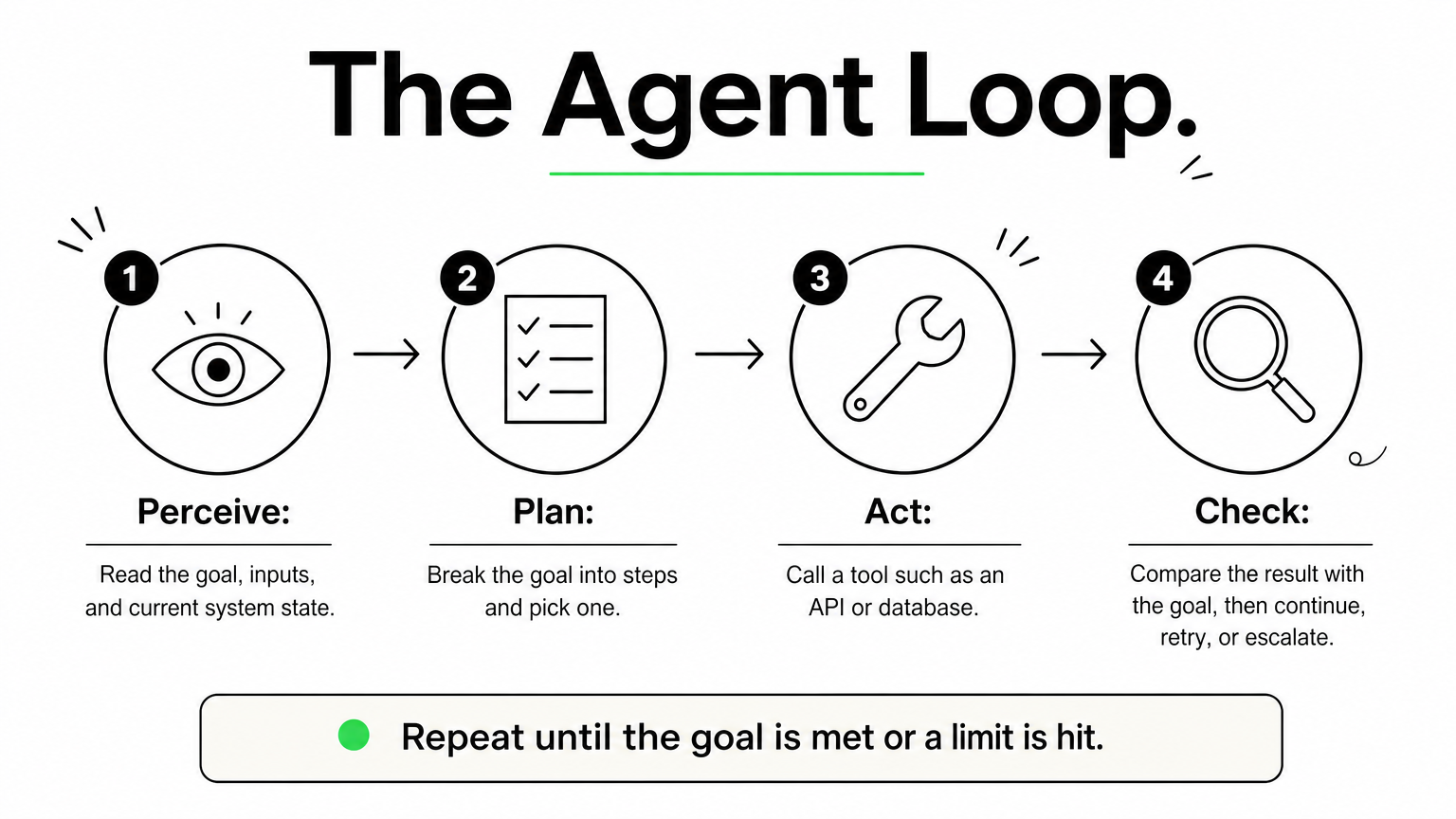
Under the hood, autonomous AI agents run a loop instead of answering once. A language model sits at the center, but the model alone is not the agent. The agent is the model plus the tools, memory, and rules wrapped around it.
The core loop
Every agent cycles through the same four moves until the goal is met or it hits a limit you set.
Perceive: read the goal, the inputs, and the current state of your systems.
Plan: break the goal into steps and pick the next one.
Act: call a tool, such as an API, a database query, or a browser.
Check: compare the result with the goal, then continue, retry, or escalate to a person.
Most production failures happen in the check step. An agent that cannot tell a failed action from a successful one will keep going confidently in the wrong direction, and that is how small errors compound.
An agent is only as autonomous as its ability to verify its own work.
The building blocks
Four components make that loop possible, and you should be able to name each one in any agent you evaluate.
Component
Job
Example
Reasoning model
Plans and decides
A large language model
Tools
Take real actions
CRM API, SQL, email
Memory
Holds context across steps
Task log, vector database
Guardrails
Limit what it may do
Spending caps, approval gates
When a vendor demo looks impressive, ask about the last two rows. Memory and guardrails separate a prototype from something you can safely leave running overnight.
Autonomous AI agents vs. agentic AI and other agents
Autonomous agents and agentic AI
Agentic AI is a way of building systems: you give a model a goal, let it plan, call tools, and adapt to results. An autonomous agent is a specific system built that way and allowed to run with minimal supervision. Some agentic systems keep a person approving every step, so they are agentic without being autonomous.
Agentic describes how a system is designed. Autonomous describes how much freedom you give it.
That distinction matters when you read vendor claims. A product marketed as "agentic" may still stop and ask you before every action.
How other agent types compare
The table below places autonomous agents next to the tools they are most often confused with.
Type
How it decides
Example
Chatbot or assistant
Responds to each prompt, takes no independent action
FAQ bot
Rule-based bot (RPA)
Follows fixed scripts, stops on surprises
Invoice-entry bot
Copilot
Suggests, and you approve
Code completion
Autonomous agent
Plans and acts toward a goal
Claims triage agent
Multi-agent system
Several agents split and review the work
Researcher, writer, and reviewer agents
Most teams should treat autonomy as a dial, not a switch. Start with a copilot that drafts while you approve, then move low-risk actions to full autonomy once your logs show consistent accuracy over a few hundred runs. Refunds, payments, and anything customer-facing can stay behind an approval gate much longer.
Real-world examples of autonomous AI agents
Examples across industries
Autonomous AI agents already run in production, mostly where work is repetitive and spans several systems. The table shows the use cases by industry we see most often, along with the part people still own.
Handles scheduling and prior-authorization paperwork
Staff make clinical decisions
Logistics
Reroutes shipments when delays hit
Dispatchers handle exceptions
Software
Triages bug reports and drafts fixes
Engineers review code
Notice what these have in common. Each agent has bounded authority, and a named person owns the exceptions. None of them is a free-roaming digital employee.
The best first agent has a narrow job, clear limits, and a person who owns the exceptions.
Choose based on integration depth and logging, not demo polish. Run a two-week pilot on one real workflow, and check whether you can replay every action the agent took. If you cannot, keep looking.
How to evaluate and deploy autonomous agents safely
Safe adoption comes down to two habits: judging the agent before you commit, and widening its authority only as evidence builds. The checks below work whether you buy a platform or build your own.
Questions to ask before you commit
Put the same five questions to every vendor and internal team, before any pilot starts:
Can you replay every action, input, and tool call?
Which permissions does the agent hold, and can you limit them per task?
What triggers escalation to a person?
How is accuracy measured, and on whose data?
Where does your data go, and who can see it?
Vague answers to the first two are a dealbreaker. If you operate in healthcare, banking, or insurance, add your compliance team to this AI governance and compliance review on day one, not after the pilot.
Roll out autonomy in stages
Most failed pilots hand an agent too much freedom too early. Autonomous AI agents should earn trust in steps, with a human checkpoint at every stage:
Shadow mode: the agent proposes actions and people perform them. Compare its choices with theirs.
Approval mode: the agent acts only after a person signs off.
Limited autonomy: the agent handles low-risk actions alone, under spending caps and rate limits.
Full autonomy: the agent runs on its own, with alerts and a tested kill switch.
Earn autonomy with logged results, not with a good demo.
Move up a stage only when your logs show steady accuracy across a few hundred runs. Drop back a stage after any serious incident.
Finally, give the agent an owner. One named person should watch the dashboards, review exceptions, and decide when to expand scope. Without that owner, monitoring becomes nobody’s job, and quiet failures pile up unnoticed.
Where autonomous agents fit next
Autonomous AI agents are not digital employees, and they are not smarter chatbots. They are goal-driven software that plans, acts, and checks its own work inside limits you set. The teams that get value from them pick one narrow, high-volume workflow, keep a person on the exceptions, and widen authority only as their logs prove accuracy.
That is the whole playbook. Understand the loop, separate agentic design from real autonomy, and ask hard questions about replay, permissions, and escalation before you sign anything. Do that, and autonomy becomes a dial you control instead of a risk you inherit. Skip it, and errors compound faster than savings.
If you want a senior team to help scope your first pilot, talk to Hatzs Dimensions about building autonomous AI agents that are production-ready, with guardrails and monitoring included from day one.
People use the terms interchangeably, and that causes real problems when you scope a project or evaluate a vendor. If you are comparing AI agents vs agentic AI, the short version is this: they are not the same thing, and mixing them up leads to mismatched budgets and expectations.
An AI agent is a single software component built to complete a defined task, such as answering support tickets or pulling data from a CRM. Agentic AI is the broader approach, where one or more agents plan, decide, and act toward a goal with minimal human direction. Think of agents as the workers and agentic AI as the system that coordinates them. Both differ from generative AI, which creates content when prompted but does not act on its own.
Below, we define each term, show how they relate, and walk through practical examples. We also explain where generative AI fits. Our senior engineers have shipped enterprise AI systems into production for over 7 years, so the guidance here comes from real deployments, not theory. By the end, you will know which one your use case calls for.
Why the difference between AI agents and agentic AI matters
Most teams first hit this distinction in a budget meeting. Someone asks for "an agentic AI solution," engineering hears "a chatbot with a few tools," and finance hears "a platform." The label sets the scope, and a wrong label means a wrong estimate. Settling the agentic AI vs AI agents question early also keeps your project plan honest before any code is written.
It changes what you scope and budget
A single AI agent has a narrow job, a short list of tools, and a clear finish line. Think of an agent that classifies inbound support tickets and drafts replies. You can scope it in a short discovery phase and test it against a fixed set of real examples.
Agentic AI is a different build. You are designing several agents, the logic that hands work between them, shared memory, and rules for when the system must stop and ask a person. The orchestration layer takes most of the effort, not the individual agents. Teams that price an agentic system like a single agent usually run out of budget at integration.
It changes your risk profile
An agent that drafts a reply can be wrong in a small, visible way. A system that plans its own steps, calls your billing API, and updates customer records can be wrong in ways that compound before anyone notices. Autonomy raises the cost of every mistake, so the controls you need grow with it.
The more freedom a system has to act, the more it needs guardrails, logging, and a human checkpoint.
The table below shows how the same questions get different answers depending on what you are building.
Question
Single AI agent
Agentic AI system
Scope
One defined task
A goal that spans many tasks
Main build effort
Prompts, tools, evaluation
Orchestration, memory, guardrails
Impact of an error
Usually limited to one output
Can cascade across steps and systems
Oversight needed
Spot checks and sampling
Audit trails and approval gates
Regulated industries feel this most. In banking, insurance, and healthcare, compliance teams ask what a system is allowed to do on its own. "It’s an agent" does not answer that. They want defined decision boundaries and a clear AI governance record of who approved what.
It changes how you evaluate vendors
Vendors use both terms loosely. A product with one model call and a button can end up marketed as "agentic." Four questions cut through the pitch:
Does it plan multiple steps on its own, or follow a fixed script?
Which systems can it act on, and with what permissions?
What happens when it fails or is unsure?
Can you see and audit every action it takes?
Clear answers tell you whether you are buying a capable single agent or a coordinated system. Both can be the right purchase. The problem starts when you pay for one and expect the other.
How to tell AI agents and agentic AI apart in practice
Definitions only help if you can apply them to a real system. When you review a demo, an architecture diagram, or your own backlog, run a few simple tests instead of trusting the label. The tests below settle most debates about AI agents vs agentic AI in a few minutes, and they look at behavior, not marketing.
Four tests you can run on any system
Each test asks what the system does, not what the vendor calls it. Count how many rows lean right in the table. One is a hint. Three or four means you are dealing with agentic AI.
Test
Leans toward an AI agent
Leans toward agentic AI
Goal
A defined task, such as "classify this ticket"
An outcome, such as "resolve this customer’s issue"
Planning
Follows a path someone designed
Builds and revises its own steps
Coordination
One component does the work
Several agents hand work to each other
Memory
Context lasts one session
State persists across tasks and days
Planning is the most telling test. An agent walks a path that an engineer drew. An agentic system chooses its own path, changes it when a step fails, and decides when the goal is met.
One request, two designs
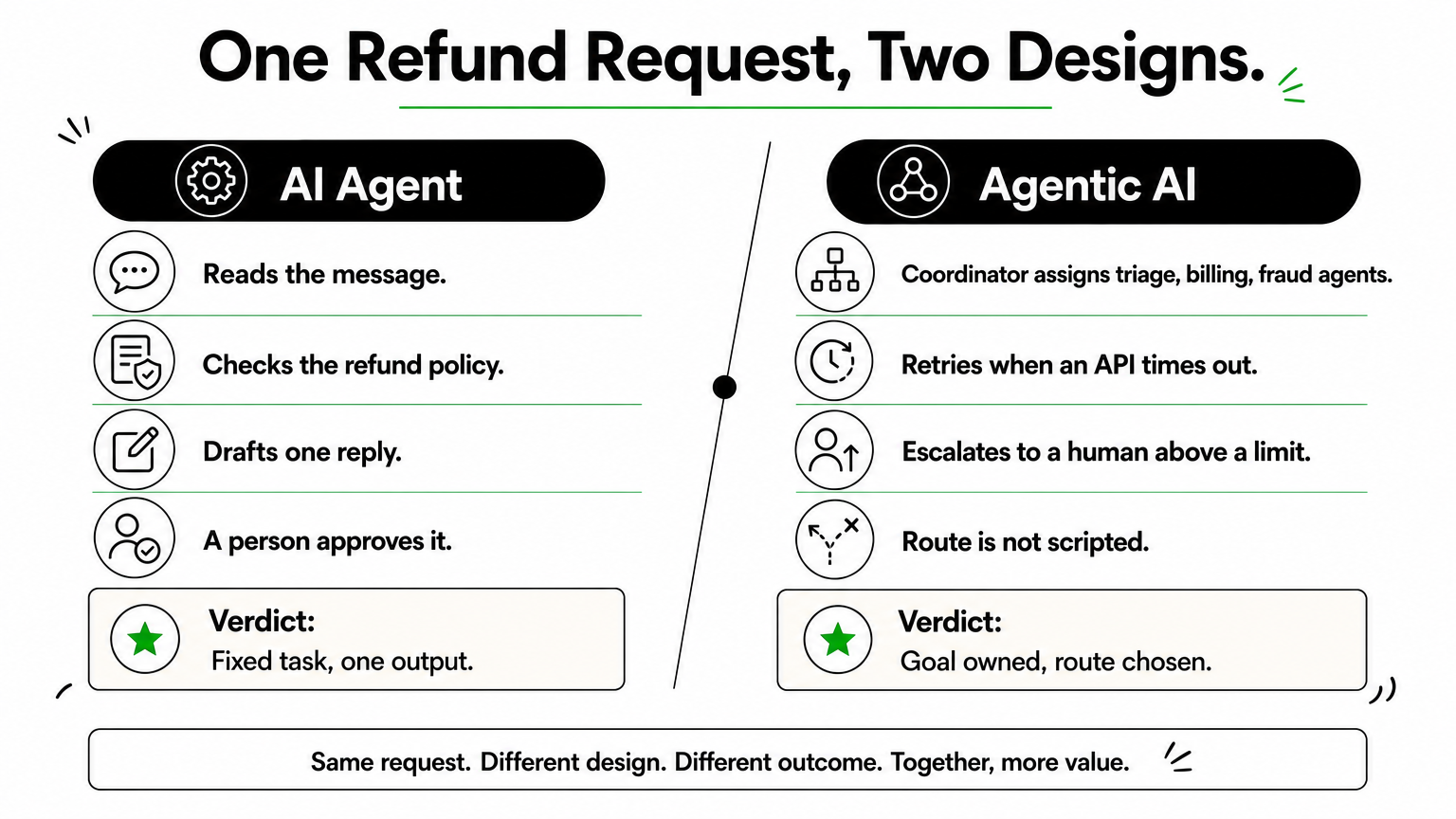
Consider a customer refund request. Built as an AI agent, the system reads the message, checks the refund policy, and drafts a reply for a person to approve. The task is fixed and the output is one reply.
Agentic AI treats the same request as a goal: resolve this refund. A coordinator assigns a triage agent, a billing agent, and a fraud-check agent, retries when an API times out, and escalates to a human when the amount passes a set limit. Nobody scripted the exact order of those steps.
If one component finishes a named task, it is an agent. If the system chooses the route to an outcome, it is agentic AI.
Where the line blurs
Plenty of products sit in the middle. A single agent with a loop and five tools can plan within one task without any coordination. Call it an agent with agentic traits, and ask what it can do without a person. That answer, not the label, should drive your risk review and your budget.
How generative AI, AI agents, and agentic AI compare
Three terms get blurred together in most vendor decks, so it helps to place them on one scale. Generative AI creates, an AI agent acts, and agentic AI pursues a goal. Each step up adds capability, and each adds risk.
Generative AI produces, it does not act
Generative AI takes a prompt and returns content such as text, code, images, or summaries. Ask it for a refund email and you get a polished draft. It does not send the email, check the refund policy, or notice that the customer has written twice. A person carries every output into the next system, so a human stays in the loop for each step.
Side-by-side comparison
The table shows where the three differ on the points that affect cost and oversight.
Generative AI
AI agent
Agentic AI
Core job
Create content
Complete a defined task
Reach a goal across tasks
Starts when
You write a prompt
A trigger or request arrives
A goal is set
Acts on systems
No
Yes, through a few tools
Yes, across many systems
Planning
None
Follows a designed path
Builds and revises its own plan
Human role
Uses every output
Approves or samples
Sets goals and limits
Notice that the jump from generative AI to an agent is about access to tools. The jump from an agent to agentic AI is about who decides the route. Those are different engineering problems with different price tags.
They stack, they do not compete
Most AI agents run on a generative model. The model reads the request and reasons about it, and the agent wraps that model with instructions, tools, and a task. Agentic AI then coordinates several of those agents. The same model can sit under all three, which is why the labels confuse buyers.
Generative AI is the engine, an AI agent is a vehicle built around it, and agentic AI is the fleet with a dispatcher.
So the agentic AI vs AI agents question is about scope, not about which model you license. You can start with one agent, prove it on real data, and add coordination later. Building in layers lets you add autonomy only where your testing shows it is safe.
Real-world examples of AI agents and agentic AI
AI agent examples make the split concrete. Across industries the pattern repeats: an agent owns one task, while an agentic system owns an outcome.
Examples of single AI agents
Most production AI today is agents. Each has a single trigger, a few tools, and a clear finish line, so you can measure accuracy on a fixed test set before launch. Typical examples:
A support agent that tags tickets and drafts replies
An accounts payable agent that extracts invoice lines and posts them to your ledger
A sales agent that qualifies inbound leads and books meetings
Examples of agentic AI systems
Agentic AI appears where work crosses systems and the route changes case by case. The table shows one industry at both levels, with the agentic version owning the whole outcome.
Industry
AI agent
Agentic AI
Insurance
Extracts data from a claim form
Runs a claim from intake to payout recommendation, checks coverage, flags fraud, routes exceptions
Logistics
Predicts a delivery delay
Reroutes the shipment, rebooks the carrier, notifies the customer
Banking
Summarizes a KYC document
Runs the onboarding review, requests missing documents, escalates edge cases
The difference between agentic AI vs AI agents is less about intelligence and more about how much of the journey the system owns.
Start narrow, then connect
Nothing in the agentic column is exotic. Each row is several agents plus coordination, memory, and escalation rules. The practical path is to deploy one agent first, prove it on real data, then connect it to others.
Also watch for cosmetic claims. A demo that runs a scripted five-step flow is an agent with a long script. Ask the vendor to show the system recovering from a failed step. If it cannot, it is not choosing its own route.
How to decide which approach fits your business
Choosing between AI agents vs agentic AI is a business decision before it is a technical one. Three questions drive it: how predictable the work is, how costly a mistake would be, and whether your systems are ready. Start with the work, not the technology, because the right answer changes from one process to the next inside the same company.
Match the approach to the work
Look at the process you want to improve and count the decisions inside it. Fixed steps with a clear finish line point to an agent. Variable routes across several systems point to agentic AI.
Choose a single AI agent when the task repeats, inputs look alike, and success is easy to measure. Invoice extraction and ticket tagging fit this.
Choose agentic AI when each case needs different steps and the goal is an outcome, such as handling a claim or recovering a delayed shipment.
Choose neither yet when the process is undocumented. If your own team cannot describe the steps, software cannot learn them.
Check your readiness
Next, test your AI readiness by checking whether your foundations can support autonomy. An agent needs clean access to the right data and a few reliable APIs. An agentic system also needs shared memory, logging, and approval gates, and those take real engineering time to build and test.
Risk tolerance matters just as much. If an error touches money, health records, or legal exposure, limit what the system can do alone and keep a person at the final checkpoint. Teams in banking and insurance often start with agents that recommend, then let them act only after months of clean results.
Give a system the least autonomy that solves the problem, then grant more only as your evidence builds.
Match the engagement model
Budget shape follows scope. A single agent with a defined task suits a fixed-price project, since you can test it against real examples and know the finish line. An agentic system grows as you add agents, tools, and rules, so a dedicated team usually fits better. Either way, pilot one workflow first. Measure error rate, time saved, and how often a person had to step in, then decide whether the next workflow earns more freedom.
Common misconceptions, including ChatGPT and agent types
Three myths come up in almost every scoping call. Each one leads to the wrong purchase or the wrong level of oversight, so it pays to clear them up before the AI agents vs agentic AI discussion goes any further.
Myth: ChatGPT is agentic AI
A plain chat session is generative AI. You type a prompt, it returns text, and you decide what happens next. Nothing acts on your systems and nothing pursues a goal after the reply appears.
The line moves when tools enter the picture. Give a model a browser, your calendar, or code execution plus a task, and it behaves like a single AI agent. Even then it is one agent. It is not a coordinated system with shared memory, escalation rules, and several specialized agents.
Myth: agentic means no humans
Agentic describes who chooses the route, not who is accountable. Production systems keep approval gates on anything touching money, records, or legal exposure. Teams that remove people entirely usually put them back after the first costly error.
Autonomy is a setting you tune per workflow, not a switch you flip for the whole system.
Myth: the classic agent types are the same as agentic AI
Textbook AI, such as Russell and Norvig’s Artificial Intelligence: A Modern Approach, sorts agents into five types. These describe how one agent decides, not how many agents work together.
Type
How it decides
Example
Simple reflex
Fixed if-then rules on current input
Spam filter rule
Model-based
Rules plus a memory of the world
Inventory monitor
Goal-based
Picks actions that reach a target
Route planner
Utility-based
Weighs trade-offs to maximize a score
Dynamic pricing engine
Learning
Improves from feedback
Recommendation engine
A goal-based agent is still one agent. Agentic AI is a system-level property: several agents, any of these types, coordinated toward an outcome. So when someone says "it’s a learning agent, so it’s agentic," ask how many components share the goal and who decides the route. Those two answers settle it.
Putting the two terms in their place
The difference comes down to scope. An AI agent completes a defined task, while agentic AI coordinates several agents toward a goal and chooses its own route. Generative AI sits underneath both, creating content but not acting. Once you see that, the AI agents vs agentic AI debate stops being about labels and starts being about how much of an outcome you want a system to own.
For your own projects, test behavior instead of trusting vendor names. Start with one agent, prove it on real data, and add autonomy only where results justify it. Give a system the least autonomy that solves the problem, and keep human checkpoints wherever money, records, or compliance are at stake.
If you are weighing agentic AI vs AI agents for a real workflow, our senior engineers can help you size it. You can scope an AI agent pilot with Hatzs Dimensions and get a plan that fits your process and risk level.
Picking AI agents for business is harder than it looks. Every vendor claims their agent "automates work," but a support bot, a sales assistant, and a custom workflow agent solve very different problems. Pricing ranges from $20 per seat to six-figure builds, and the wrong pick wastes a quarter of your budget.
Here is the short answer. Small teams under 50 people should start with off-the-shelf platforms that cost under $500 a month. Mid-sized and enterprise companies usually outgrow those tools once agents need access to internal data, approvals, and compliance controls. At that point, a platform with real integration depth or a custom build pays off.
This list ranks 12 options, from no-code tools to enterprise platforms. For each one, you get what it does, what it costs, and which company size and use case it fits. Our team at Hatzs Dimensions has shipped production AI agents for 250+ clients, so the notes on limits and hidden costs come from real deployments, not vendor demos.
1. Hatzs Dimensions custom AI agents
What it does
Hatzs Dimensions builds custom AI agents around your systems, data, and rules instead of asking you to fit a template. We handle design, engineering, and ongoing support, so you get a production agent, not a prototype. Typical builds include:
Support and claims agents that resolve tickets or process documents
Sales agents that qualify leads and book meetings
Operations agents that reconcile data, route approvals, and update records
Best for company size and use case
Mid-sized and enterprise teams in insurance, banking, healthcare, and logistics get the most from this route. These AI agents for businesses with complex workflows need to read and write to core systems, apply compliance rules, and leave an audit trail. Our insurance work cut operations costs by 30% because the agent sat inside the claims process, not beside it.
Buy a platform for generic tasks, and build custom when the agent must act on your own data.
Skip this option if you only need an inbox helper or a simple lead-capture bot. The no-code tools later in this list do that for far less money.
Cost and pricing model
We do not publish a price list, because scope drives cost. Pricing is quoted after discovery, and you choose between two engagement models:
Model
Best when
How you pay
Fixed-price project
Scope is clear and budget must be certain
One agreed price per deliverable
Dedicated team
The roadmap will change or you plan several agents
Ongoing monthly team cost
Expect a higher upfront spend than a subscription, but no per-seat or per-conversation platform fees. Budget separately for model usage and cloud hosting.
Setup effort and integrations
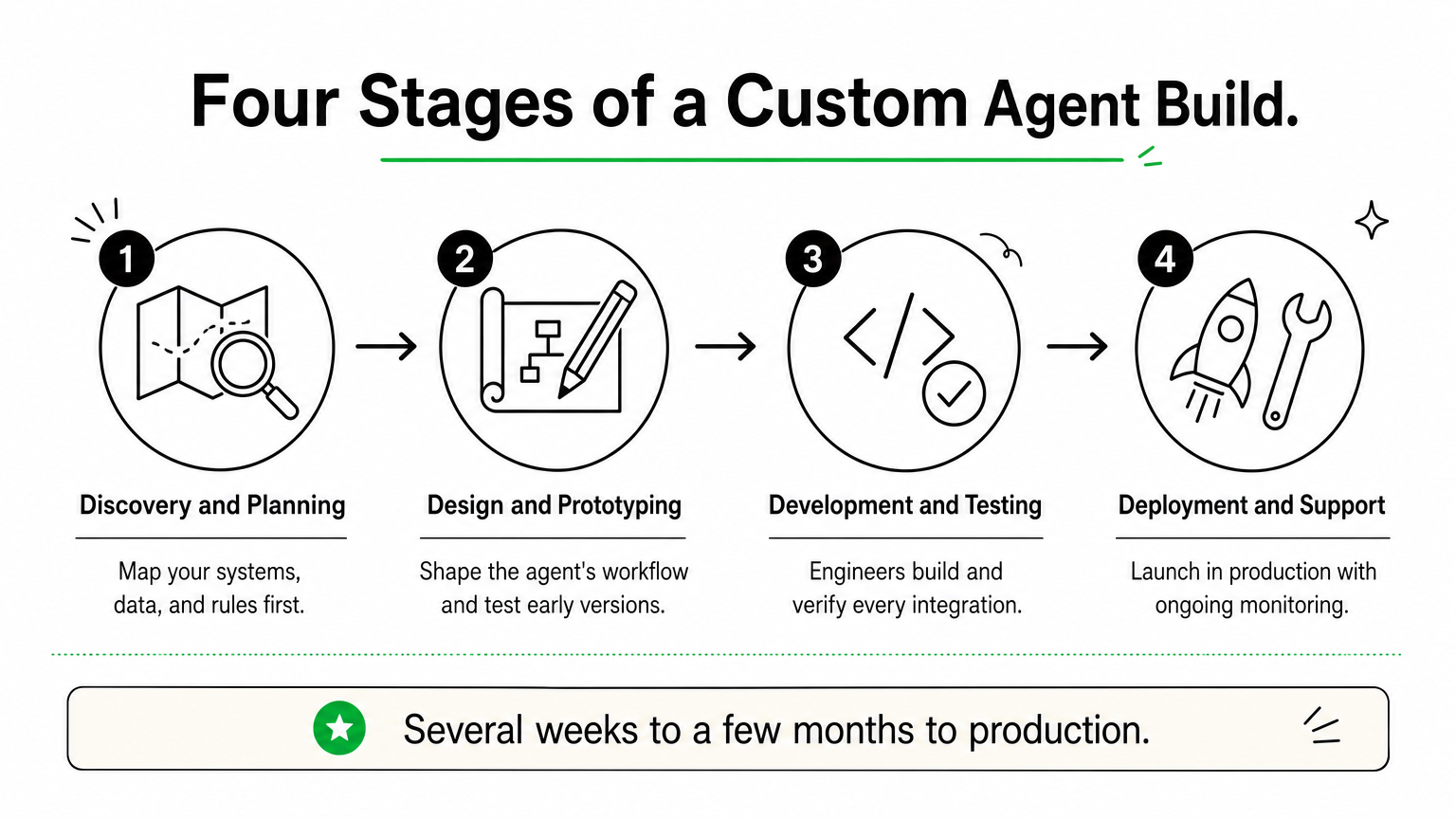
Every project runs through four stages, with senior engineers on each one:
Discovery and planning
Design and prototyping
Development and testing
Deployment and support
A focused first agent usually reaches production in several weeks to a few months, depending on data quality and how many systems it touches. We connect to CRMs, ERPs, databases, and cloud services through APIs, and we can add data governance and AI governance controls from day one.
Limitations to know
Custom means slower to start than a subscription. You cannot sign up on Friday and run an agent on Monday, and the upfront investment is real.
You also need an internal owner who can answer process questions and approve decisions. Without one, projects stall. And because you own the system, plan for monitoring and updates after launch, whether you handle them or we do under a support agreement.
2. Microsoft Copilot Studio
What it does
Copilot Studio is Microsoft’s low-code builder for AI agents. You describe a task in plain language, connect knowledge sources such as SharePoint, and publish to Teams, a website, or Microsoft 365 Copilot.
Agents can also run on their own. Autonomous agents trigger on events like a new email or a changed record, then act without a prompt.
Best for company size and use case
Mid-sized and enterprise teams already on Microsoft 365 get the fastest return. IT helpdesk, HR questions, and internal knowledge bots fit well, because the data and identity controls already exist.
Copilot Studio wins when your data already lives in Microsoft 365.
Shops outside the Microsoft ecosystem lose most of that advantage. Small teams without Microsoft licensing should look at Zapier Agents or Lindy instead.
Cost and pricing model
Pricing is usage-based, built on Copilot Credits. Confirm current numbers on Microsoft’s Copilot Studio page before budgeting, because plans change often.
Option
Price
Notes
Credit pack
$200 per month
25,000 credits, shared across the tenant
Pay-as-you-go
$0.01 per credit
No upfront commitment
Microsoft 365 Copilot
$30 per user per month
Covers agent use inside Microsoft 365
Setup effort and integrations
Simple agents take hours to days. Anything touching approvals or several systems needs someone who knows Power Platform.
Over 1,000 connectors, including Dynamics 365, SAP, and ServiceNow
Governance through Entra ID, Purview, and the admin center
Custom actions through Power Automate flows or APIs
Limitations to know
Credit consumption is hard to predict. Generative answers and agent actions burn credits fast, so monthly costs can climb as adoption grows.
Deep customization hits a ceiling. Agents that need complex multi-system logic or data outside Microsoft’s stack often end up needing custom engineering.
3. Salesforce Agentforce
What it does
Agentforce is Salesforce’s platform for building AI agents that work inside your CRM. Agents answer customers, qualify leads, and update records using data from Sales Cloud, Service Cloud, and Data Cloud. You set topics, guardrails, and actions in Agent Builder, then deploy to chat, email, web, or Slack.
Best for company size and use case
Mid-sized and enterprise companies already running Salesforce get the most value. Service case deflection, lead qualification, and sales follow-up fit best, because the agent reads the same records your reps use.
Agentforce pays off when Salesforce is already your system of record.
Teams on another CRM would pay for a migration before they got an agent. Small businesses will find the licensing heavy for what they need.
Cost and pricing model
Salesforce has changed its pricing several times, so verify numbers on the Agentforce pricing page before you budget. Three models are common:
Model
Price
Notes
Flex Credits
$0.10 per action
Sold in packs, such as $500 for 100,000 credits
Per-user add-ons
From $125 per user per month
Built for employee-facing agents
Agentforce 1 Editions
From $550 per user per month
Bundled licenses across clouds
Setup effort and integrations
A basic service agent can go live in a few weeks if your Salesforce data is clean. Plan on a Salesforce admin or implementation partner. Agents connect through Flow, Apex, and MuleSoft, and the Einstein Trust Layer masks sensitive data before it reaches the model.
Limitations to know
Action-based billing is hard to forecast, since every lookup and update can consume credits. Data Cloud often becomes a required add-on, which raises the total bill.
Agent quality also depends on your CRM data. Messy records produce weak answers, and systems outside Salesforce need extra integration work.
4. Sierra
What it does
Sierra builds conversational agents for customer service. They handle chat, email, and voice, and they take real actions, such as processing a return, changing a subscription, or rebooking a delivery. Bret Taylor, a former Salesforce co-CEO, co-founded the company, and teams configure agent behavior through Sierra’s Agent SDK and tooling. Brand voice, escalation rules, and guardrails are set up front.
Best for company size and use case
Among AI agents for business, Sierra is one of the most narrowly focused. It suits large consumer brands in retail, telecom, subscription services, and financial services, where support volume is the biggest cost line. Internal helpdesks and back-office automation are not its strength.
Sierra fits companies whose biggest expense is customer conversations.
Cost and pricing model
Sierra does not publish prices. You get a quote through sales. The company is known for outcome-based pricing, where you pay when the agent resolves a conversation without a human handoff. Ask early how a "resolution" is defined, because that definition drives your invoice.
Setup effort and integrations
Onboarding is sales-led and hands-on. Expect weeks, not hours, and plan for engineering time to expose the right actions safely. Typical connections include:
Your CRM and helpdesk
Order, billing, and subscription systems
Knowledge bases and policy documents
Telephony for voice agents
Limitations to know
There is no self-serve trial, so you cannot test it over a weekend. Budgets skew toward enterprise, which puts it out of reach for most small teams.
It also stays in the customer-facing lane. If you need agents that reconcile data or route internal approvals, look at Copilot Studio or a custom build instead.
5. Google Gemini Enterprise Agent Platform
What it does
Google’s offering pairs Gemini Enterprise, a workspace where employees build and run agents, with Vertex AI Agent Builder for developers. Google renames and bundles these products often, so check current names on the Gemini Enterprise page.
No-code agent designer for business users
Agent Development Kit for custom code
Managed runtime and Agent2Agent protocol support
Best for company size and use case
Mid-sized and enterprise teams on Google Cloud or Workspace get the most from it. For AI agents for business that search across Drive, Gmail, and BigQuery, the data connections already exist. Research, document analysis, and data-heavy workflows fit best.
Choose Google’s platform when your data already lives in Google Cloud.
Cost and pricing model
Pricing mixes per-user seats with usage-based charges for developer tools. Verify figures before budgeting, because they shift.
Component
Typical price
Notes
Gemini Business
About $21 per user per month
Smaller teams
Gemini Enterprise
From about $30 per user per month
Adds governance and security
Agent Builder and runtime
Usage-based
Billed on compute and model tokens
Setup effort and integrations
Business users can launch a simple agent in hours. Custom agents built with the Agent Development Kit need cloud engineers who understand IAM, networking, and deployment.
Connectors for Google Workspace, Salesforce, SAP, and Microsoft 365
Access controls through Google Cloud IAM
Model choice beyond Gemini through Vertex AI
Limitations to know
The product line is broad and confusing. Teams often struggle to tell which tier they need, and usage costs on the developer side are hard to forecast.
Companies outside Google’s ecosystem also lose the main advantage. Without Workspace or Google Cloud data, integration work grows and the case for this platform weakens.
6. Lindy
What it does
Lindy is a no-code builder for AI agents. You describe a job in plain language, pick a trigger such as a new email or calendar event, and the agent follows the steps you set. Popular templates include:
Inbox triage and drafted replies
Meeting scheduling and call notes
Lead research and outreach
Best for company size and use case
Small teams and solo operators get the most from it. For AI agents for business with 1 to 50 people, Lindy takes over repetitive admin work like follow-ups, scheduling, and CRM updates, with no developer involved.
Lindy works best as a fast, low-cost assistant, not as core infrastructure.
Larger companies can use it for sales or ops pilots, but they will hit limits quickly.
Cost and pricing model
Lindy bills by credits, and plans change often. Check the current numbers before you commit.
Plan
Approx. price
Notes
Free
$0
Small credit allowance for testing
Pro
About $50 per month
Several thousand credits
Business
About $300 per month
Higher limits, team features
Enterprise
Custom
Security and support add-ons
Long, multi-step tasks use more credits, so heavy usage costs more than the sticker price suggests.
Setup effort and integrations
Most agents take under an hour to build and test. You connect Gmail, Google Calendar, Slack, HubSpot, Salesforce, and Notion with a few clicks, and thousands of other apps are reachable through partner connections.
Limitations to know
Complex jobs with many branches can misfire without close testing, so review outputs before you let an agent send anything to customers. Governance is also thin. You get little control over audit trails, data residency, or role-based approvals.
Once an agent must write to your core systems under compliance rules, a custom build is the safer route.
7. Zapier Agents
What it does
Zapier Agents lets you build AI teammates that work across your apps. You write instructions, attach data sources, and the agent uses Zapier’s app connections to take action. It can also browse the web for research. Typical jobs include:
Researching leads and enriching CRM records
Drafting and routing support replies
Summarizing meetings and posting follow-ups
Best for company size and use case
Small and mid-sized teams that already run Zaps get the fastest win. Among AI agents for business in this price range, it suits ops, marketing, and sales teams that want flexible task automation without hiring engineers.
Zapier Agents work best when your tools are scattered across many apps.
Large regulated companies will want tighter controls than it offers.
Cost and pricing model
Billing is activity-based, so every agent action counts against a monthly allowance. Zapier adjusts plans often, so confirm figures on its pricing page. Treat these as rough ranges:
Plan
Approx. price
Notes
Free
$0
Small activity allowance for testing
Paid tiers
From about $35 per month
Larger allowances, billed annually
Team and Enterprise
Custom
SSO, admin controls, support
Setup effort and integrations
A simple agent takes under an hour. Zapier connects to thousands of apps, including Gmail, Slack, HubSpot, Salesforce, and Google Sheets, so you rarely write code. Your existing Zaps can also become agent tools.
Limitations to know
Activity counts add up quickly. An agent that researches, drafts, and updates records in one run can use several activities per task, so heavy volume costs more than the entry price suggests.
Agents also act less predictably than fixed Zaps. Test with approval steps before you let one email customers. Governance and audit depth are thin, so core-system work under compliance rules points toward a custom build.
8. Gumloop
What it does
Gumloop is a visual no-code platform for building AI workflows and agents. You drag nodes onto a canvas and chain them together. The flow pulls data, runs an AI model, and pushes results into your other tools. Its built-in assistant can also draft a flow from a plain-language request. Common uses include:
Scraping and enriching lead lists
Summarizing documents and emails at scale
Routing data between sheets, CRM, and Slack
Best for company size and use case
Ops, marketing, and sales teams of 5 to 200 people get the most from it. Among AI agents for business at this tier, Gumloop suits data-heavy repetitive work like lead enrichment and content pipelines, where you want more control than a simple trigger-and-action tool gives you.
Gumloop fits teams that want to see and tune every step of an agent.
Enterprises can run pilots on it, but regulated workloads need stronger controls.
Cost and pricing model
Pricing is credit-based, and plans move often, so check Gumloop’s site before you commit. Treat these as rough figures:
Plan
Approx. price
Notes
Free
$0
About 2,000 credits for testing
Solo
About $37 per month
Roughly 10,000 credits, billed annually
Team
About $244 per month
Larger credit pool, shared workspace
Enterprise
Custom
Security and support add-ons
Model-heavy steps burn credits quickly, so high volume costs more than the entry price suggests.
Setup effort and integrations
Your first flow takes an hour or two to build and test. Gumloop connects to Gmail, Slack, Google Sheets, Notion, Airtable, and HubSpot, and an API request node reaches most other systems.
Expect more setup time than with Lindy, since you design the logic yourself. Anyone comfortable with spreadsheet formulas can manage it, so no engineers are required for standard flows.
Limitations to know
Governance is lighter than enterprise platforms offer, with limited audit depth and approval controls. The tool also leans toward structured workflows more than open-ended autonomy.
Large flows become hard to maintain as they grow, and credit costs rise with volume. If an agent must write to core systems under compliance rules, a custom build is the safer route.
9. Relevance AI
What it does
Relevance AI is a no-code platform for building AI agents and teams of agents. You give an agent instructions, a knowledge base, and tools, then run it on a trigger or a schedule. Its multi-agent workforce feature lets one agent hand work to another. Common builds include:
Sales research and outbound drafting
Inbound lead qualification
Support triage and document processing
Best for company size and use case
Growth-stage and mid-sized teams of 20 to 500 people get the most from it. For AI agents for business that need more than one trigger and one action, it suits sales and operations teams that want several agents working a process together.
Relevance AI fits teams that want agents to collaborate, not just automate single tasks.
Solo operators will find simpler tools like Lindy cheaper and quicker to start.
Cost and pricing model
Pricing combines a monthly plan with usage credits, and Relevance AI has changed its tiers several times. Treat these as rough figures and confirm on its pricing page.
Plan
Approx. price
Notes
Free
$0
Small allowance for testing
Pro
About $19 per month
Solo and early pilots
Team
About $234 per month
Shared workspace, higher limits
Business
About $599 per month
Larger volume, more controls
Enterprise
Custom
Security and support add-ons
Agents that call premium models or run long chains use more credits, so real costs track usage, not the plan name.
Setup effort and integrations
A first agent takes one to a few hours to build and test. You connect Gmail, Slack, HubSpot, Salesforce, and Google Sheets with a few clicks. For anything else, a custom API or code tool fills the gap. Standard agents need no engineers, but multi-agent flows reward someone who thinks in process logic.
Limitations to know
Costs are hard to forecast until you watch a pilot run for a few weeks. Chained agents also fail in subtle ways, so test each handoff before customers see any output.
Governance is lighter than enterprise platforms offer. If an agent must write to core systems under compliance rules, a custom build is the safer route.
10. n8n
What it does
n8n is a workflow automation platform with a built-in AI Agent node. You build on a visual canvas, connect a language model, memory, and tools, and the agent picks its next step. Unlike most tools above, you can self-host it on your own servers.
Best for company size and use case
Technical teams of 10 to 500 people get the most from it. For AI agents for business where data must stay inside your environment, n8n suits engineers and ops teams that want control over hosting and logic without coding everything from scratch.
n8n fits teams that want no-code speed with the option to drop into code.
Non-technical teams will move faster with Lindy or Zapier Agents.
Cost and pricing model
Billing is per workflow execution, not per step, so long agent runs stay predictable. The self-hosted Community Edition is free, and you pay only for servers. Cloud prices below are approximate, so confirm them before budgeting.
Plan
Approx. price
Notes
Community (self-hosted)
$0
You handle hosting and upkeep
Starter
About €20 per month
Around 2,500 executions
Pro
About €50 per month
Around 10,000 executions
Business and Enterprise
From about €667 per month
SSO, environments, support
Setup effort and integrations
A first agent takes a few hours. Self-hosting adds a day or two for Docker, backups, and security. Key connection points:
400+ built-in integrations, including Gmail, Slack, HubSpot, and Postgres
HTTP request nodes for any API
JavaScript and Python code nodes for custom logic
Limitations to know
Self-hosting makes you responsible for uptime, updates, and security. Without a DevOps owner, small problems turn into outages.
The license is "fair-code," not fully open source, so check the terms before reselling it inside a product. Agents also need careful testing, and enterprise governance features sit on the higher tiers.
11. CrewAI
What it does
CrewAI is an open-source Python framework for building teams of AI agents. You define roles, such as researcher and writer, give each one goals and tools, and the "crew" splits the work. A paid platform adds a visual studio, deployment, and monitoring on top of the framework.
Best for company size and use case
Engineering-led teams of any size get the most from it. For AI agents for business that run multi-step research, content, or analysis pipelines, CrewAI gives developers full control over agent logic without building an orchestration layer from scratch.
CrewAI suits teams that have developers and want to own how their agents work.
Non-technical teams will move faster with Lindy or Zapier Agents.
Cost and pricing model
The framework is free under an open-source license. You pay for model usage and your own hosting, while the managed platform charges by execution. Tiers shift, so confirm current figures on CrewAI’s site.
Option
Approx. price
Notes
Open source
$0
You host and maintain it
Professional
About $25 per month
Set execution allowance, overage per run
Enterprise
Custom
Security, support, private deployment
Setup effort and integrations
Expect a day or two to get a working crew, and longer to reach production. You need Python skills. CrewAI connects to OpenAI, Anthropic, Google, and local models, and custom tools wrap any API or database you already use.
Limitations to know
Code-first means no quick wins for non-developers. Multi-agent runs can loop or burn tokens, so set step limits and log every action.
Self-hosting leaves monitoring, security, and uptime with you. For regulated workloads that need audit trails, a custom build with governance from day one is the safer route.
12. Beam AI
What it does
Beam AI builds autonomous agents that run back-office processes from start to finish. Typical jobs include invoice matching, order management, and ticket resolution. You start from prebuilt agent templates or design your own, and the agents improve from the corrections your team makes. Human-in-the-loop review lets a person approve low-confidence decisions before anything executes.
Best for company size and use case
Mid-sized and enterprise operations teams get the most from it. Among AI agents for business, Beam suits high-volume, document-heavy processes in finance, supply chain, and customer operations, where staff lose hours re-keying data between systems.
Beam AI fits companies that want to automate whole processes, not individual tasks.
Small teams with simple inbox or scheduling jobs will do better with Lindy or Zapier Agents.
Cost and pricing model
Beam does not publish full pricing, so expect a sales-led quote. Confirm current terms on its site before you budget. Cost usually depends on three things:
Number of agents in production
Volume of tasks or process runs
Support and security requirements
Ask for a fixed-price pilot so you can measure real savings before committing to a larger rollout.
Setup effort and integrations
Plan on several weeks for a first process. Most of that time goes to mapping rules and exceptions, not building, and templates shorten the work. Beam connects to ERP, CRM, helpdesk, and email systems through connectors and APIs. Your IT team must grant scoped access, and an operations lead should own the process definition.
Limitations to know
Scope is narrower than general builders. Beam targets process automation, so it is a poor fit for personal assistants or quick experiments. There is also little public pricing and no cheap self-serve path, which means you cannot test it over a weekend.
Unusual internal systems can push you toward extra engineering. When an agent must follow your exact rules inside legacy software, a custom build is worth pricing next to it.
Choosing your first AI agent
Start with the job, not the tool. If your team has under 50 people and a simple task, a no-code option like Lindy, Zapier Agents, or Gumloop gets you a working agent this week for under $500 a month. If your data already lives in Microsoft, Salesforce, or Google, use the platform that holds it.
Custom work earns its cost when the agent must act on your core systems under compliance rules. Most AI agents for business reach that point sooner than expected, and they then need audit trails, governance, and integration depth that subscriptions rarely offer.
Pilot one narrow process, measure the savings, then expand. If you want a senior team to scope that first build, talk to Hatzs Dimensions about custom AI agent development.