Category: AI Strategy & Adoption

  • AI Agents Examples: 12 Real-World Use Cases by Industry

    AI Agents Examples: 12 Real-World Use Cases by Industry

    Most lists of AI agents examples stop at chatbots and thermostats. That leaves you with a definition but no idea what an agent actually does inside a business, or whether it would work in yours.

    Here is the short answer. An AI agent is software that perceives its environment, makes decisions, and takes action toward a goal with little human input. A fraud-monitoring agent at a bank, a dispatch agent at a logistics firm, and a claims-triage agent at an insurer are all real examples. They differ in how much they reason, plan, and learn, which is why agent type matters when you pick one.

    Below you will find 12 real-world use cases, grouped by industry across healthcare, retail, finance, and more. Each one shows what the agent does, what it replaces, and the result to expect. Our team at Hatzs Dimensions has shipped agents like these into production for enterprise clients, so we focus on what works outside the demo.

    1. Custom AI agents built by Hatzs Dimensions

    What the agent does

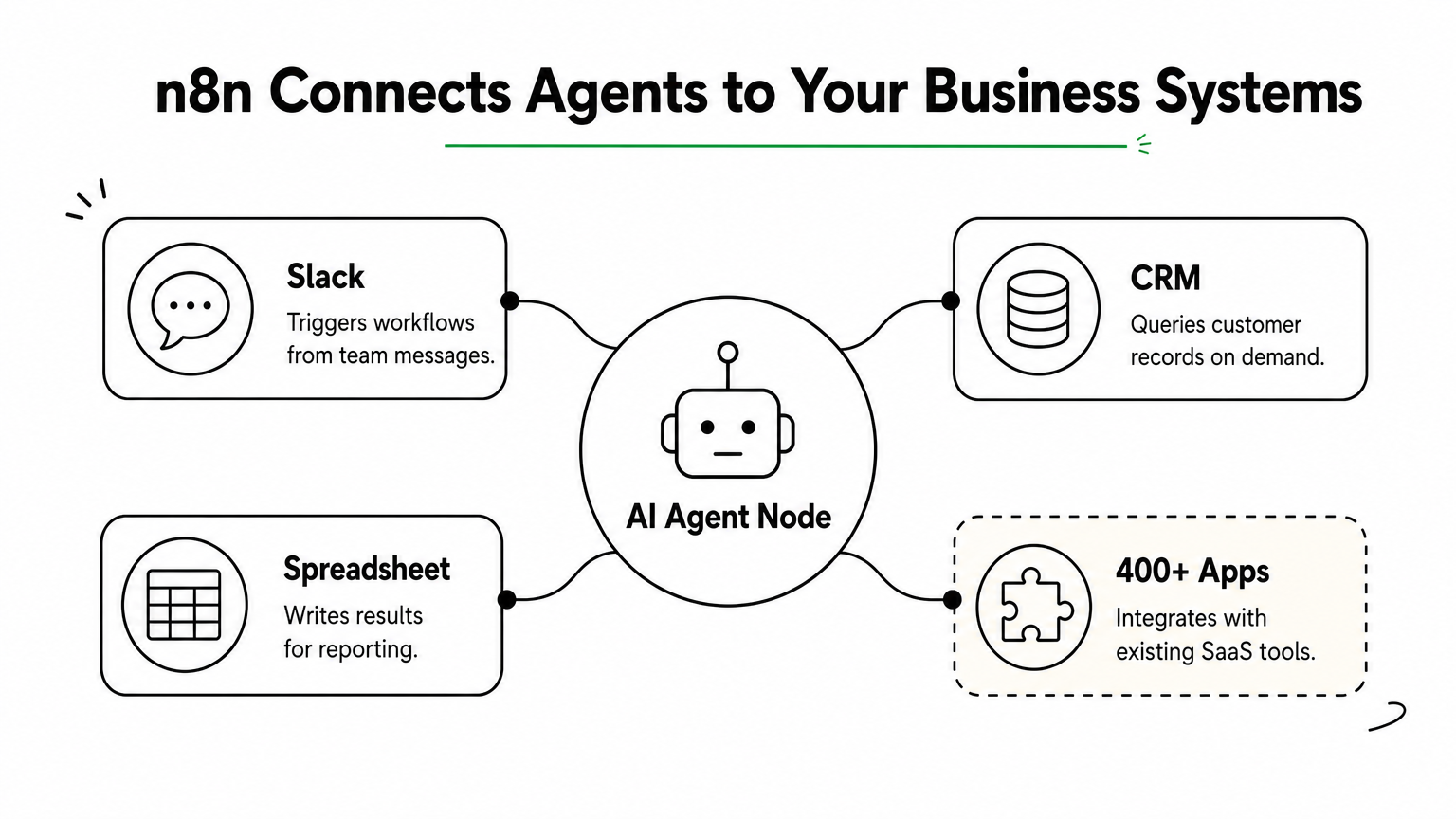
    Our custom agents take a multi-step business workflow and run it from start to finish. One reads incoming insurance claims, checks them against policy data, and routes exceptions to an adjuster. Another qualifies inbound leads and books meetings. As an example of AI agents in production, this is the closest to real work, because each one is built around your systems and rules instead of a generic template.

    Agent type and how it works

    Most of our builds are goal-based agents that use a large language model to plan and external tools to act. Each one runs the same four-step loop:
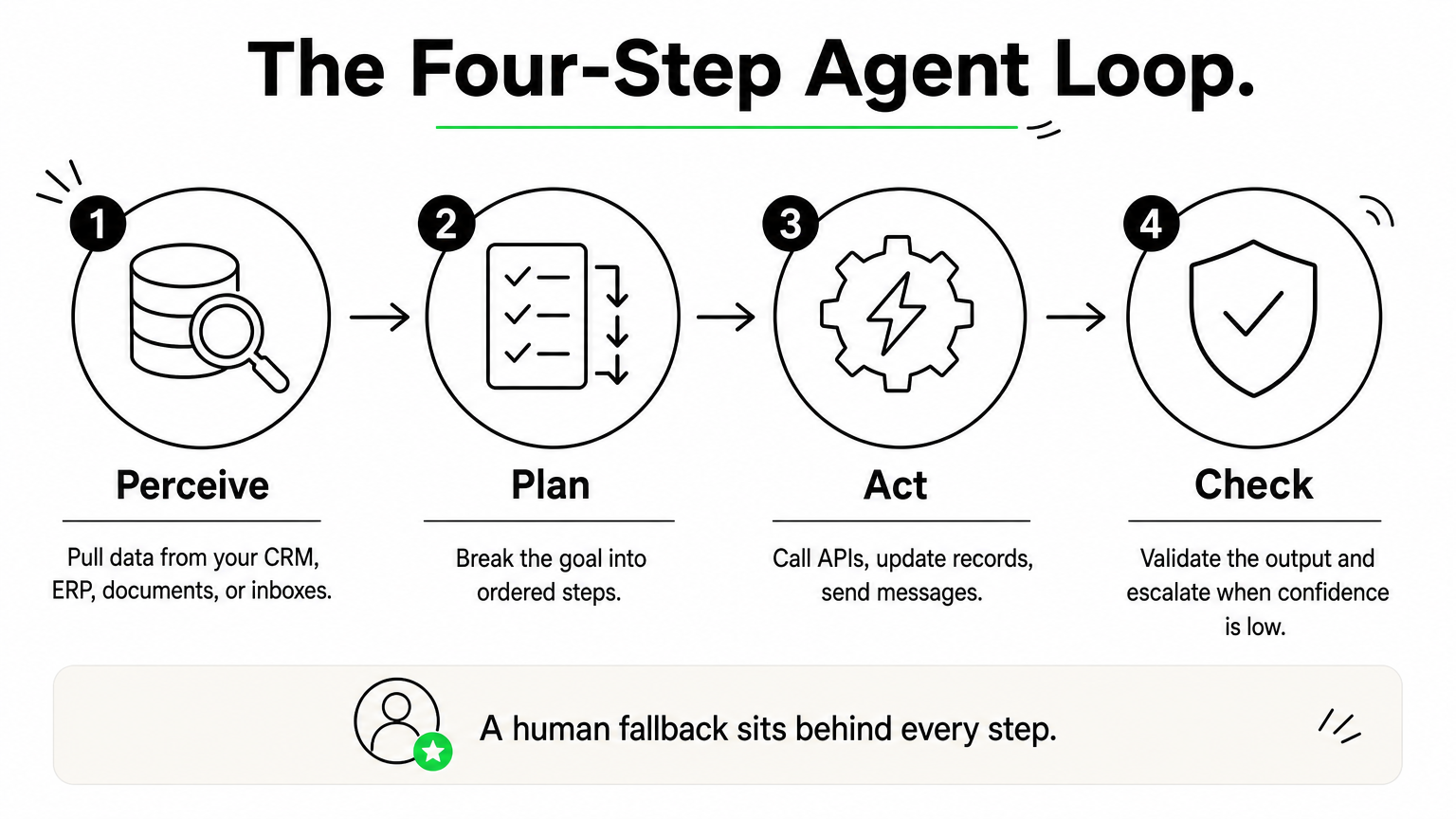
    Four-step process diagram showing perceive, plan, act, and check stages of a custom AI agent.

    1. Perceive: pull data from your CRM, ERP, documents, or inboxes.
    2. Plan: break the goal into ordered steps.
    3. Act: call APIs, update records, send messages.
    4. Check: validate the output and escalate when confidence is low.

    Guardrails matter more than the model. We add confidence thresholds, audit logs, and a human escalation path so the agent never acts blindly on a high-stakes decision.

    A production agent is a goal, a set of tools, and a human fallback, not a chatbot with a bigger prompt.

    Who it is for

    Mid-sized and enterprise teams are the usual fit, especially CTOs, VPs of Engineering, and founders who own a process that is repetitive, rule-heavy, and spread across several systems. It also suits you if regulators are watching and you need AI governance and compliance designed in from day one.

    Delivery follows four stages: discovery and planning, design and prototyping, development and testing, then deployment and support. You can choose a dedicated team or a fixed-price project. Our senior-only engineers have 7+ years of enterprise AI work behind them, across 250+ clients and a 98% retention rate.

    Business results to expect

    Results depend on the process you automate, but our case studies show the range. Gains are largest where volume is high and the work is mostly rules and lookups.

    Use case Result
    Insurance operations 30% lower operating costs
    Lead qualification 300% more conversion capacity
    Customer engagement 40% higher engagement

    2. Customer support agents like Intercom Fin

    What the agent does

    Fin answers customer questions in chat and email using your help center, past tickets, and product docs. It resolves routine issues end to end, such as order status or password resets, and hands off to a human with the full conversation attached when it can’t. Among AI agents examples, it is the one most customers have already met.

    Agent type and how it works

    The goal is a resolved conversation, not a single reply, which makes Fin a goal-based agent. Connected to your systems, it can also take actions such as issuing a refund or changing an address. Each conversation follows a simple loop:

    1. Read the question and the customer’s context.
    2. Retrieve matching articles and past answers.
    3. Answer, or call a tool to act.
    4. Escalate when confidence is low.

    Who it is for

    Support teams handling thousands of repetitive tickets a month get the most from it, especially SaaS and ecommerce companies. You also need a well-kept help center. Fin is only as good as the content it retrieves, so fix thin documentation first.

    Business results to expect

    Intercom has priced Fin at $0.99 per resolution, so you pay when the agent closes a ticket, not when it merely replies. The company reports resolution rates above 50% for teams with mature help content. Expect faster first responses and round-the-clock coverage, with your human agents focused on complex cases.

    Support agents earn their keep by resolving tickets, not by deflecting them.

    3. Financial data agents like Uber Finch

    What the agent does

    Finch is Uber’s finance agent, and it lives inside Slack. Instead of filing a ticket with the data team, an analyst types a question in plain English and gets figures pulled from governed data sources. As an AI agents example, it shows how agents close the gap between a question and an answer. Typical asks include:

    • Quarterly revenue by region
    • Variance against the prior period
    • A summary sent to a spreadsheet

    Agent type and how it works

    Technically, Finch is a goal-based agent built around a language model. It turns the question into a database query, runs it, and checks the result before replying. Access follows the user’s role, so permissions stay enforced at the data layer.

    1. Interpret the question.
    2. Generate a query against curated tables.
    3. Return the answer with its source.

    A finance agent is only as trustworthy as the data it is allowed to query.

    Who it is for

    Finance teams with a clean data warehouse and a backlog of ad hoc requests are the best fit. Think FP&A leads and controllers. If revenue means different things across teams, fix your metric definitions first, because the agent will faithfully return the wrong number.

    Business results to expect

    Uber has not published a hard ROI figure, so we won’t invent one. The realistic gain is minutes instead of days for routine questions, with analysts freed for judgment work. Measure your own baseline first: average time to answer and monthly request volume.

    4. Insurance claims and underwriting agents

    What the agent does

    A claims agent reads the first notice of loss, pulls the policy, and checks coverage. It flags missing documents and routes exceptions to an adjuster. An underwriting agent works upstream, summarizing applications and scoring risk against your guidelines. Among AI agents examples, this one shows how agents take over paperwork-heavy work that used to eat adjuster hours.

    Agent type and how it works

    Claims triage is a goal-based agent. The goal is a correct, fast decision. Underwriting adds utility-based logic, weighing risk against price. A typical claim moves through three steps:

    1. Extract data from forms, photos, and PDFs.
    2. Match the facts to policy terms and limits.
    3. Approve simple claims, or escalate with a summary.

    In insurance, the agent prepares the decision and a licensed human owns the denial.

    Who it is for

    Carriers, MGAs, and third-party administrators with high claim volume fit best, especially if simple claims clog your queue. You also need clean policy data and clear authority limits, because regulators expect an accountable person behind every adverse decision.

    Business results to expect

    Our own insurance work cut operating costs by 30%. Expect shorter cycle times on simple claims and more adjuster hours spent on complex ones. Track three numbers before launch: cycle time, touch rate per claim, and leakage.

    5. Healthcare scheduling and intake agents

    What the agent does

    A scheduling agent books, moves, and cancels appointments by text, voice, or web chat. An intake agent collects demographics, insurance details, and symptoms before the visit and writes them into the EHR. As an example of AI agents in a clinical setting, it gives your front desk its phones back without touching medical decisions.

    Agent type and how it works

    Scheduling is a goal-based agent. The goal is the right slot with the right provider. Waitlist logic adds a utility-based layer that decides who gets a freed slot. A typical booking runs like this:

    1. Verify the patient’s identity.
    2. Check provider availability and visit rules.
    3. Book, then send confirmations and reminders.
    4. Hand off to staff for any clinical question.

    In healthcare, the agent handles logistics and a clinician handles anything medical.

    Who it is for

    Clinics, specialty practices, and hospital networks with high call volume and a no-show problem are the best fit. You also need HIPAA-compliant handling: a signed business associate agreement with every vendor, encrypted data, and audit logs. Confirm your EHR exposes scheduling through an API before you start.

    Business results to expect

    Expect fewer missed calls and fewer no-shows, since reminders and easy rescheduling run automatically. Staff time moves from the phone to patients. Capture a baseline before launch: no-show rate, average hold time, and the share of patients who complete intake before arrival.

    6. Fraud and risk monitoring agents in banking

    What the agent does

    A fraud agent watches card payments, transfers, and logins as they happen. It scores each transaction for risk, blocks the clearly bad ones, and opens a case with supporting evidence for the rest. Among AI agents examples in finance, this one stands out because it reviews every event around the clock, far beyond what an analyst team could cover.

    Agent type and how it works

    This is a utility-based agent. It weighs the cost of letting fraud through against the cost of declining a good customer. A learning component updates the model as fraud patterns shift. A flagged transaction moves through four steps:

    1. Collect signals such as device, location, amount, and history.
    2. Score the risk against the customer’s normal behavior.
    3. Approve, request step-up authentication, or block.
    4. Send borderline cases to an analyst with a short summary.

    The best fraud agent is not the one that blocks the most, it is the one that blocks the right things.

    Who it is for

    Banks, credit unions, and fintechs with high transaction volume and a growing alert backlog are the best fit. You also need explainable decisions, because compliance teams and regulators will ask why a customer was declined. Build AI governance in from the start, not after launch.

    Business results to expect

    Expect fewer false positives and faster case review, which leaves analysts time for real investigations. Record your baseline before launch: false-positive rate, fraud losses in basis points, and average alert handling time. Those three numbers will show you whether the agent is paying off.

    7. Retail and ecommerce pricing agents

    What the agent does

    A pricing agent watches competitor prices, inventory, demand, and margin targets. It then adjusts prices on its own within rules you set. It can mark down slow stock and pause discounts on items about to sell out. Among AI agents examples in retail, this one ties directly to margin, because every price change either earns or loses money.

    Agent type and how it works

    Pricing is a utility-based agent. It does not chase a single target. It weighs revenue, margin, and sell-through, then picks the price with the best overall payoff. A learning component refines its demand estimates as results come in. Each cycle runs like this:

    1. Pull sales, stock, and competitor price data.
    2. Forecast demand at several price points.
    3. Pick the best price inside your floors and ceilings.
    4. Publish the price, then measure the outcome.

    A pricing agent should optimize inside limits you set, never set the limits itself.

    Who it is for

    Retailers and ecommerce brands with large catalogs and fast-moving competitor prices get the most value. You need reliable inventory and cost data, plus clear rules such as minimum margins and minimum advertised price (MAP) policies. A small catalog rarely justifies the build, since a person can reprice a few dozen items by hand.

    Business results to expect

    Expect faster reaction to market changes and far fewer manual price edits, with margin protected by your guardrails. Capture a baseline before launch so you can prove the gain:

    • Gross margin per category
    • Sell-through rate
    • Hours spent on manual repricing

    8. Logistics and warehouse routing agents

    What the agent does

    A delivery van rerouting around a roadblock next to a warehouse robot carrying a parcel.

    A routing agent plans how goods and vehicles move. It assigns orders to drivers, re-sequences stops when a delay hits, and directs pickers or robots along the shortest path inside the warehouse. Among AI agents examples in logistics, this one reacts to live conditions such as traffic, weather, and dock capacity, which static planning software cannot do.

    Agent type and how it works

    This is a utility-based agent with a planning layer. It trades off delivery time, fuel, driver hours, and promised delivery windows, then picks the best option. A learning component sharpens its arrival-time predictions over time. Each re-plan runs like this:

    1. Ingest orders, GPS pings, traffic, and inventory data.
    2. Generate candidate routes or pick paths.
    3. Score each one against cost and service windows.
    4. Dispatch the winner, then re-plan when something changes.

    Routing agents win by re-planning every few minutes, not by finding one perfect plan.

    Who it is for

    Fleets, third-party logistics providers, and distribution centers with many daily stops or high order volume fit best. You need accurate location and inventory data, plus telematics or a warehouse management system with an API. A small fleet running fixed routes rarely needs one.

    Business results to expect

    Expect lower fuel and mileage costs and more on-time deliveries, with dispatchers handling exceptions instead of building routes by hand. Capture a baseline before launch so the gain is provable:

    • Miles driven per stop
    • On-time delivery rate
    • Picks per labor hour

    9. Sales and lead qualification agents

    What the agent does

    A sales agent replies to new leads within seconds, asks qualifying questions, and books meetings on a rep’s calendar. It also enriches records from your CRM and public company data, then scores each lead against your ideal customer profile. Among AI agents examples in sales, this one sits closest to revenue, since a fast reply often decides who wins the deal.

    Agent type and how it works

    Qualification is a goal-based agent. The goal is a booked meeting with a lead worth a rep’s time. Scoring adds a utility-based layer that weighs fit against buying intent. Each lead follows this path:

    1. Capture the inquiry from a form, email, or chat.
    2. Enrich it with company data and past CRM history.
    3. Ask follow-up questions and score the answers.
    4. Book a meeting, or route the lead to nurture or a human rep.

    A qualification agent should hand reps better conversations, not just more of them.

    Who it is for

    B2B teams with high inbound volume and slow response times fit best, including SaaS companies and service providers. You also need a clean CRM and a written definition of a qualified lead. Without one, the agent just automates your confusion.

    Business results to expect

    We have seen 300% more lead conversion capacity in a client engagement, because reps stopped sorting and started selling. Expect faster response times and fuller calendars. Capture your baseline first:

    • Speed to first response
    • Lead-to-meeting rate
    • Rep hours spent on unqualified leads

    10. Research agents like Anthropic’s multi-agent system

    What the agent does

    Anthropic’s Research feature in Claude takes an open-ended question, splits it into parts, and searches the web and your connected tools in parallel. It returns a cited report instead of a pile of links. Among AI agents examples, it shows what agents do best: long, branching work that no single search can finish.

    Agent type and how it works

    This is a goal-based agent built as an orchestrator with workers. A lead agent plans, then spawns subagents that each chase one angle. The flow looks like this:

    1. The lead agent analyzes the question and drafts a plan.
    2. Subagents search different sources at the same time.
    3. Each one reports findings back to the lead.
    4. A citation pass checks claims against sources before the report is written.

    Research agents win by dividing the question, not by thinking harder about it.

    Who it is for

    Analysts, consultants, product teams, and legal or market intelligence groups get the most from it. It fits breadth-first questions such as competitor scans or regulatory reviews. It fits poorly when every step depends on shared context, like most coding work. Plan to verify the citations yourself on anything that reaches a client or a court.

    Business results to expect

    In Anthropic’s own tests, the multi-agent setup beat a single-agent baseline by 90.2% on an internal research evaluation. Parallel searching cut research time by up to 90% on complex queries. The catch is cost, since these systems use roughly 15x more tokens than a normal chat. Save them for high-value questions. Capture a baseline first: hours per research brief, source coverage, and errors found in review.

    11. Personal assistants like Siri, Alexa, and Copilot

    What the agent does

    Siri, Alexa, and Copilot take spoken or typed requests and act on your behalf. Among AI agents examples, these are the ones you already use daily. Copilot goes deeper at work, drawing on your email, calendar, and documents. Typical requests include:

    • Set a reminder or timer
    • Control smart-home devices
    • Summarize a long meeting thread

    Agent type and how it works

    Older assistants were simple reflex agents: hear a command, fire a fixed response. Newer versions act as goal-based agents that plan multi-step tasks with a language model. Each request runs like this:

    1. Capture the request by voice or text.
    2. Pull context from your calendar, contacts, or files.
    3. Choose the app or tool to call.
    4. Confirm, then act.

    The shift from voice assistant to agent is the shift from answering to doing.

    Who it is for

    Consumers get Siri and Alexa with their devices. Alexa+ is free with Prime or $19.99 a month otherwise, while Microsoft 365 Copilot costs $30 per user per month. Knowledge workers are its core audience.

    Before rollout, audit your permissions. Copilot sees whatever a user can see, so overshared files surface in answers. Fix your access controls first.

    Business results to expect

    Expect time back on routine work such as meeting notes and first drafts, though gains vary by role. Run a pilot group before buying seats and track:

    • Hours spent on meeting summaries
    • Time to a first draft
    • Weekly active use per seat

    12. Self-driving agents like Waymo

    What the agent does

    Waymo’s driver takes a rider from pickup to drop-off with no human at the wheel. You hail a car in an app, and the agent handles lanes, signals, pedestrians, and pull-overs. Among AI agents examples, it is the most visible one operating in the physical world at city scale.

    Agent type and how it works

    This is a utility-based agent with a heavy learning component. It constantly weighs safety, progress, and comfort, then picks the best maneuver. The loop below repeats many times per second:

    1. Perceive: fuse lidar, radar, and camera data.
    2. Predict: estimate where nearby cars, cyclists, and pedestrians will go.
    3. Plan: score candidate trajectories and pick the best.
    4. Act: steer, brake, or accelerate.

    In driving, safety is not a trade-off the agent negotiates, it is the limit everything else works inside.

    Who it is for

    Riders in Waymo’s service cities use it today. Cities, fleet operators, and logistics firms watch it closely for lessons. Most companies will never build one, but you can borrow the design: layered redundancy, hard safety limits, and remote human support for edge cases. Those patterns carry over to any high-stakes agent you deploy.

    Business results to expect

    The best public evidence is a peer-reviewed study with Swiss Re covering 25.3 million driverless miles. Compared with human drivers, Waymo cut property damage claims by 88% and bodily injury claims by 92%. Treat those as results for one mature, tightly mapped service, not a promise for every autonomous system. Your takeaway is to measure against a human baseline before you scale.

    13. Simple reflex agents like thermostats

    What the agent does

    A wall thermostat with a motion-sensor light above and a robot vacuum on the floor.

    A thermostat reads the room temperature and switches heating or cooling on or off. That is the whole job. Among AI agents examples, it is the simplest and oldest one, and you probably own several, from motion-sensor lights to robot-vacuum bumpers. Each one reacts to what it senses right now, with no memory of yesterday.

    Agent type and how it works

    This is a simple reflex agent. It follows condition-action rules and ignores history, goals, and predictions. The loop is short:

    1. Sense the current condition, such as 68°F.
    2. Match it to a rule: if below 68°F, turn the heat on.
    3. Act, then repeat.

    Because it holds no model of the world, it can’t plan ahead or handle a case its rules don’t cover. A learning thermostat like Nest adds memory and prediction, which pushes it toward a goal-based agent.

    A simple reflex agent is only as smart as the rules you write for it.

    Who it is for

    Anyone with a fully observable, rule-bound problem is a fit. Think building controls, factory safety interlocks, or triggers such as "if stock drops below 50 units, reorder." When the right action depends on context, history, or trade-offs, choose a different agent from this list.

    Business results to expect

    Expect predictable, low-cost behavior. These agents are cheap to build, easy to test, and simple to audit, so they suit regulated settings where you must explain every action. The gains are small but steady. Track how often a rule fires wrongly and which situations it never anticipated. Those gaps tell you when it is time to upgrade.

    Choosing the right AI agent to start with

    The best of these AI agents examples share one trait: they take a narrow, high-volume process and handle it well, with a human fallback for hard cases. Start where your work is repetitive, your data is clean, and you can measure a baseline today. For most teams that means support, sales qualification, or claims triage, not self-driving cars.

    Match the agent type to the problem. Fixed rules call for a simple reflex agent. Clear goals call for a goal-based agent, and real trade-offs call for a utility-based one. Pick the simplest type that works, then add guardrails and audit logs before you scale.

    If you want a second opinion, our senior engineers can map your workflow to the right design. Talk to Hatzs Dimensions about building your first custom AI agent and ship one that works in production.
  • 10 Best AI Coding Agents in 2026, Compared by Workflow

    10 Best AI Coding Agents in 2026, Compared by Workflow

    Picking from the current crop of AI coding agents is harder than it was a year ago. Cursor, Claude Code, Codex, and GitHub Copilot all claim to write, test, and ship code on their own. In practice they behave very differently. Some live in your editor and suggest changes line by line. Others run in a terminal or the cloud and work through a ticket while you do something else.

    Here is the short answer. No single agent wins for every team. The right choice depends on how you work: inline editing, multi-file refactors, background tasks, or full feature delivery. Price and security controls matter too, especially if your code touches regulated data.

    This list compares 10 AI agents for coding by workflow, so you can match a tool to the way your team builds. For each one, you’ll see what it does well, where it falls short, and who it fits. Our senior engineers at Hatzs Dimensions put these tools into production projects for clients, so the notes come from real delivery work, not feature pages.

    1. How we compare AI coding agents

    What an AI coding agent is

    An AI coding agent takes a goal, plans the steps, edits files, runs commands, and checks its own results. That separates it from autocomplete, which only predicts the next few lines. AI powered coding agents read your repository, run your tests, and loop until the tests pass or the agent gets stuck.

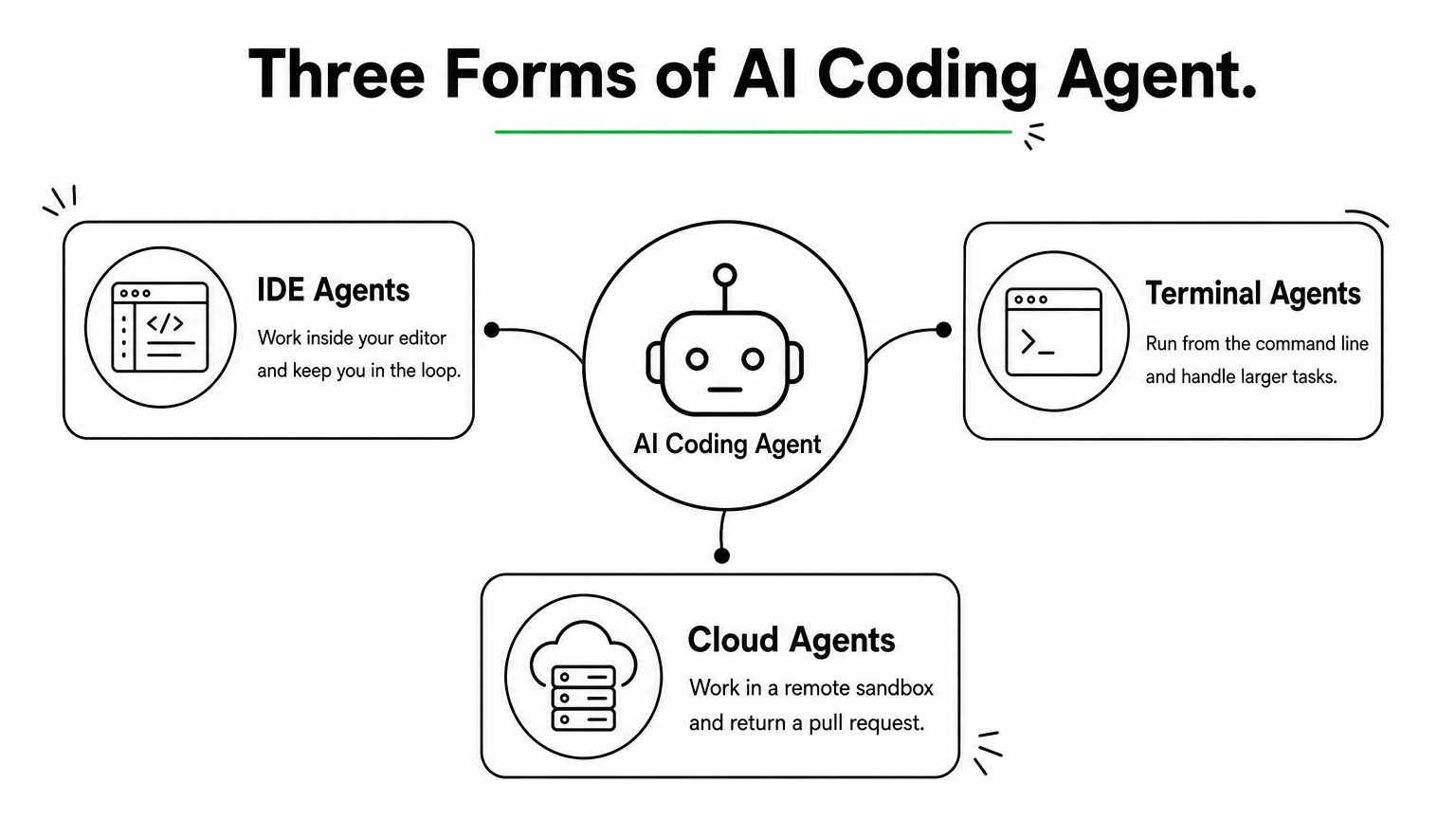
    Hub diagram showing IDE, terminal, and cloud forms of AI coding agents branching from one center.

    Three forms matter for this list. IDE agents work inside your editor and keep you in the loop. Terminal agents run from the command line and handle larger tasks. Cloud agents work in a remote sandbox and return a pull request. Many tools now offer more than one form.

    Evaluation criteria and how we judged

    Our senior engineers used each tool on real client work: feature builds, refactors, bug fixes, and test writing. We scored each agent on five criteria. We care most about how much of the output we actually merged, because a flashy demo means little if a human rewrites the result.

    • Autonomy: how long it works without hand-holding.
    • Context handling: how well it understands a large, messy codebase.
    • Code quality: correctness, style fit, and test coverage.
    • Control and safety: permissions, diffs, and rollback.
    • Cost predictability: whether the bill stays stable under heavy use.

    Judge an agent by how much of its work you merge, not by how much it writes.

    Who it is for

    This list is for CTOs, engineering leads, and founders who need to pick tools for a team, the same people wrestling with AI strategy that moves past the hype. It also helps individual developers who want to know where each agent fits. Regulated industries like banking and healthcare get extra attention in the governance checks near the end.

    Your use case shapes the answer. Maybe you want an AI powered web development agent to speed up a React front end and its API layer, the kind of web application development work we ship every week. Maybe you need AI agents for coding that can refactor a legacy backend. The first calls for tight editor feedback. The second rewards long-running, autonomous work.

    Pricing

    Prices below reflect what vendors listed as of October 2026. Plans change often, so confirm on the vendor’s pricing page before you buy. Most tools use one of three models:

    • Flat subscription: a fixed monthly fee per seat, usually with usage caps.
    • Usage-based: you pay for model tokens through an API key, so heavy use costs more.
    • Hybrid: a base subscription plus metered overage for premium models or long tasks.

    For each tool we note the entry price and the point where costs tend to jump, since that is where budgets break.

    2. Cursor

    How it works

    Cursor is a fork of VS Code with agents built in, so your extensions, themes, and keybindings carry over. Among AI coding agents, it is the one most developers try first. You describe a task in the chat panel, and the agent searches an index of your codebase, edits several files, and runs terminal commands. You review every change as a diff.

    Project rules let you store conventions in your repo. That way the agent follows your style and architecture preferences in every session. Background agents can also take a task in the cloud and open a pull request while you keep working.

    Strengths and limitations

    Where Cursor shines is feedback speed. Tab completion, inline edits, and agent runs share one interface, so you never switch tools mid-thought. We merged more of its output on front-end and API work than on almost any other IDE agent.

    • Strength: fast multi-file edits with clear, reviewable diffs.
    • Strength: model choice, so you can pick a cheaper model for small tasks.
    • Limitation: long autonomous runs drift more than terminal agents do.
    • Limitation: you must leave your current editor, which some teams resist.

    Cursor is the best pick when you want to stay in the loop while the agent does the typing.

    Who it is for

    It suits developers who think in the editor and want to review work as it happens. It also fits small product teams building an AI powered web development agent workflow for React, Next.js, or Node projects. If your tasks are big, unattended refactors, look at the terminal agents later in this list.

    Pricing

    Expect per-seat plans with usage limits, and heavier use pushes you into higher tiers. Prices below are what Cursor listed as of October 2026. Confirm them on Cursor’s pricing page before you buy.

    Plan Price Best for
    Hobby Free Trying it out
    Pro $20/month Daily individual use
    Pro+ $60/month Heavy agent use
    Ultra $200/month Power users
    Teams $40/user/month Shared rules and admin controls

    Costs jump when developers run long agent sessions on premium models, so set spending limits early.

    3. Claude Code

    How it works

    Claude Code is Anthropic’s terminal-based agent. You launch it inside a repository and give it a goal. It reads your files, edits code, and runs commands on its own. Extensions for VS Code and JetBrains let you use it from an editor too.

    A CLAUDE.md file in your repo holds conventions, build commands, and test steps. The agent loads it every session, which keeps its work consistent across long tasks. Risky actions ask for permission unless you approve them in advance.

    Strengths and limitations

    Of all the AI coding agents we tested, this one handled large, tangled codebases best. It plans before it edits and stays on task through long refactors. We also script it in CI for chores like migrations and test generation.

    • Strength: deep multi-file reasoning on legacy code.
    • Strength: hooks, subagents, and MCP integrations for custom workflows.
    • Limitation: no inline autocomplete, so you pair it with an editor.
    • Limitation: subscription usage caps can bite on heavy days.
    • Limitation: Claude models only.

    Claude Code is the strongest pick when the task is big and you want to walk away.

    Who it is for

    Senior engineers and backend teams get the most from it. It fits unattended refactors, migrations, and bug hunts, where you would rather review a finished diff than watch every step. If you want constant visual feedback, Cursor suits you better.

    Pricing

    Access comes through a Claude subscription or through API billing. Prices below are what Anthropic listed as of October 2026. Confirm them on Claude’s pricing page.

    Plan Price Best for
    Pro $20/month Light to moderate use
    Max 5x $100/month Daily agent work
    Max 20x $200/month Heavy, all-day use
    API Pay per token Teams that want metered billing

    Costs jump when you run several long sessions a day on the top model. That is the point where Max or API billing makes sense, and where you should track usage per developer.

    4. OpenAI Codex

    How it works

    Row of isolated glass containers each holding a laptop running a task, beside a stack of ticket cards.

    Codex is OpenAI’s coding agent, and it comes in several forms. The cloud agent runs inside ChatGPT, where each task gets its own sandboxed container with your repository loaded. It edits files, runs tests, and returns a diff or pull request.

    You can also run it locally. An open-source CLI and an IDE extension let you work from your terminal or VS Code. An AGENTS.md file stores your build commands and conventions, much like CLAUDE.md does for Claude Code.

    Strengths and limitations

    Parallel work is what sets Codex apart among AI coding agents. You can queue several tasks at once, step away, and review the finished diffs later. Each task runs in isolation, so one bad run cannot break another.

    • Strength: parallel, sandboxed cloud tasks that return reviewable pull requests.
    • Strength: bundled with ChatGPT plans, so many teams already own it.
    • Limitation: cloud runs give slower feedback than an IDE agent.
    • Limitation: the sandbox limits internet access by default, so tasks that need outside packages or services can fail.
    • Limitation: OpenAI models only.

    Codex is the best fit when you want to hand off a backlog, not pair on a single task.

    Who it is for

    Teams with a steady stream of well-scoped tickets benefit most. Think bug fixes, test coverage, dependency bumps, and small features. If your developers already pay for ChatGPT, they get Codex at no extra cost.

    Skip it for exploratory work where you need to steer every step. For that, Cursor or Claude Code fits better.

    Pricing

    Access comes bundled with ChatGPT plans, or you can pay per token with an API key. Prices below are what OpenAI listed as of October 2026. Confirm them on OpenAI’s pricing page.

    Plan Price Best for
    Plus $20/month Light to moderate use
    Pro $200/month Heavy daily use
    Business Per user, see OpenAI Shared workspaces and admin controls
    Enterprise Custom Large, regulated teams
    API Pay per token Metered billing in the CLI

    Costs jump when several developers queue many parallel tasks and hit plan limits. That is when Pro or API billing starts to make sense.

    5. GitHub Copilot agent mode

    How it works

    Copilot’s agent mode runs inside your editor, including VS Code, Visual Studio, and JetBrains IDEs. You give it a goal, and it picks the files to change, edits them, and runs terminal commands. It reads the errors and tries again until the task works.

    A separate cloud feature, the coding agent, starts from GitHub itself. You assign an issue to Copilot, and it works in a sandbox powered by GitHub Actions. It then opens a draft pull request for review. A copilot-instructions.md file in your repo stores your conventions.

    Strengths and limitations

    Distribution is the real advantage. Among AI coding agents, Copilot sits closest to your issues, reviews, and CI, so there is nothing new to adopt. It also lets you choose between models from OpenAI, Anthropic, and Google.

    • Strength: lowest entry price on this list, plus mature admin controls.
    • Strength: the issue-to-pull-request flow fits existing GitHub habits.
    • Limitation: on large, tangled refactors it drifted more than Claude Code did.
    • Limitation: premium requests are metered, so heavy agent use can exhaust your allowance.

    Copilot is the easiest agent to roll out, even if it is not the most autonomous.

    Who it is for

    Teams already on GitHub get the fastest start, especially larger organizations that need central policy and audit controls. It also suits managers who want one vendor and one invoice. If your work is mostly big unattended refactors, pair it with a terminal agent.

    Pricing

    Individual plans start low, and business tiers add seat-level management. Prices below are what GitHub listed as of October 2026. Confirm them on GitHub’s Copilot plans page.

    Plan Price Best for
    Free $0 Trying agent mode
    Pro $10/month Daily individual use
    Pro+ $39/month Heavy agent use, more premium requests
    Business $19/user/month Teams needing policy controls
    Enterprise $39/user/month Large, regulated organizations

    Costs jump when agent runs burn through the monthly premium request allowance. Overage is billed per request, so watch usage per seat from the first month.

    6. Cline

    How it works

    Cline is an open-source extension for VS Code, with JetBrains and CLI versions as well. You bring your own API key from Anthropic, OpenAI, Google, or OpenRouter, or point it at a local model. It has a Plan mode and an Act mode. Plan mode reads your code and proposes steps. Act mode edits files and runs commands, and it asks for your approval at each step.

    Checkpoints snapshot your workspace after every step, so you can roll back a bad change fast. A .clinerules file stores your conventions, and MCP servers let the agent call outside tools. Among AI coding agents, Checkpoints and approval prompts make Cline one of the easiest to supervise.

    Strengths and limitations

    Control is the draw. You see every prompt, every command, and every dollar spent, and you can swap models whenever one underperforms.

    • Strength: no vendor lock-in, and free, open-source code you can inspect.
    • Strength: local models keep code on your own hardware.
    • Limitation: long sessions send large context, so token bills climb quickly.
    • Limitation: frequent approval prompts slow you down, and there is no inline autocomplete.

    Cline gives you the most control over models and costs, and you pay for that control with your own attention.

    Who it is for

    Developers who want model freedom get the most from it. It also fits security-minded teams that need self-hosted AI agents and local models for sensitive repositories. If you want one flat monthly bill and little tuning, Copilot or Cursor is simpler.

    Pricing

    The extension itself is free. Your real cost is model usage, and the table below shows where it lands. Confirm any team or enterprise plan on Cline’s site before you buy.

    Option Price Best for
    Extension Free Everyone
    Hosted models via API key Pay per token Flexible, metered use
    Local models Hardware cost only Private code

    Costs jump when you run long sessions on premium models, since context grows with each step. Set a spending cap on your API key from day one.

    7. Windsurf

    How it works

    Windsurf is an AI-native editor built on the VS Code foundation. Its agent, Cascade, tracks what you edit, run, and open, so it can infer your intent without a long prompt. It edits across files, runs terminal commands, and calls outside tools through MCP. Cognition, the company behind Devin, now owns it.

    Rules hold the conventions you write. Memories hold what Cascade learns about your project. Together they carry context between sessions, so you repeat yourself less.

    Strengths and limitations

    Among AI coding agents, Windsurf is the gentlest on-ramp for developers new to agentic work. The interface is clean, and Cascade explains each step as it goes. The free tier is also actually usable, which is rare.

    • Strength: context awareness cuts the effort you spend writing prompts.
    • Strength: the lowest paid entry price among the IDE agents here.
    • Limitation: usage runs on credits, and premium models burn them fast.
    • Limitation: it pulls extensions from the Open VSX registry, so some Microsoft-only extensions are missing.

    Windsurf is the cheapest way to try an IDE agent, as long as you watch your credits.

    Who it is for

    It suits developers who want a Cursor-style workflow at a lower price, and teams testing agents before committing budget. Junior and mid-level engineers tend to like how readable its steps are. For big unattended refactors, Claude Code or Codex is the better fit.

    Pricing

    Plans are per seat, with credits for agent actions. Prices below are what Windsurf listed as of October 2026. Confirm them on Windsurf’s pricing page.

    Plan Price Best for
    Free $0 Trying Cascade
    Pro $15/month Daily individual use
    Teams $30/user/month Shared admin and billing
    Enterprise Custom Large, regulated teams

    Costs jump when developers run long Cascade sessions on premium models and exhaust the monthly credits. Extra credits are sold separately, so review usage weekly before it surprises you.

    8. Aider

    How it works

    Terminal window next to a chain of commit nodes with a hand pressing an undo key.

    Aider is an open-source pair programming tool that runs in your terminal. You start it inside a git repository, add the files you want changed, and describe the task in plain English. It edits those files and commits each change to git with a descriptive message.

    A repo map built with tree-sitter gives the model a compact view of the wider codebase, so it can reference code in files you did not add. It can also run your linter and tests after each edit and try to fix failures. A CONVENTIONS.md file holds your style rules.

    Strengths and limitations

    Git discipline sets Aider apart among AI coding agents. Every edit becomes its own commit, so /undo reverts a bad change in seconds and your history stays readable. It also works with nearly any model, including local models through Ollama.

    • Strength: a transparent, git-native workflow that is easy to review.
    • Strength: model freedom, with token use that stays modest on small tasks.
    • Limitation: less autonomous than Claude Code or Codex, because you choose the files and steer.
    • Limitation: terminal only, with no graphical interface and more setup than an IDE agent.

    Aider treats git as the safety net, which makes every change easy to review and easy to undo.

    Who it is for

    Developers who live in the terminal and want small, reviewable commits get the most from it. It suits cost-conscious engineers and open-source maintainers who want to pick their own model.

    Skip it if you want to hand off a ticket and walk away. Codex or Claude Code handles that better.

    Pricing

    The software is free under the Apache 2.0 license, and you pay only for the model you connect. Rates below reflect what was true as of October 2026, so check your model provider for current token prices.

    Option Price Best for
    Aider Free Everyone
    Hosted models via API key Pay per token Flexible, metered use
    Local models Hardware cost only Private code

    Costs jump when you add many files to the chat on a premium model, since every message resends that context. Use a cheaper model for small edits and cap your API spend from the start.

    9. Gemini CLI

    How it works

    Gemini CLI is Google’s open-source terminal agent. You run it inside a repository, state a goal, and it reads files, edits code, and runs shell commands after you approve each action. Built-in tools add Google Search grounding and web fetching, and MCP servers connect it to outside services. A GEMINI.md file stores your conventions, much like CLAUDE.md does. Among AI coding agents, it offers the largest context window here, up to 1 million tokens with Gemini models.

    Strengths and limitations

    Generosity is the draw. The free tier lets you test a terminal agent on real work without entering a card, and the code is open under Apache 2.0. You can read the project on GitHub before you install it.

    • Strength: the huge context lets it take in a mid-sized repository at once.
    • Strength: free access and inspectable code.
    • Limitation: on long multi-step refactors it lost the thread more often than Claude Code did.
    • Limitation: Gemini models only, and free-tier data terms may not suit client code.

    Gemini CLI is the lowest-risk way to try a terminal agent, as long as you read the data terms first.

    Who it is for

    Developers who want a free terminal agent get the most from it, as do teams already on Google Cloud. It also suits anyone who needs to feed a big codebase or long documentation into one session. Regulated teams should skip the free tier and use a paid plan with enterprise data controls.

    Pricing

    Access comes through a free personal Google account, a Google AI subscription, or a paid API key. Prices below are what Google listed as of October 2026. Confirm them on Google’s pricing pages before you buy.

    Option Price Best for
    Free (personal Google account) $0, daily request caps Trying it out
    Google AI Pro $19.99/month Higher limits for individuals
    Google AI Ultra $249.99/month Heavy daily use
    Gemini Code Assist (Standard, Enterprise) Per user, see Google Teams needing admin and data controls
    API key Pay per token Metered billing

    Costs jump when you hit the free daily caps and move to API billing on a premium model. Track token spend before you roll it out to a team.

    10. Devin

    How it works

    Devin is Cognition’s cloud agent, built to behave like a junior engineer instead of an assistant. Each session gets its own sandboxed workspace with a shell, editor, and browser. You assign work from Slack, the web app, or a Jira or Linear ticket.

    From there, it plans the task, writes code, runs tests, and opens a pull request. You can message it mid-task to change direction. Among AI coding agents, it is the one closest to full delivery without a human in the loop.

    Strengths and limitations

    Autonomy is the pitch, and for well-scoped tickets it delivers. Devin can take a migration or a batch of repetitive fixes and return a pull request hours later, while your team works on something else.

    • Strength: end-to-end ticket handling, from Slack message to pull request.
    • Strength: parallel sessions, so one engineer can supervise several tasks.
    • Limitation: vague tickets produce vague results, and it can burn compute going down a wrong path.
    • Limitation: you still review every pull request, and cost is harder to predict than on flat plans.

    Devin pays off only when your tickets are clear enough to hand off without a conversation.

    Who it is for

    Engineering leads with a backlog of routine, well-defined work get the most from it. Think version upgrades, test coverage, small bug fixes, and repeated changes across many repositories.

    It is a poor fit for exploratory design work or tight feedback loops. For those, Cursor or Claude Code serves you better.

    Pricing

    Devin bills by Agent Compute Units (ACUs), where one unit covers roughly 15 minutes of active work. Prices below are what Cognition listed as of October 2026. Confirm them on Devin’s pricing page.

    Plan Price Best for
    Core Pay as you go, about $2.25 per ACU Trying it on a few tasks
    Team About $500/month with 250 ACUs included Shared use across a team
    Enterprise Custom Large, regulated organizations

    Costs jump when sessions run long on unclear tasks. Write tight tickets and set ACU limits per session.

    11. Side-by-side comparison and how to choose

    Quick comparison table

    Use this table to shortlist two or three AI coding agents before you run any trials. Prices are entry-level plans as of October 2026.

    Agent Form Best workflow Entry price
    Cursor IDE Inline multi-file edits $20/month
    Claude Code Terminal Large refactors $20/month
    OpenAI Codex Cloud, CLI Parallel backlog tasks $20/month
    Copilot agent mode IDE, cloud Issue-to-pull-request on GitHub $10/month
    Cline IDE extension Supervised, model-flexible work Free, plus tokens
    Windsurf IDE Low-cost IDE agent $15/month
    Aider Terminal Small, git-native commits Free, plus tokens
    Gemini CLI Terminal Huge context, free trial Free
    Devin Cloud Hand-off of clear tickets About $2.25 per ACU

    Picking by workflow, team size, and budget

    Start with how your team works, then check size and budget.

    • Inline editing: Cursor, Windsurf, or Cline.
    • Big unattended refactors: Claude Code.
    • Backlog hand-off: Codex or Devin.
    • GitHub-centered teams: Copilot agent mode.
    • Free or open source: Aider or Gemini CLI, and a wider field of open source coding agents worth trying.

    Most teams do best with one editor agent plus one autonomous agent. Together they cover quick edits and long-running tasks.

    Pair one editor agent with one autonomous agent, and most workflows are covered.

    Solo developers can start at $10 to $20 a month. Teams of ten or more should favor central billing and admin controls, such as Copilot Business or Cursor Teams. On a tight budget, Aider with a cheap model costs the least.

    Security, privacy, and governance checks for teams

    Run a security review before rollout, not after the first incident. Ask every vendor these questions:

    • Does it retain or train on your code? Get the answer in writing.
    • Can you limit which commands and files the agent can touch?
    • Does it offer SSO and audit logs?
    • Are secrets kept out of the repo and the agent’s context?
    • Does a human approve every merge?

    Regulated teams in banking or healthcare should use enterprise tiers or local models, log agent activity like any other privileged access, and fold the tooling into their AI governance and audit readiness program.

    Picking the right agent for your team

    The best AI coding agents are the ones your team actually merges code from. Match the tool to your workflow first: editor agents for inline work, terminal agents for big refactors, cloud agents for backlog hand-off. Then check price and security. Most teams land on one editor agent plus one autonomous agent, and that pairing covers nearly everything on this list.

    Start small. Pick two or three tools from the comparison table and run them on a real ticket for a week. Measure how much output survives code review. Trials on live work tell you more than any benchmark or feature page.

    If you want help choosing, rolling out, or governing these tools across a larger team, talk to the senior engineers at Hatzs Dimensions. We build custom software and AI agents that drive business outcomes every day, and we can help you turn an agent pilot into a reliable delivery process.

  • 8 Best Open Source AI Coding Agents to Try in 2026

    8 Best Open Source AI Coding Agents to Try in 2026

    Every engineering team is testing open source ai coding agents right now, and most are drowning in options. GitHub’s ecosystem alone lists dozens of forks and clones, each claiming to write, debug, or refactor code faster than the last one. If you’re a CTO or engineering lead trying to pick a tool that won’t get abandoned in six months, that noise gets expensive fast.

    This list cuts through the marketing and answers the real question: which open source agents actually hold up in production workflows. We ranked each tool on code quality, community activity, integration depth, and how well it handles real repositories rather than toy demos. You’ll see where each one fits, whether that’s solo development, enterprise codebases, or regulated environments that need auditable, self-hosted AI.

    We built this guide from the same lens we use when advising clients on moving AI from hype to real business impact at Hatzs Dimensions: production readiness matters more than hype. Below you’ll find eight agents worth testing in 2026, what makes each one different, and practical notes on where they fall short so you can match the tool to your actual workflow instead of the demo video.

    1. OpenHands for scaling agent workflows across teams

    OpenHands (formerly OpenDevin) is the closest thing the open source world has to a full engineering department in a box. Instead of a single chat window that suggests code, it runs autonomous agents that can plan a task, write code, execute it in a sandboxed environment, and iterate on the results without you babysitting every step. That distinction matters if you’re evaluating open source ai coding agents for anything beyond quick snippets.

    A terminal running automated code tests inside an isolated sandboxed server environment.

    How it works

    OpenHands spins up an isolated Docker container for each session, giving the agent a real shell, a real file system, and the ability to run tests, install dependencies, and browse the web for documentation. The agentic loop is the core idea: the agent breaks a ticket into subtasks, executes them, checks the output against expected behavior, and self-corrects before handing you a diff. You can run it through a CLI, a lightweight web UI, or wire it into CI so agents pick up issues automatically.

    The teams getting the most value from OpenHands treat it like a junior engineer with unlimited patience, not a magic autocomplete.

    Who it’s for

    Engineering leads managing multiple repositories and backlog items are the natural fit here, especially teams already comfortable with containerized dev environments. It also suits organizations experimenting with multi-agent orchestration, where one agent reviews another’s output before a human ever sees the PR. Solo developers can use it too, but the setup overhead (Docker, API keys, sandbox configuration) is more than you need for a single-file script.

    Standout features

    What separates OpenHands from lighter-weight assistants is its benchmark performance and its willingness to let the agent fail safely inside a sandbox rather than touching your live environment directly.

    • SWE-bench performance: OpenHands has posted some of the strongest open source results on SWE-bench, a benchmark that tests whether agents can resolve real GitHub issues end to end.
    • Multi-agent delegation: You can configure specialized sub-agents for planning, coding, and browsing, each handling a different part of the task.
    • Event stream architecture: Every action and observation is logged as an event, which gives you a full audit trail of what the agent did and why, useful for teams that need to explain AI-driven changes to compliance reviewers.
    • Extensible tool integration: Agents can call custom tools, hit internal APIs, or query documentation, which makes it adaptable to enterprise stacks rather than locked into a fixed toolset.

    Pricing and licensing

    OpenHands is released under the MIT license, so you can self-host, modify, and redistribute it without licensing fees. The catch is that it isn’t a free lunch on the model side. You still pay for whatever LLM backend you connect, whether that’s an API from a commercial provider or a self-hosted open weight model running on your own GPUs. Budget for token costs accordingly, since autonomous multi-step agents burn through context far faster than a single chat completion. For teams weighing self-hosted infrastructure against managed AI deployment, this is exactly the kind of tradeoff we help clients model out at Hatzs Dimensions, before they commit engineering hours to a rollout.

    2. OpenCode for terminal-first development

    OpenCode strips away the browser tabs and IDE panels and puts the agent right where a lot of senior engineers already live: the terminal. It’s built for developers who find switching between a chat window and their editor slows them down more than it helps, and it treats the command line as a first-class interface rather than an afterthought bolted onto a GUI product.

    How it works

    Running OpenCode drops you into an interactive terminal UI (TUI) where you describe a task in plain language and watch the agent read files, propose diffs, and execute shell commands in real time. It supports multiple LLM providers through a simple config file, so you can point it at Anthropic, OpenAI, or a local model without touching source code. Sessions are scriptable too, which means you can pipe tasks in from other tools or trigger runs as part of a build pipeline.

    If your team already lives in tmux and vim, OpenCode meets you there instead of asking you to change habits.

    Who it’s for

    OpenCode fits developers and small teams who spend most of their day in a shell and resent context-switching to a browser for AI help. It’s a strong match for backend engineers working on servers without a display, DevOps teams automating repetitive fixes, and anyone who prefers keyboard-driven workflows over point-and-click interfaces. Enterprises running headless build servers will also find it easier to integrate than GUI-dependent alternatives.

    Standout features

    Speed and low overhead define OpenCode’s appeal, and its feature set reflects a preference for minimalism.

    • Provider-agnostic model support: Swap between hosted APIs and local models without rewriting configs.
    • Session persistence: Resume interrupted tasks without losing context.
    • Lightweight footprint: Runs on modest hardware, no GPU required unless you’re self-hosting the model.
    • Scriptable automation: Integrates cleanly into existing CI/CD pipelines.

    Pricing and licensing

    OpenCode is open source and free to self-host. As with most open source ai coding agents, model costs are separate and depend entirely on which provider you connect.

    3. Cline for VS Code power users

    Cline lives inside VS Code as an extension, which makes it the easiest entry point on this list if your team already builds there every day. Rather than asking you to learn a new interface or jump into a terminal, it puts an autonomous coding agent directly in the sidebar, reading your open files, running commands, and proposing changes you approve before they touch disk. For teams comparing open source ai coding agents that need zero workflow disruption, Cline is the pragmatic choice.

    How it works

    Cline works through a plan-and-act loop: you describe what you want, it reads relevant files in your workspace, drafts a plan, then executes changes step by step while showing you a diff at each stage. It can run terminal commands, install packages, and even take screenshots of a running app to check its own work visually. Every action requires your approval by default, though you can loosen that for trusted, low-risk tasks. It connects to Anthropic, OpenAI, or local models through Ollama, so you’re not locked into one LLM provider.

    Cline’s real advantage isn’t intelligence, it’s that it never leaves the editor you already trust.

    Who it’s for

    Cline suits developers who want agentic capability without abandoning VS Code’s ecosystem of extensions, linters, and debuggers. It’s a good fit for frontend and full-stack teams iterating quickly on UI work, since the screenshot-checking feature catches visual bugs a text-only agent would miss. Freelancers and small shops also gravitate toward it because setup takes minutes, not a DevOps sprint.

    Standout features

    Cline’s approval-gated design and visual feedback loop set it apart from agents that act first and explain later.

    • Human-in-the-loop approvals: Nothing executes without your sign-off unless you explicitly enable auto-approve.
    • Browser and screenshot tools: The agent can preview a running app and self-correct based on what it sees.
    • Model Context Protocol support: Extend the agent with custom tools via MCP servers.
    • Checkpoints: Roll back to any prior state if a change goes sideways.

    Pricing and licensing

    Cline is Apache 2.0 licensed and free to install from the VS Code Marketplace. You pay only for API usage on whichever model provider you connect, with no subscription fee to Cline itself.

    4. Aider for git-native pair programming

    Aider treats your codebase as a conversation with git at the center, not an afterthought. Every change the agent makes gets committed automatically with a descriptive message, so your history reads like a changelog written by a very disciplined pair programmer. Among open source ai coding agents, Aider stands out for how tightly it couples itself to version control rather than treating commits as a manual cleanup step you do later.

    How it works

    You run Aider from the command line inside any git repository, and it builds a map of your codebase using tree-sitter to understand function signatures and file relationships without loading everything into context. When you describe a change, it edits the relevant files directly, runs your test suite if you ask it to, and commits the diff with a message it writes itself. You can undo any commit instantly since every edit is a normal git commit, which makes experimentation low-risk.

    Aider’s git-first design means every AI edit is just another commit you can diff, blame, or revert like any other.

    Who it’s for

    Aider fits developers who already think in commits and want an agent that respects that workflow instead of working around it. It suits solo developers and small teams maintaining mature codebases where traceability matters, and it works well for anyone nervous about letting an agent touch production code without an easy undo button.

    Standout features

    Aider’s repository mapping and commit discipline are what keep it usable on large, unfamiliar codebases.

    • Repo map via tree-sitter: Understands code structure without dumping the whole repo into context.
    • Automatic git commits: Every change is versioned and reversible.
    • Voice-to-code input: Dictate instructions instead of typing them.
    • Broad model support: Works with Claude, GPT, Gemini, and local models through simple config flags.

    Pricing and licensing

    Aider is Apache 2.0 licensed, completely free to run, and asks nothing beyond whatever LLM API costs you incur.

    5. Goose for a self-hosted agent runtime

    Goose, built by Block, is designed to run as an extensible agent runtime rather than a single-purpose tool bolted onto an editor. It’s built for teams who want to define their own agent behaviors, connect custom tools, and run everything on infrastructure they control. Among open source ai coding agents, Goose stands out for treating the agent itself as a platform you configure rather than a fixed product you just install.

    How it works

    Goose operates through extensions, small plugins that give the agent new capabilities like running shell commands, querying a database, or hitting an internal API. You describe a goal, and Goose plans the steps, calls the extensions it needs, and executes them in sequence, checking its own output along the way. It runs from the CLI or a desktop app, and because it’s built with Model Context Protocol (MCP) support baked in, connecting it to existing internal tooling takes far less custom glue code than agents that expect you to write your own integrations from scratch.

    Goose’s extension model turns the agent into infrastructure you shape, not a black box you just prompt.

    Who it’s for

    Goose suits platform teams and internal tooling groups who want an agent runtime they can extend rather than a fixed assistant. It’s a strong fit for organizations already running self-hosted infrastructure and comfortable maintaining their own extensions over time. Teams without dedicated platform engineers will find the setup more involved than plug-and-play alternatives like Cline.

    Standout features

    Goose’s extensibility and provider flexibility are what make it useful beyond a single workflow.

    • Extension architecture: Add new tool capabilities without forking the core agent.
    • MCP-native: Connects to existing MCP servers with minimal configuration.
    • Multi-model support: Works with Anthropic, OpenAI, Google, and local models.
    • Session recipes: Save and reuse common agent workflows as templates.

    Pricing and licensing

    Goose is Apache 2.0 licensed, free to self-host, and backed by Block’s engineering team. As with the rest of this list, model API costs run separately based on whichever provider you connect.

    6. Kilo Code for broad platform coverage

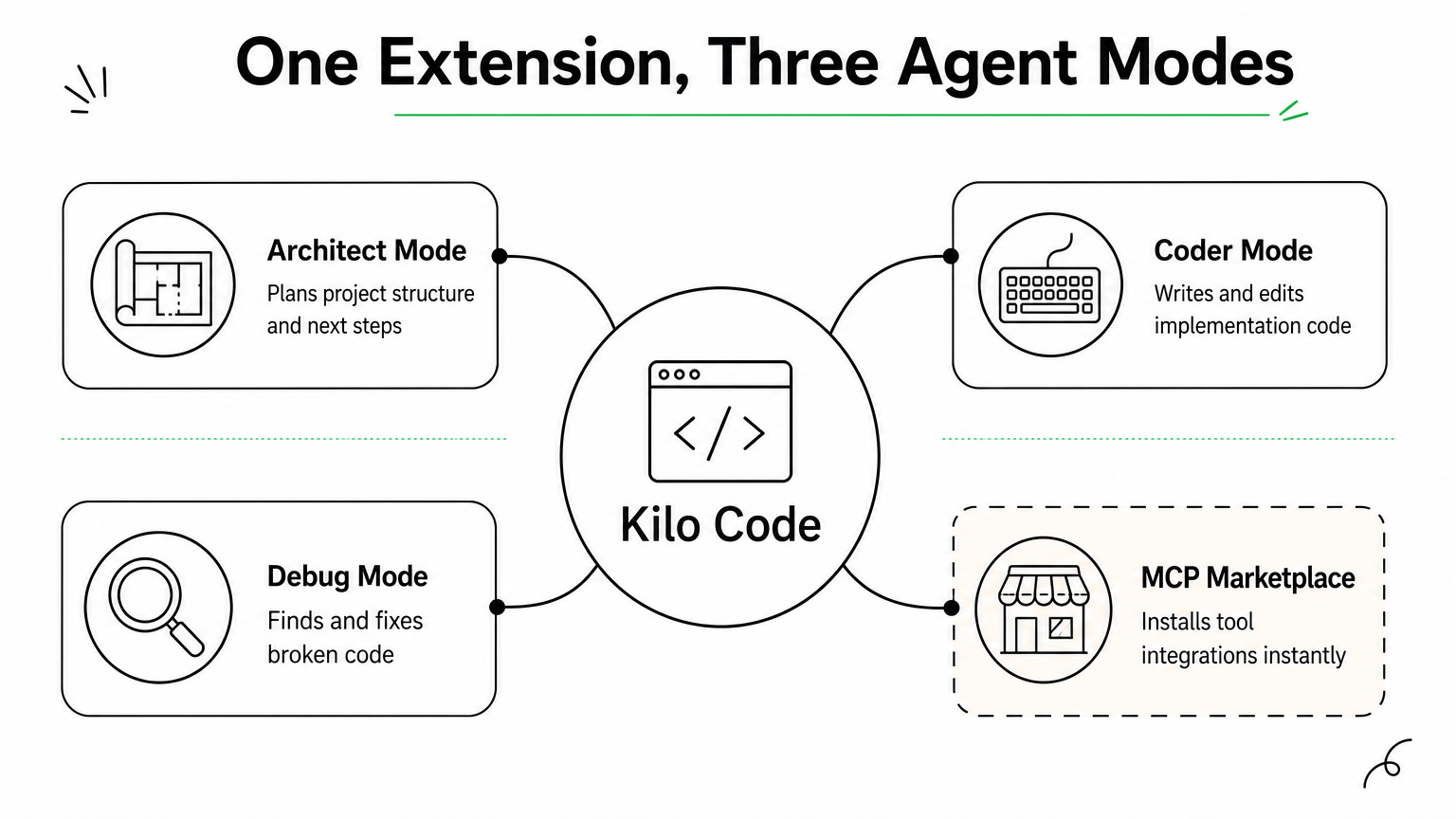
    Kilo Code combines ideas from several earlier open source agents into one extension that runs across VS Code, Cursor, and other VS Code forks without extra configuration. It positions itself as a merger project, pulling the best parts of Roo Code and Cline into a single codebase, which means you get multi-mode agent behavior and broad editor support in one install instead of juggling separate extensions for different tasks.

    A hub diagram showing Kilo Code at the center connected to Architect, Coder, Debug, and MCP Marketplace modes.

    How it works

    Kilo Code operates through distinct modes, Architect for planning, Coder for implementation, and Debug for troubleshooting, each tuned with different prompts and permissions for the task at hand. You switch modes depending on where you are in a project, and the agent adjusts its behavior accordingly rather than treating every request the same way. It also includes a built-in MCP marketplace, letting you browse and install tool integrations without hand-writing connector code yourself.

    Kilo Code’s mode-switching means the agent behaves like planner, builder, or debugger depending on what the job actually calls for.

    Who it’s for

    Developers who bounce between VS Code and Cursor on different machines benefit most from Kilo Code’s cross-editor compatibility. It also suits teams that want structured agent modes rather than one generic chat loop, particularly when juniors need guardrails during implementation while seniors want faster architecture planning. Teams already invested in Roo Code or Cline will find the transition nearly frictionless.

    Standout features

    Kilo Code’s mode system and marketplace give it flexibility that single-purpose extensions lack.

    • Multiple specialized modes: Architect, Coder, Debug, and custom modes you define yourself.
    • Cross-editor support: Works in VS Code, Cursor, and Windsurf without separate builds.
    • MCP marketplace: Install tool integrations directly from the extension.
    • Checkpoint history: Step back through prior agent states when a change misfires.

    Pricing and licensing

    Kilo Code is open source and free to install from the VS Code Marketplace, with an optional hosted credit system for teams that don’t want to manage their own API keys. Self-hosted model connections remain free beyond whatever provider costs you incur.

    7. Tabby for air-gapped code completion

    Tabby takes a different angle than every agent above it on this list: instead of chasing autonomous task completion, it focuses on fast, private code completion you can run entirely disconnected from the internet. If your organization can’t send code to a third-party API for legal or security reasons, Tabby is one of the few open source ai coding agents built specifically for that constraint rather than treating it as an afterthought.

    A server rack isolated in a locked room with no outside network connection, serving code completions to editor plugins.

    How it works

    Tabby runs as a self-hosted server that serves code completions to IDE plugins for VS Code, JetBrains, and Vim, using open weight models like StarCoder or CodeLlama that you download and run on your own hardware. It indexes your private repositories locally, so completions are grounded in your actual codebase and naming conventions instead of generic public training data. Because nothing leaves your network, teams in regulated industries can deploy it inside an isolated VPC or even a fully air-gapped environment with no outbound connectivity at all.

    Tabby’s real pitch isn’t smarter completions, it’s completions that never leave your building.

    Who it’s for

    Banks, healthcare providers, defense contractors, and any team under strict data residency requirements or AI governance and compliance obligations are the obvious audience here. Tabby also suits organizations that already run GPU infrastructure for other workloads and want to repurpose it for developer tooling instead of paying per-token fees to an external vendor.

    Standout features

    Tabby trades autonomous task execution for airtight privacy and predictable infrastructure costs.

    • Fully offline operation: No API calls to external providers, ever.
    • Self-hosted RAG over your codebase: Completions reference your actual repos, not just general patterns.
    • Multi-IDE plugin support: One server backs VS Code, JetBrains, and Vim clients.
    • Team analytics dashboard: Tracks completion acceptance rates across your engineering org.

    Pricing and licensing

    Tabby is released under Apache 2.0 and free to self-host indefinitely. Your only real cost is the GPU hardware needed to run the model, which scales with team size rather than usage volume.

    8. SWE-agent for autonomous issue resolution

    SWE-agent, built by researchers at Princeton and Stanford, was designed from the start to answer one question: can an agent take a raw GitHub issue and produce a working, tested fix without a human writing a single line? It’s less a product and more a research-grade tool that happens to work well enough for production use, which makes it one of the more academically rigorous open source ai coding agents on this list.

    How it works

    Instead of giving the agent unrestricted shell access, SWE-agent wraps everything in an Agent-Computer Interface (ACI), a purpose-built set of commands for viewing, editing, and searching files that’s tuned specifically for how language models reason about code. The agent reads an issue description, locates the relevant files using its search commands, edits them, runs the test suite, and iterates until tests pass or it hits a retry limit. This constrained interface is what drives its strong benchmark scores rather than raw model size.

    SWE-agent proves that a narrower, well-designed toolset often beats giving an agent unrestricted access to your shell.

    Who it’s for

    Engineering teams with a large backlog of well-scoped bugs get the most value here, since SWE-agent shines on issues with clear reproduction steps and existing tests. Research teams benchmarking agent performance, and organizations building their own agent tooling on top of a proven ACI pattern, are also a strong match.

    Standout features

    SWE-agent’s benchmark pedigree and transparent design make it a reference point for anyone building custom agents.

    • SWE-bench origin: The benchmark and the agent were developed together, so results are well-documented and reproducible.
    • Configurable ACI: Swap in your own command set for different languages or repo structures.
    • Trajectory logging: Full record of every command and observation for debugging or research.
    • Model-agnostic: Works with GPT-4, Claude, and open weight models interchangeably.

    Pricing and licensing

    SWE-agent is MIT licensed and free to run, with model API costs as your only ongoing expense.

    Picking the right agent for your stack

    None of these eight tools is a universal answer, and that’s the point. OpenHands and SWE-agent push hardest on full autonomy for teams ready to hand over entire tickets. Cline, OpenCode, and Kilo Code meet you inside the editor or terminal you already use, with far less setup friction. Goose gives platform teams a runtime to shape, Aider keeps git at the center of every edit, and Tabby solves the one problem the others can’t: running completions where no code leaves your building.

    Questions worth asking before you commit: does your team need autonomy or assistance? Does compliance require self-hosted, air-gapped tooling? Can your engineers maintain extensions, or do they need something that installs in minutes? Answer those honestly and the shortlist gets short fast.

    If you’d rather skip the trial-and-error and get a recommendation matched to your actual codebase and compliance requirements, talk to Hatzs Dimensions about building a strategic roadmap for AI adoption.

  • 7 Best Self-Hosted AI Agents for Running AI on Your Terms

    7 Best Self-Hosted AI Agents for Running AI on Your Terms

    Every time you send a prompt to a cloud AI provider, your data leaves your infrastructure. For companies in healthcare, banking, insurance, or law enforcement, that alone can be a compliance problem, not just an inconvenience, which is why AI governance and compliance belongs in the decision from the start. That’s why more engineering teams are turning to self-hosted ai agents: systems that run on your own servers, under your own security policies, with full control over how data moves and where it’s stored.

    If you’re comparing options right now, you want a straight answer, not marketing copy. This article breaks down seven proven open-source platforms for running agents on infrastructure you own, covering what each tool does well, where it falls short, and which use cases it fits best, from simple task automation to complex multi-agent orchestration.

    We’ve built and deployed AI systems for over 250 clients, so this list reflects what actually holds up in production, not just what looks good in a demo. You’ll get a practical comparison of deployment complexity, scalability, and integration effort for each platform, so you can pick the one that matches your team’s technical capacity and your organization’s data governance requirements, without gambling on a tool that stalls once real workloads hit it.

    1. LangChain and LangGraph

    LangChain started as a library for chaining prompts and tools together, but its real value today comes from LangGraph, the framework built on top of it for orchestrating multi-step, stateful agents. Together they form the closest thing to a standard toolkit for building self-hosted ai agents that need to reason across multiple steps, call external APIs, and maintain memory between turns. If you’ve outgrown a single prompt-response chatbot and need something that plans, retries, and branches based on conditions, this is usually where teams land first.

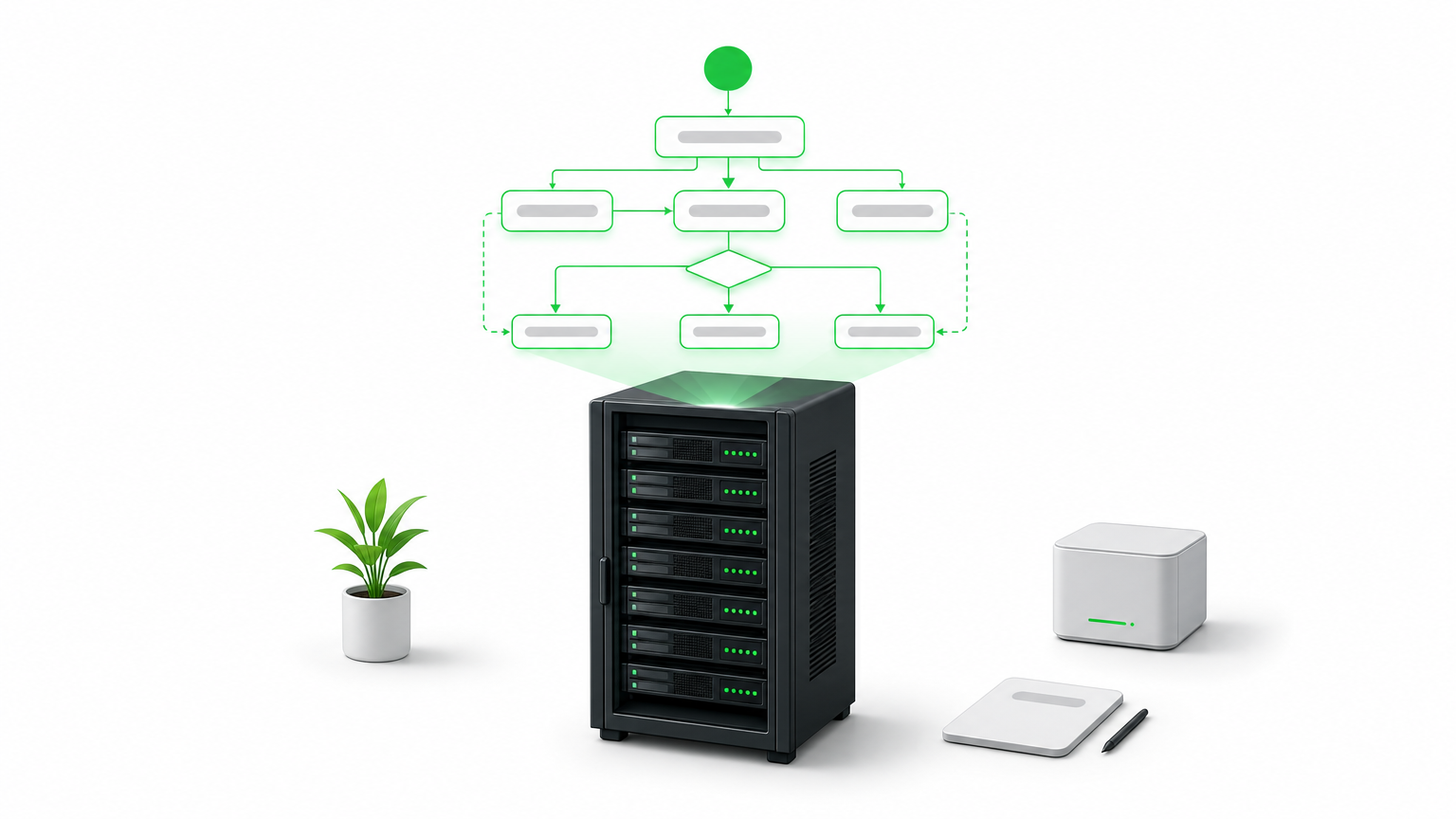
    A server rack beneath a glowing diagram of connected nodes and arrows representing an agent graph.

    How it works

    LangGraph models an agent as a directed graph, where each node represents a function, tool call, or LLM invocation, and edges define how control passes between them. This graph structure matters because it replaces the fragile if-else logic that older agent frameworks relied on. You define state explicitly, so the agent can pause, resume, or loop back without losing context. Typical production setups include:

    • A vector database (Chroma, Pgvector, or Weaviate) for retrieval-augmented generation
    • A self-hosted model server (Ollama, vLLM, or a local Hugging Face deployment) or an API connection to a hosted LLM
    • A persistence layer for checkpointing agent state between steps
    • LangSmith or an open-source alternative for tracing and debugging agent runs

    A graph-based agent doesn’t just answer questions, it remembers what it tried, what failed, and what to do next.

    Who it’s for

    Engineering teams with Python experience and at least one developer comfortable reading and modifying agent logic will get the most out of this stack. It suits companies building custom enterprise AI automation rather than deploying an off-the-shelf chatbot, think insurance claims triage, multi-step data enrichment pipelines, or internal copilots that need to query several systems before responding. It’s not the fastest path to a working demo, and teams without in-house engineering support often underestimate the ramp-up time before their first agent runs reliably in production.

    Pricing and licensing

    Both LangChain and LangGraph are open source under the MIT license, so you pay nothing to run them on your own infrastructure. Costs come from what you connect them to: compute for self-hosted models, API fees if you call hosted LLMs, and engineering time to build and maintain the graph logic. LangSmith, the observability layer, has a free tier and paid plans starting around $39 per seat per month, though you can substitute open-source tracing tools if you want a fully self-hosted stack with zero recurring fees.

    2. Dify

    Dify takes a different approach than LangChain: instead of a code-first framework, it gives you a visual application builder for creating and deploying LLM agents, complete with a web interface for managing prompts, datasets, and workflows. If your team wants to stand up a working agent without writing orchestration code from scratch, Dify gets you there faster, while still letting developers drop into the backend when they need custom logic.

    How it works

    Dify packages everything an agent needs into one deployable stack: a workflow canvas for chaining prompts and tools, built-in retrieval-augmented generation with document upload and chunking, and an API layer that turns any workflow into a callable endpoint. You install it via Docker Compose, point it at a self-hosted or hosted LLM, and manage agents through the dashboard rather than a codebase.

    A visual builder won’t replace a skilled engineer, but it lets that engineer ship an agent in a day instead of a sprint.

    Who it’s for

    Product teams and smaller engineering shops that want self-hosted AI agent deployment without a heavy coding lift will find Dify a good match. It works well for internal tools, customer support bots, and document Q&A systems where the logic is fairly linear. Teams needing complex branching, long-running state, or deep custom orchestration will eventually bump into the platform’s limits and may need to graduate to something like LangGraph.

    Pricing and licensing

    Dify’s self-hosted community edition runs under an open-source license with no seat fees, and you can deploy it entirely on your own servers. Dify also offers a managed cloud version with paid tiers if you’d rather skip infrastructure management, but for teams prioritizing data control, the self-hosted route keeps everything, including prompts and documents, inside your own network.

    3. Flowise

    Flowise takes the visual-builder idea one step further by focusing on drag-and-drop agent construction for teams that live closer to the LangChain ecosystem but don’t want to write graph code by hand. Built on top of LangChain’s node library, it exposes the same building blocks, chains, retrievers, memory modules, and tool calls, through a canvas interface, making it one of the more approachable self-hosted ai agents platforms for teams that already understand LangChain concepts but want a faster way to assemble them.

    How it works

    Behind the interface, Flowise runs on Node.js and stores your flows as JSON, which means you can version them in git and move them between environments without rebuilding anything by hand. Each node on the canvas maps directly to a LangChain component, so an experienced developer can open the underlying code and extend a node when the visual layer runs out of options. Deployment typically looks like:

    • Docker container running the Flowise server and UI
    • A connected vector store for document retrieval
    • A model endpoint, either local (Ollama) or hosted
    • Exported flow JSON stored in version control for rollback and review

    The value of a canvas tool isn’t skipping code, it’s giving your team a shared, visual reference for logic that used to live only in a developer’s head.

    Who it’s for

    Flowise suits teams split between technical and non-technical members, where a product manager or analyst wants to prototype an agent’s logic visually, then hand it to a developer for hardening. It’s a strong fit for rapid agent prototyping and internal tools that don’t need heavy custom orchestration, but less suited to teams building highly complex, stateful multi-agent systems from the ground up.

    Pricing and licensing

    Flowise is open source under the Apache 2.0 license, so self-hosting costs nothing beyond your own infrastructure and any LLM API fees. A hosted cloud version exists for teams that don’t want to manage servers, with paid plans layered on top, but the self-hosted deployment remains free and fully under your control.

    4. n8n

    n8n started as a general workflow automation tool, closer to Zapier than to an agent framework, but recent versions added native AI agent nodes that let you build actual reasoning workflows instead of simple triggers-and-actions. That history shows: n8n is less about pure agent orchestration and more about connecting agents into the rest of your business systems, which makes it one of the more practical self-hosted ai agents options for teams that already run automation pipelines and want AI layered into them, not built as a standalone project.

    Hub diagram showing an AI agent node connected to Slack, CRM, spreadsheet, and other app integrations.

    How it works

    Workflows in n8n live on a visual canvas where each node handles a task: an HTTP call, a database query, a conditional branch, or now, an AI agent node that wraps an LLM with tools and memory. You self-host the whole thing with a single Docker container or a docker-compose stack, connect it to Postgres for workflow storage, and point the AI nodes at OpenAI, Anthropic, or a local model server like Ollama. Because it already integrates with over 400 apps and services, many of them the same platforms and tools we build with, an agent built here can trigger from a Slack message, query a CRM, and write results to a spreadsheet without custom glue code.

    An agent is only useful once it can act on the systems your business actually runs, and that’s where n8n earns its place.

    Who it’s for

    Operations and IT teams running intelligent process automation across existing SaaS tools will get the most value here, especially if the agent’s job is to fetch data, apply logic, and push updates rather than hold complex multi-turn conversations. It’s a weaker fit for teams needing deep custom reasoning chains or long-running stateful agents.

    Pricing and licensing

    n8n’s self-hosted edition is source-available under a fair-code license, free for internal use with no workflow limits, though commercial resale requires a separate agreement. Its hosted cloud plans start around $20 per month if you’d rather skip server management.

    5. AutoGPT platform

    AutoGPT was one of the first projects to popularize the idea of a fully autonomous agent loop, an AI that sets its own subtasks, executes them, and self-corrects without a human approving every step. The original 2023 hype cycle overstated what it could do, but the current AutoGPT platform has matured into a legitimate option for teams who want an agent that runs continuously toward a goal rather than responding to single prompts.

    How it works

    The platform now ships as a modular system with a visual workflow builder, a backend server, and a library of reusable "blocks" that represent actions like web search, file operations, or API calls. You deploy it with Docker Compose, connect it to an LLM provider or a self-hosted model, and define a goal along with the tools the agent can access. From there, the agent loops through planning, execution, and evaluation steps on its own, logging each decision so you can audit why it took a given action.

    An autonomous loop is only as safe as the guardrails you put around it, so budget for monitoring before you budget for automation.

    Who it’s for

    Teams experimenting with autonomous task execution, like continuous research gathering, monitoring, or multi-step content pipelines, get the most value here. It suits organizations comfortable putting engineering time into sandboxing and reviewing agent behavior, since unsupervised loops can rack up API costs or take unintended actions if left unchecked. It’s a poor starting point for teams that need predictable, auditable single-purpose agents, since the open-ended design trades control for autonomy.

    Pricing and licensing

    AutoGPT is open source under the MIT license, so self-hosting the platform costs nothing beyond your own infrastructure and whatever LLM you connect it to. There’s no official paid tier tied to the core project, which keeps the cost model simple, but you’ll want to set hard spending caps on any connected API keys before letting an autonomous loop run unattended.

    6. OpenHands

    OpenHands, previously known as OpenDevin, targets a narrower problem than the general-purpose frameworks above: it’s an autonomous coding agent that writes, tests, and debugs code inside its own sandboxed environment. Instead of chaining prompts around a business workflow, OpenHands acts like a junior developer you can hand a ticket to, one that can read a codebase, make changes, run the test suite, and iterate until the task passes.

    A computer screen displaying a code editor, terminal, and browser panel used by an autonomous coding agent.

    How it works

    The agent runs inside a Docker-based sandbox that gives it a real shell, a file system, and a browser it can control, so it isn’t limited to generating text suggestions. You connect it to an LLM, either a hosted model or a self-hosted one through an OpenAI-compatible endpoint, and assign it a task through the web UI or API. From there it plans its steps, executes commands, checks the output, and retries when something breaks, logging every action for review. Typical deployment includes:

    • A Docker host with enough CPU and memory to run isolated sandboxes per task
    • An LLM endpoint capable of strong code generation (GPT-4 class or better tends to perform best)
    • Git access scoped to the repositories the agent is allowed to touch

    Give a coding agent shell access without version control guardrails, and you’re one bad run away from a broken branch.

    Who it’s for

    Engineering teams looking for self-hosted ai agents that handle real development work, bug fixes, dependency upgrades, small feature branches, will get the most value here. It suits organizations with existing CI/CD pipelines that can absorb agent-generated pull requests for human review, rather than teams expecting fully unattended deployment.

    Pricing and licensing

    OpenHands is open source under the MIT license, free to self-host with no seat fees. Your ongoing cost is compute for the sandbox environments plus whatever LLM API or local model you connect, since coding tasks tend to run longer and use more tokens than typical chat agents.

    7. Tabby

    Tabby is a self-hosted AI coding assistant built for teams that want Copilot-style code completion without sending a single line of proprietary code to a third-party API. Where OpenHands acts like a junior developer executing whole tasks, Tabby stays closer to the editor, offering inline suggestions, chat, and code search as you type. If your legal or security team has blocked GitHub Copilot over data residency concerns, Tabby is usually the first alternative engineers ask about.

    How it works

    Tabby runs as a single Docker container that bundles a model server, a completion API, and an admin dashboard for managing users and usage analytics. It supports open models like StarCoder, CodeLlama, and DeepSeek Coder, and you can swap in whichever one fits your GPU budget and language mix. Editor plugins for VS Code, JetBrains IDEs, and Vim connect straight to your self-hosted instance, so completions never leave your network. A typical setup looks like:

    • A GPU-equipped server (even a single consumer GPU handles small teams)
    • A quantized open-source code model matched to your available VRAM
    • The Tabby server container plus editor extensions rolled out fleet-wide

    Code completion is only trustworthy at a company scale once you can prove the model never phones home with your source.

    Who it’s for

    Engineering organizations with strict IP or client confidentiality requirements, think agencies, defense contractors, or fintech, benefit most from Tabby’s fully local footprint. It also suits teams that already run local model deployment for other workloads and want to reuse that infrastructure rather than paying per-seat for a hosted assistant.

    Pricing and licensing

    Tabby is open source under Apache 2.0, free to self-host with no per-seat fees regardless of team size. Your real cost is GPU hardware, since completion quality and latency both scale with the model you can afford to run locally.

    Finding the right fit for your infrastructure

    No single platform on this list wins every use case. LangGraph handles complex, stateful reasoning; Dify and Flowise get you to a working agent faster; n8n ties agents into systems you already run; AutoGPT and OpenHands push toward autonomy; Tabby keeps code completion entirely in-house. The right choice depends on your team’s engineering depth, your compliance requirements, and how much control you actually need over where data lives.

    Running self-hosted ai agents well takes more than picking a framework off this list. You still need the infrastructure, monitoring, and governance to keep agents reliable once real workloads and real users hit them, and that’s where most in-house builds stall out. If you’d rather skip the trial-and-error and get a system that’s production-ready from day one, talk to Hatzs Dimensions about deploying autonomous AI agents in your infrastructure and put a team behind it that’s already done this 250 times over.

  • The Enterprise AI Readiness Gap: 3 Paths to Successful AI Adoption

    The Enterprise AI Readiness Gap: 3 Paths to Successful AI Adoption


    Contents

    1. Introduction
    2. Key Takeaways
    3. What Makes Enterprise AI Readiness Uniquely Challenging
    4. The Scale of the AI Adoption Gap
    5. Three Paths to Close the AI Readiness Gap
    6. Common Failure Modes in Enterprise AI Adoption
    7. How HATZS Approaches the AI Readiness Challenge
    8. Conclusion

    Introduction

    Most enterprises are not failing at AI because the technology is immature. They are failing because they attempt to deploy AI onto infrastructure, workflows, and teams that were never designed to support it. The enterprise AI readiness gap is not a technology problem — it is a strategy and execution problem, and it manifests differently depending on where an organization sits on the maturity curve.

    According to McKinsey’s 2025 State of AI report, while over 72% of organizations have experimented with AI in at least one business function, fewer than 25% have successfully scaled those experiments beyond a single department. The gap between experimentation and enterprise-wide value is where most initiatives stall — and where competitive advantage is decided.

    This article delivers a concrete framework: three deployment paths for closing the AI readiness gap, a decision matrix to help you choose the right one, and the failure modes that derail even well-resourced organizations.


    Key Takeaways

    • Over 72% of organizations have run AI experiments, but fewer than 25% have scaled them successfully
    • The global AI market is growing at 38.1% CAGR, projected to reach $1.8 trillion by 2030
    • Poor data infrastructure is the single most common reason AI pilots fail to reach production
    • Organizations that invest in AI governance frameworks before deployment reduce incident rates by up to 60%
    • The right adoption path depends on your current data maturity, internal capability, and deployment timeline — not on what competitors are doing

    What Makes Enterprise AI Readiness Uniquely Challenging

    AI readiness is not a single capability — it is a composite of data infrastructure quality, organizational change management, governance frameworks, and technical talent. Most readiness assessments focus on only one of these dimensions and miss the others entirely.

    The required conditions for enterprise-grade AI deployment span clean, governed data pipelines; integration architecture that connects AI outputs to business workflows; cross-functional alignment between IT, operations, and business leadership; and observability tooling that makes model behavior auditable. Organizations that are strong in one dimension but weak in others deploy systems that underperform or create operational risk.

    The challenge is compounded by the pace of change. Tooling that was best practice eighteen months ago is being replaced by new orchestration frameworks, foundation model APIs, and deployment standards. Organizations building internal capability must invest in learning infrastructure that can keep pace with the field — not just the current state of it.

    A practical benchmark: if your organization has run more than two AI pilots that did not reach production, the barrier is almost certainly readiness, not technology. Three paths lead forward.


    The Scale of the AI Adoption Gap

    The gap between AI ambition and AI execution is widening at the enterprise level. Global AI spending is on track to exceed $300 billion annually by 2026, with the majority allocated to tools and platforms rather than the organizational change required to use them effectively.

    The pressure shows up most acutely at the data layer. Studies consistently show that data quality and accessibility issues are the primary blockers for 67% of failed AI initiatives — not model performance. Organizations that invest in data infrastructure first consistently outperform peers who start with model selection. A 2025 Gartner survey found that companies with mature data governance practices were 2.5 times more likely to achieve measurable AI ROI within 12 months.

    At the talent layer, the challenge mirrors the broader technology market. Demand for engineers with production-grade AI deployment experience significantly outpaces supply. But the more acute shortage is in AI product managers and business analysts who can translate model outputs into workflow changes — roles that are rarely included in AI hiring plans but are critical to actual value realization.

    The governance gap is equally serious. Enterprises deploying AI without defined risk frameworks, model monitoring, and escalation protocols are accumulating technical and regulatory debt that becomes increasingly expensive to unwind as deployment scales.


    Three Paths to Close the AI Readiness Gap

    No single route works for every organization. The right path depends on your current data maturity, internal capability, deployment timeline, and risk tolerance. The comparison below provides an objective starting point.

    DimensionPath 1: Foundational BuildPath 2: Accelerated PartnershipPath 3: Hybrid Transformation
    Time to first production deployment12–18 months6–10 weeks10–16 weeks
    Estimated Year 1 investment$300K–$600K$100K–$220K$150K–$350K
    Internal capability retainedHighLow without transfer planHigh with structured handoff
    Risk profileLower long-termHigher if vendor-dependentBalanced
    Best-fit organizationWell-resourced, long runwayFast-moving, constrainedMost mid-market and enterprise

    Path 1: Foundational Capability Building

    Foundational capability building is the right long-term investment for organizations whose AI ambition is central to competitive strategy and who have the runway to execute it properly. The practical path does not start with model selection — it starts with a data and governance audit.

    A credible foundational program runs in three phases. First, a cross-functional team conducts a 4–6 week data infrastructure assessment, identifying quality gaps, access bottlenecks, and governance weaknesses. Second, a 3–4 month infrastructure remediation phase establishes clean data pipelines, access controls, and monitoring baselines. Third, the first AI use case is deployed on this stabilized foundation — not before.

    The critical investment is not technology but organizational alignment. Foundational builds fail when AI initiatives are treated as IT projects rather than business transformation programs. Executive sponsorship and defined business outcome metrics must precede the first line of architecture.


    Path 2: Accelerated Partnership

    Accelerated partnership provides immediate access to AI deployment expertise for organizations that cannot afford to wait. A partner team with production-grade experience brings pre-built frameworks, proven architecture patterns, and implementation speed that can compress a 12-month build into 8–10 weeks for well-defined use cases.

    The tradeoff is dependency and knowledge transfer risk. Organizations that engage AI partners without specifying documentation standards, architecture handoffs, and internal team embedding requirements often find themselves unable to maintain, monitor, or modify the systems they have paid to build. Every partnership engagement must include milestone-based knowledge transfer as a contractually accountable deliverable — not a goodwill intention.

    For PE-backed companies, fast-moving scale-ups, and organizations facing competitive pressure with limited internal bandwidth, this path delivers the fastest time to measurable value. The key is selecting a partner that treats knowledge transfer as a product, not an afterthought.


    Path 3: Hybrid Transformation

    The hybrid transformation model is the most practical choice for most enterprises in 2026. External specialists handle readiness assessment, architecture design, and initial deployment. Internal teams embed with those specialists and learn by building. After 3–4 months, the internal team owns operations and iteration while the external partner provides architectural guidance for the next use case.

    This model reduces Year 1 investment by 30–50% compared to a full foundational build. More importantly, it accelerates internal capability by 6–9 months compared to self-directed programs, because engineers and analysts absorb production-grade patterns from practitioners who have solved the same problems across multiple industries. That tacit knowledge transfer is the primary value delivered — the deployed AI system is secondary.

    The hybrid model also handles the senior talent shortage without requiring a permanent high-cost hire. Organizations gain expert judgment during the highest-risk phases — architecture and initial deployment — while building sustainable internal capacity for ongoing operations and iteration.


    Common Failure Modes in Enterprise AI Adoption

    Most enterprise AI initiatives fail at execution, not conception. Four failure modes appear consistently across organizations navigating the readiness gap.

    Failure Mode 1: Starting with the model instead of the data. Organizations that begin AI initiatives by selecting tools and models before auditing their data infrastructure consistently underperform. Models are only as good as the data they operate on. A 2025 Deloitte analysis found that 58% of failed AI projects traced the primary cause to data quality issues that were known before deployment began. Prevention requires a data readiness assessment as the mandatory first milestone.

    Failure Mode 2: Treating AI deployment as an IT project. AI systems that improve business outcomes require business outcome ownership. When AI initiatives live entirely within IT without a business sponsor defining success metrics, they optimize for technical performance rather than business value. A chatbot with high resolution rates but declining customer satisfaction scores is a deployment failure, not a success. Every AI initiative needs a business lead accountable for outcomes.

    Failure Mode 3: Skipping governance until something goes wrong. AI systems operating at scale without defined monitoring, intervention protocols, and audit trails create regulatory and reputational risk that compounds over time. Governance frameworks are consistently deprioritized in favor of deployment speed — until an incident makes the cost of that decision concrete. Governance architecture must precede production deployment, not follow it.

    Failure Mode 4: Measuring inputs instead of outcomes. Organizations that track AI project metrics — models deployed, APIs integrated, hours invested — without measuring business outcome metrics — revenue influenced, cost reduced, decisions improved — cannot demonstrate ROI and lose executive support before value is realized. Success metrics must be defined in business terms before the first deployment begins.


    How HATZS Approaches the AI Readiness Challenge

    HATZS approaches enterprise AI adoption through an integrated readiness-first methodology that addresses data infrastructure, organizational alignment, and governance before a single model is deployed. Our engagement model combines embedded expertise with deliberate internal capability transfer — ensuring that every client team we work with ends the engagement more capable than when it began.

    Our process starts with a structured AI Readiness Assessment: a 3–4 week diagnostic that evaluates data quality, infrastructure architecture, governance maturity, and internal capability across the dimensions that most directly predict deployment success. The output is not a report — it is a prioritized action plan with defined milestones, resource requirements, and risk flags.

    From there, HATZS works with each client to select the deployment path that matches their constraints. Whether through a foundational build, accelerated partnership, or hybrid transformation engagement, our teams bring production-grade patterns from cross-industry deployments and codify those patterns into documentation, runbooks, and training that empower internal teams to own and evolve their AI systems long-term.

    Across recent client engagements, organizations working with HATZS have reduced time-to-first-production-deployment by an average of 12 weeks compared to internally estimated timelines, while simultaneously closing data infrastructure gaps that had previously blocked 2–3 prior AI initiatives.


    Conclusion

    The enterprise AI readiness gap is a solvable problem — but only if it is diagnosed correctly. Organizations that treat AI adoption as a technology procurement decision will continue to fund pilots that never scale. Organizations that treat it as a business transformation initiative, with the data infrastructure, governance, and organizational change requirements that transformation demands, are the ones deploying AI that changes outcomes.

    The decision framework is straightforward. If your organization has an 18-month runway and strategic AI ambition, invest in foundational capability. If you need production deployment within a quarter and have a well-defined use case, engage an experienced partner with a non-negotiable knowledge transfer component. For most organizations, the hybrid transformation model delivers the optimal balance of speed, cost control, and sustainable internal capability.

    Start with one honest question: when your last AI pilot failed to reach production, what was the actual reason? The answer determines your path.

    Ready to assess your organization’s AI readiness and select the right deployment path? HATZS’s advisory team helps technical leaders and business executives understand where they stand and what it takes to move forward. Contact us to schedule an AI Readiness Assessment.


    HATZS is a technology consulting and AI solutions firm helping mid-market and enterprise organizations design, deploy, and scale AI initiatives that deliver measurable business outcomes.


    Frequently Asked Questions

    What is the enterprise AI readiness gap? The AI readiness gap describes the distance between an organization’s intention to deploy AI and its actual capacity to do so successfully at scale. It encompasses data infrastructure quality, governance maturity, internal talent, and organizational alignment. Most enterprises have significant gaps in at least two of these dimensions.

    How long does it take to close an AI readiness gap? It depends on the depth of the gap. Organizations with mature data infrastructure and existing technical capability can move to production deployment in 8–12 weeks with the right external support. Organizations with significant data quality or governance deficits typically require 12–18 months for foundational remediation before reliable production deployment is achievable.

    What is the most common reason AI pilots fail to reach production? Data quality and accessibility issues account for the majority of failed AI transitions from pilot to production. This is followed by lack of business outcome ownership and absence of governance frameworks. Model performance is rarely the primary failure cause.

    Should we build AI capability internally or work with a partner? Neither pure option is optimal for most organizations. Full internal builds take longer than competitive pressures allow. Full outsourcing without knowledge transfer creates dependency that becomes expensive over time. A hybrid model — where external experts lead architecture and initial deployment while internal teams embed and learn — delivers faster deployment and sustainable internal capability simultaneously.

    What governance capabilities are required before deploying AI in production? At minimum: logging of model inputs and outputs, monitoring dashboards with defined alert thresholds, human-in-the-loop intervention mechanisms for high-stakes decisions, rollback protocols, and defined escalation paths for anomalous behavior. These should be designed and validated in staging before any production deployment.

    How do we evaluate an AI consulting partner? Evaluate on three dimensions: documented case studies showing production deployments (not prototypes), a sample architecture document or assessment output demonstrating systems thinking quality, and a clearly specified knowledge transfer methodology with milestone-based handoff criteria. Partners who cannot provide all three should not reach the shortlist.

  • AI Strategy for Executives: How to Move From Hype to Real Business Impact

    AI Strategy for Executives: How to Move From Hype to Real Business Impact

    Let’s be honest about where most companies actually are with AI right now.

    You’ve approved a few pilots. Your teams are using ChatGPT, Copilot, or something similar. There’s probably a slide in your last board deck with “AI strategy” somewhere in the title. And yet, when someone asks what AI is actually doing for the business — the concrete, measurable kind of doing — the answer gets fuzzy fast.

    You’re not alone. Most organizations are stuck in what I call the adoption gap: AI is present, but it isn’t yet strategic. The gap between deploying AI tools and extracting real business value from them is where most executive energy should be focused right now. And it’s not a technology problem — it’s a leadership one.


    The Pilot Trap

    Here’s a pattern that plays out constantly: a team runs an AI pilot, it works reasonably well, leadership celebrates the win, and then… nothing scales. Six months later, the same organization is running three more pilots in different departments, none of which are connected, and still can’t point to a meaningful line on a P&L.

    The pilot trap happens when AI adoption is driven by curiosity rather than strategy. Pilots are valuable — they test assumptions, build internal capability, and create proof points. But a portfolio of pilots is not a strategy. At some point, leadership has to make the call: which of these bets do we scale, which do we kill, and what does AI actually mean for how we compete?

    That call is a business decision, not a technology decision. Which is exactly why it belongs in the room you’re sitting in.


    What “AI Strategy” Actually Means

    There’s a lot of noise around this phrase, so let’s simplify it.

    An AI strategy answers three questions:

    Where does AI create disproportionate value for our specific business? Not AI in general — AI in your context, with your data, in your competitive landscape. A logistics company and a professional services firm have very different answers here.

    What do we need to build, buy, or change to capture that value? This is the operational side: data infrastructure, talent, vendor relationships, process redesign. Most organizations underestimate how much non-AI work is required to make AI work well.

    How will we know if it’s working? AI investments need success metrics tied to business outcomes, not technology outputs. “We deployed a model” is not a metric. “We reduced customer churn by 8% in the segments where the model runs” is.

    If your organization can answer all three questions clearly, you have a strategy. If the answers are vague or vary depending on who you ask, you have a direction, which is a start — but it needs to become something more concrete.


    The Decisions Only You Can Make

    One of the most common mistakes I see is executives treating AI adoption as something to delegate entirely. Hand it to IT, hire a Chief AI Officer, let the innovation team figure it out. The thinking goes: this is technical, so technical people should own it.

    The problem is that the highest-stakes AI decisions aren’t technical at all. They’re about risk tolerance, competitive positioning, and values. Consider:

    • Which decisions are you willing to let AI make autonomously, and which ones require a human in the loop?
    • If your AI system produces a result that turns out to be wrong, who is accountable — and what’s the remediation path?
    • Are there customer-facing use cases where using AI might be effective but would feel wrong to your customers if they knew about it?

    These questions don’t have technical answers. They require judgment about what kind of company you want to be, what your customers expect, and how much risk is appropriate given the upside. That’s leadership work, and it can’t be delegated.


    Three Practical Things to Do in the Next 90 Days

    If you’re a C-suite leader who wants to move from good intentions to actual traction with AI, here’s a practical starting point.

    1. Get a real inventory of what’s running. Before you build anything new, understand what you already have. How many AI tools are active across your organization? Which teams are using them? What data are they touching? You may be surprised — and in some cases, concerned — by the answer. This isn’t a witch hunt; it’s a baseline. You can’t govern or scale what you haven’t mapped.

    2. Pick one high-value problem and go deep. Rather than spreading investment across five “exploration” efforts, identify one business problem where AI could create significant, measurable impact — and resource it properly. Give it dedicated ownership, clear success metrics, and a realistic timeline. Breadth feels innovative; depth actually delivers.

    3. Have the accountability conversation. For every AI system your organization runs, there should be a named individual — not a team, not a committee — who is accountable for its outputs. If something goes wrong, who calls it and who fixes it? That clarity doesn’t slow you down. It’s what lets you move quickly without flying blind.


    On the “We’ll Figure It Out Later” Approach

    There’s a natural temptation to move fast and deal with governance, accountability, and strategy later — once you’ve proven the technology works. The logic seems reasonable: why slow down to build infrastructure for a bet that hasn’t paid off yet?

    Here’s the practical problem: later is expensive. When you build accountability and oversight into AI systems after they’re running in production, you’re not adding structure to an empty foundation — you’re retrofitting it into decisions that have already been made, processes that have already changed, and outputs that have already influenced outcomes. That work costs significantly more in time and money than building it right the first time.

    The organizations that are scaling AI most effectively right now aren’t moving recklessly fast. They’re moving with intention — deploying quickly into well-defined problem areas, with clear ownership, real metrics, and a short feedback loop. Speed and discipline aren’t opposites in AI adoption. They’re what each other requires.


    The Competitive Reality

    AI adoption is not going to be a differentiator forever. Right now, there’s still meaningful separation between organizations that are using AI strategically and those that are still in “exploratory mode.” That window is closing. Within two to three years, the baseline expectation in most industries will be that AI is embedded in core operations — customer service, forecasting, risk management, product development.

    The question isn’t whether AI will be part of how your business runs. It’s whether you’ll have built the capability, the data infrastructure, and the organizational habits to use it well before your competitors do.

    That’s not a technology question. That’s a strategy question. And it’s yours to answer.


    The best place to start is a clear-eyed assessment of where you are today — not where your roadmap says you should be. What does AI actually do for your business right now, and what would it need to do differently to matter at the level you’re planning for?